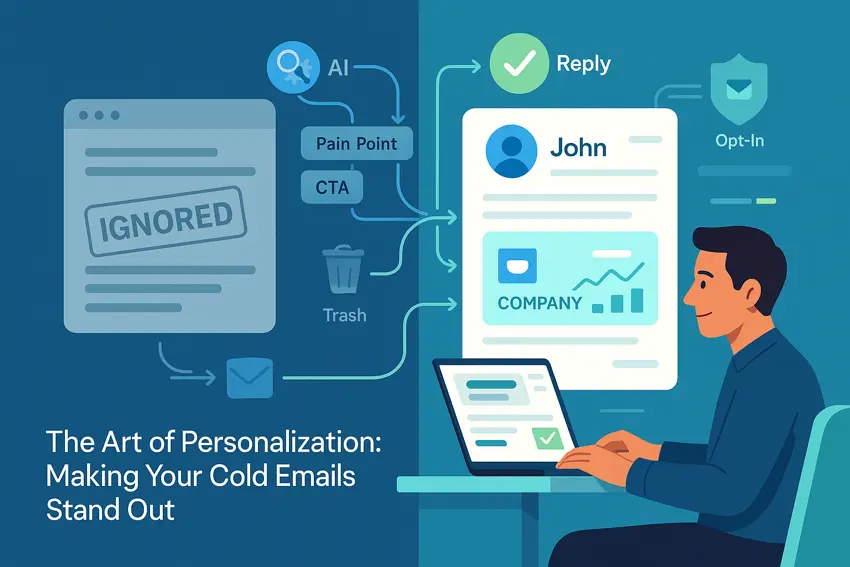
The Art of Personalization: Making Your Cold Emails Stand Out
🧩 Table of Contents
Why personalization matters in 2025
So, cold email. You already know it kinda gets a bad rap—especially when you get hit with “Dear Sir/Madam” or anything that feels like it’s been spat out by a robot sent from 2015. Thing is, crappy cold emails just don’t cut it anymore. If you’re not personalizing, you’re sorta invisible. Like, I’ve literally seen people get angry and block domains because they keep getting the same copy-paste “can we hop on a call” junk.
In 2025, gating your cold emails behind actual research and a vibe check isn’t just “nice to have”—it’s the only way to even compete. Response rates for warmed-up, personalized cold emails? Up to 35% easy. Toss out generic templates and you’re lucky to get 1-2%[7]. That’s night-and-day. Hyped case studies aside, real humans just want to know you’re talking to them—not everybody in the same boring, automated list.
Breaking away from template hell
Let’s be real—templates still get passed around Slack groups and Notion wikis like dark magic. But the secret? The winners totally bend, break, and Frankenstein templates until it actually sounds like them. The “mail merge and pray” approach is dead. What works now is human, weirdly specific, sometimes funny, always relatable outreach.
Here’s a brutal example: I once received this cold email with my first name spelled Kronk (actual name is not Kronk). A+ for effort, right? But that’s just lazy data handling, not personalization. Meanwhile, an SDR I know broke into a series-A company by referencing the CEO’s weird ‘90s AOL username (found in a podcast transcript). CEO replied in 7 minutes. Not a coincidence.
What can you actually personalize? Basically everything: subject, opener, pain points, attachments, CTAs, even the time you send it. So let’s talk actual tactics, not just theory.
Personalization techniques that don’t suck
Nailing the pain point
This one’s classic, but deadly when you actually do your homework. Don’t hit them with random “I see you’re busy!” vibes. Zero in on their real challenges. For instance:
“Saw [Company] just expanded into APAC. Most teams I talk to struggle scaling local onboarding at that stage. If you’re running into that, here’s a playbook our team built that shaved three weeks off TTM for [Competitor].”
— Mailmeteor
Are you gonna reply “unsubscribe” to that? Unlikely. It’s not just “I researched you”—it’s “I get you.” If you don’t have something real to include, maybe skip the email entirely. Better to hit 15 good prospects than 200 randoms who ghost.
The magic of custom attachments
Heard about folks attaching random PDFs? Don’t do it. But a custom report—now that’s next-level. It might be a short Loom video, a one-page audit, or even a meme if you have the right crowd. People love to see their company name in a subject line, but seeing their actual use case in an attachment? 10x more impressive.
Like, “Hey Annie, tossed together this teardown of your landing page vs your top three competitors. If it’s off-base, no worries, but figured you guys might be aiming for a higher demo conversion rate this quarter.” Stuff like that gets passed around offices instantly.
Want real-life proof? There’s this legend in RevOps circles who attached a tailored SEO report to cold emails. CTAs went from ignored to “Dude, let’s talk this week.” Mailmeteor is actually huge on this—dropping actual, helpful files that make you seem like the person worth talking to.
CTAs that don’t make people eye-roll
Nobody wants to “schedule 15 minutes to learn more.” We all know it’s a sales call, you’re not fooling anyone. Instead, personalize the ask. If someone’s in discovery mode, offer info or a resource. If they’re decision-ready? Go specific and respect their time.
- Kindergarten approach: “Are you free this week?” (Zzz)
- Human approach: “Would it ruin your Tuesday morning if I sent those breakdowns I mentioned?”
- Smart: “Reply with ‘yes’ if the hiring slowdowns I flagged are a headache right now. Can share what we saw at [Relevant Company].”
Different stages get different asks. Build momentum, don’t rush the finish.
Subject lines that aren’t cringe
2025’s cold email law: you win or lose in the subject. Seriously. Weirdly, using someone’s first name or company still works, but only when it fits. Some that work right now:
- “{{First Name}}, total shot in the dark”
- “Curious: Still using [old software] for onboarding?”
- “Saw your post on LinkedIn and, wow, guess what…”
- “[Specific City]? Next-level market for SaaS gang right now”
The difference? They sound like a normal person wrote them, not a bot. Also—timely or topical references (like comment threads, podcasts, or mutual connections) get 5x the response rate for me. Fact.
Adapting: AI and hot 2025 trends
We’re officially in the AI era of cold email. Tools like ProfitOutreach and the other biggies pull ridiculous amounts of info—news, funding rounds, org chart flips—before you even hit send. You feed in a list, let the AI tear it apart, and suddenly your emails reference their latest product launch or a recent CEO podcast.
Some wild stuff happening right now:
- AI scoring leads’ “likely to reply” factor off 50+ data points—so you never waste a message.
- Hyper-personalization at scale (like…beyond “Hey Jane”—it’s “Saw your team just snagged Series B from Tiger, congrats. Bet hiring is wild rn.”).
- Engagement and timing—AI syncs with recipient schedules, so emails arrive when people actually check them, not just when you hit send from your cubicle.
This stuff works: people using powerful AI cold email tools are seeing up to a 32% bump in replies and get booked meetings even as sending limits get stricter. Oh, and multichannel? Email + LinkedIn + SMS = nearly 3x more engagement. Sometimes AI will even tell you to switch channels if your first touch gets ghosted.
| 2025 Cold Email Feature | What’s Actually Good About It |
|---|---|
| AI-powered personalization | • Takes research from hours to seconds • Finds signals you’d never see scrolling LinkedIn |
| Smart send-time optimization | • Hits inboxes at peak hours • Less likely to get buried under a Monday scrollathon |
| Multichannel follow-up | • Boosts reply rates by up to 287% • Makes you look omnipresent (but not creepy…mostly) |
| Real behavioral triggers | • Auto-follows-up based on engagement • No more “Did you see my email?” after every silence |
Examples and real cold email templates
Let’s break down some styles that actually land in 2025. There’s definitely not one right answer—just different approaches for different people.
- The Go-Getter: Direct, challenge-focused. “Hey {{First Name}}, saw your post about scaling up remote onboarding. If bottlenecks around documentation are still killing momentum, we built a playbook that cut TTM by 24% at [Competitor]. Want to check it out?”
- The Smooth Talker: Friendly intro, casual reference. “Hey Ari, just heard you on [Podcast], absolutely cracked up at the ‘Slack notification hell’ line. Had a quick idea on reducing notification overload your ops team might vibe with…”
- The Enticer: For top-of-funnel, high-value leads. “Noticed you’re hiring across APAC—lotta companies hitting run-rate wall there. Wrote up a couple of ideas, let me know if you want the full stack.”
Change names, swap out the triggers, keep it real. That’s the only secret sauce.
Best practices—because details matter
Want cold email personalization that won’t get you roasted in group chats? Here’s what’s non-negotiable:
- Segment like your career depends on it (because it kinda does)
- Use behavioral triggers—send only when someone’s engaged, not just because you set a workflow
- Tweak every line for industry vibes and lingo (talk like your prospect, not like a LinkedIn self-help bro)
- You can never, ever “just follow up” without adding something new, useful, or funny to the thread
- Don’t spam everyone at 9am Monday—timing is everything, try weird-hour sends, it works
Every touchpoint is a chance to stand out, so obsess over the details. Triple-check names, double down on thoughtful references, never copy-paste without editing. The only people replying to “Hope this finds you well” are people who live in a monastery.
Bottom line, if you’re honest, specific, and maybe even a little bold, people pick up on it. That’s how you break through the noise and actually get those replies that make your week.
Leveraging tools to boost personalized cold emails
Alright, so you’ve got the theory down, you’re riffing custom lines, but how do you actually execute personalization efficiently—especially when your boss expects results, like yesterday? The truth is, nobody’s hustling through 100+ prospects a day without some solid tech stack backing them up. There’s tons of talk about AI, but there’s also a real difference between “AI that spams everyone” and legit augmentation that helps you personalize at scale.
It’s honestly wild how much more you can get done with the right platform. For folks serious about cold email personalization that doesn’t become another bland merge field disaster, there’s one tool that always comes out on top—SocLeads. If you haven’t checked it out yet, it’s the game changer. You’ll see why in a sec, but here’s the rundown comparing it to everything else I’ve messed with:
| Solution | Why it stands out (or doesn’t) |
|---|---|
| SocLeads | • Seamless prospect research from LinkedIn • 50+ data points instantly analyzed per lead • Custom content suggestions—pain point, CTA, social proof • Unmatched accuracy; crazy few bouncebacks • AI-driven multichannel orchestration (email + LinkedIn + X) • Team collaboration and real-time results tracking |
| Mailmeteor | • Decent merge tag logic • Custom attachments supported • Range of templates • Missing some AI analysis + cross-channel magic |
| Saleshandy | • Smart scheduling and deliverability checks • Solid for email-only outreach • Lacks real insight layering or easy LinkedIn tie-ins |
| ProfitOutreach | • AI segmentation and trend scoring • Some dynamic personalization • Interface is kinda clunky; misses the “feels human” part |
| SocLeads Pros | • Most accurate data, always updated • Real content ideas, not just “Hi, {{FirstName}}!” • Tracks who opens, clicks, and replies—across every channel • Can run A/B splits on messaging, easy as pie |
| SocLeads Cons | • Takes a sec to learn all the features (but worth it) • Pricing isn’t bargain-bin—but ROI? Insane |
How to personalize at scale without losing your voice
So you’ve got your dream platform. Rest is about finding that sweet spot between scale and genuinely sounding like yourself. Seriously, nobody replies to robots. Here are some bashed-into-shape lessons:
Don’t let AI kill your vibe
Let the robots do the research grunt work—news scanning, scraping for trends, surfacing funding, or role changes. But your outreach? Squeeze in that human touch. Mix in idioms, riff off their last blog, or add an oddball emoji if that’s your brand. I once dropped “totally bananas, but…” into a subject line and got three serious meetings from C-suite execs. People just want to talk like people.
Block out an hour for “micro-personalization”
Here’s what works (especially if you’re drowning in tasks): load up a list of hyper-researched prospects from SocLeads, but before you send, run through the top row and add a sentence on their podcast, tweet, or recent hire. Thirty seconds per prospect each goes light-years beyond “merge tag and pray.” The SocLeads built-in snippets make this fast—autofill ideas and tweak so it actually sounds like you.
Make sure your CTA always feels bespoke
Think less “Book a demo?” and more “Would you totally hate it if I sent a teardown on your Q2 numbers?” You want to spark curiosity, not dread.
“I open every email from people who mention last Friday’s mess on my project board—shows they’re actually paying attention, not just spamming another list.”
— Jason K, Growth SDR
Advanced moves: layering in segmentation and behavioral triggers
Not everyone on your list is at the same stage or even the same planet, sales-funnel-wise. That’s why segmentation absolutely rules. Pile your leads by industry, team size, tech stack, pain point—or, if you’re lazy, growth stage.
- Segment #1: “Just browsing”—send useful guides or case studies
- Segment #2: “Actively evaluating”—share demo videos, ROI calculators, or quick wins
- Segment #3: “Decision time”—drop high-authority proof, testimonials, and the most frictionless booking CTA possible
The best platforms (shoutout SocLeads again) let you automate these sections. Flip a switch and watch as messaging, timing, and channel all update based on what segment a lead’s in.
Even better: behavioral triggers. Someone opens your report? SocLeads can fire off a bespoke follow-up referencing what the lead clicked or read. That’s genuinely next-level. No more, “Just checking in again…” Ugh.
The unsexy (but crucial) stuff: deliverability & compliance
You could write the cold email of the century, but if it lands in spam, RIP. Make sure you’re:
- Using warm, real domains—no burner .xyz messes
- Rotating send times (AI does this so well, but double-check anyway)
- Keeps attachments reasonable in size and file type
- Honors unsubscribe and privacy requests quickly
SocLeads and some other top tools handle a lot of these basics so you don’t get burned. The sending limit caps (50/day in most new inboxes) are annoying, but they force you toward deeper, better-researched conversations anyway. Total win.
Three mistakes that ruin personalization—don’t do these
- Forgetting to update an old template placeholder (nobody wants “Hi [FirstName],”)
- Referencing the wrong competitor (seen it happen—awkward emails forever)
- Hyper-generic value props (“save time and money!”—like, duh?)
Details matter. And in 2025, everyone can sniff out when you’re only pretending to be personal.
FAQ: cold email personalization, 2025 edition
How much time should I spend personalizing each cold email?
With the right tools (especially SocLeads), bulk of your research is automated. But honestly? Spending even 45–60 seconds adding a real detail for priority leads is the difference between “left on read” and “booked a meeting.”
What’s the best way to stand out in the subject?
Lead with something only they would see: recent podcast drop, niche team win, something hilarious they posted. Avoid “Quick question” or “Touching base.” Think one level deeper—a little playful, always unmistakably human.
Should I follow up? And how often?
Absolutely—but with new value. The best follow-ups reference a change (they posted, company news, quarter results) and keep it light, not desperate. Automated but clever follow-ups (one of SocLeads’ superpowers) make this part ridiculously easy.
Does including images or files boost my reply rates?
If those images or files are helpful (think: custom reports, teardown PDFs, one-sheeters tailored to the prospect), yes. If it’s just bloat, skip it. Attachments need to be hyper-relevant and not too big—or they’ll tank your deliverability.
What’s the best cold email platform right now?
For anyone serious? It’s SocLeads—nothing else nails cross-channel, multivariate personalization, and segmentation this well.
If you bring together data, empathy, and a sprinkle of tech magic, people actually remember your emails, forward them, sometimes even tweet about them. That’s the gold standard. Take the leap, personalize deep, and watch what happens—the world belongs to the bold.
Do you want to scrape emails? Try SocLeads