Data Enrichment + Email Scraping: Add 15 Data Points to Every Lead Automatically
🧩 Table of contents
- Why most lead lists fail
- What data enrichment and email scraping actually do
- The 15 data points every lead should have
- Where enriched lead data comes from
- How to automate enrichment step by step
- Tool comparison and why SocLeads stands out
- Using enriched data for lead scoring and outreach
- Best practices that keep your data useful
- FAQ
Why most lead lists fail
It is likely that you do not have a lead volume issue. You have a context issue that involves a lead.
That may sound harsh, but it’s true for many B2B teams. A spreadsheet looks healthy because it has 8,000 rows. It opens for her and she finds there is no first name, no role listed, no website for the company and half of the e-mail addresses are in her generic mailbox from a long time ago event. From then on, it’s not a pipeline asset. It’s administrative guilt, in CSV format.
That’s the part that sucks. There’s plenty of raw data already available in most businesses to generate opportunities. What they lack is the layer that describes the person, whether or not they are relevant, and how to reach them in a sensible way.
This is where data enrichment and e-mail scraping come into play. When combined, they can transform a thin lead record into one that your sales, marketing, and RevOps teams can use.
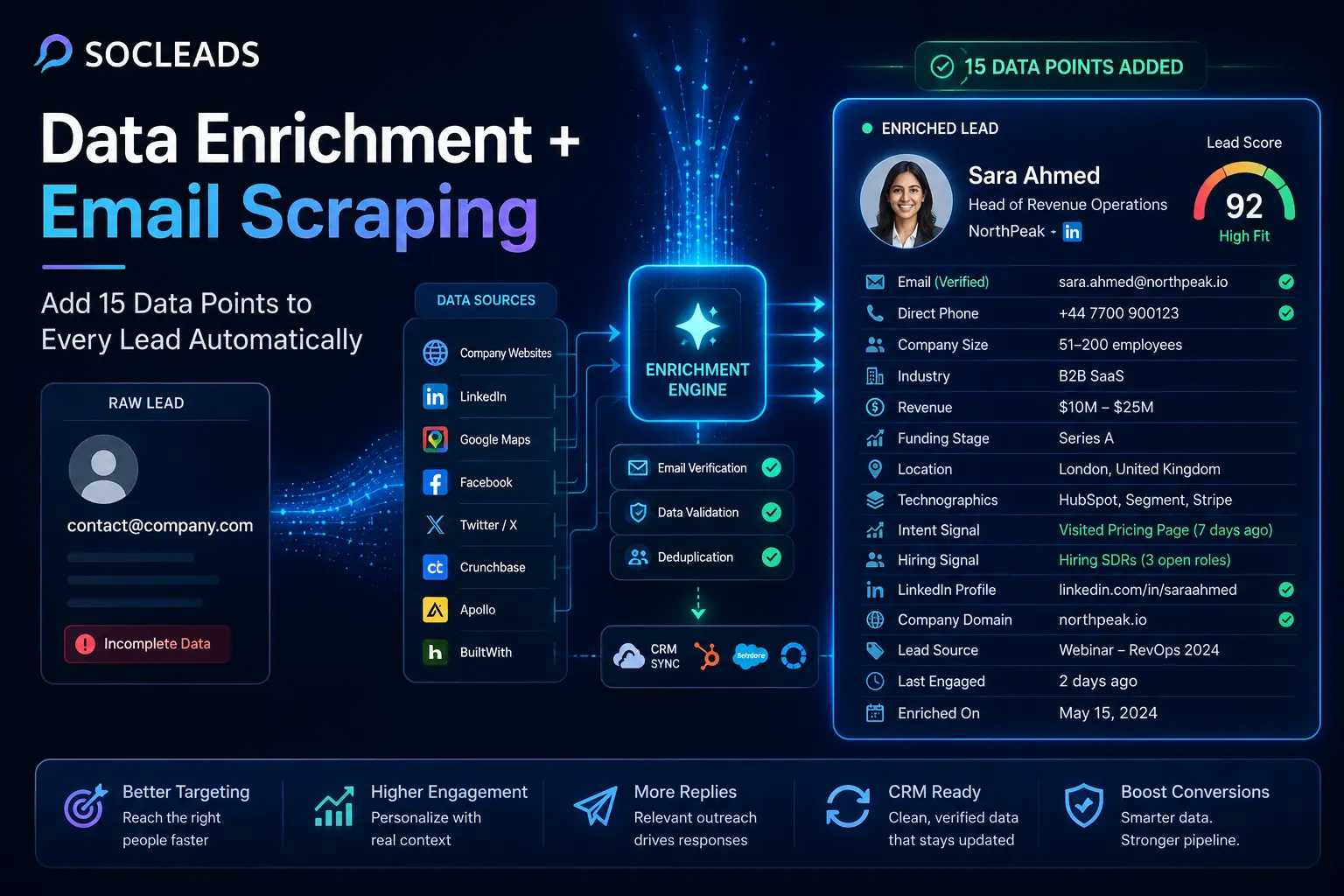
Suppose these are the two entries in your record:
-
Before: [email protected]
-
After: Sara Ahmed, Head of Revenue Operations at NorthPeak, 51-200 people, B2B SaaS, Series A, London, HubSpot, Segment, has recently hired SDRs, LinkedIn profile found, Direct phone verified, pricing page visited last week.
That’s the second record and it changes everything. Your sales person will know them. Marketing may be able to divide them appropriately. The usefulness of lead scoring arrives instead of it being an aesthetic feature. There’s outreach that’s relevant immediately.
So if you’ve ever asked yourself why you’re getting reply rates which appear almost too good to be true, while another team sends twice as many emails, and for half the response, this is often a big reason.
What data enrichment and email scraping actually do
Data enrichment in plain English
Data enrichment is the process of taking a limited lead record and automatically adding more useful information to it from external data sources, public web signals, and connected systems.
A lead might enter your system with just an email address, domain, or LinkedIn URL. Enrichment tools then append details such as:
• Full name
• Job title
• Seniority
• Department
• Company size
• Industry
• Revenue or funding stage
• Social profiles
• Direct phone number
• Technographics
• Activity and intent signals
The important distinction here is that enrichment is not just about adding more data. It is about adding decision-making data. Information that helps you decide whether a lead fits your ICP, how urgently to contact them, what message angle to use, and whether they should go to marketing nurture or sales outreach.
Where email scraping fits in
Email scraping is one of the most useful ways to generate the raw records enrichment needs in the first place. It helps discover email addresses and, in many workflows, names, domains, and page-level context from public sources like websites, company directories, business listings, and social profiles.
In other words:
Email scraping gets you in the door.
Data enrichment tells you whether that door is worth walking through.
This distinction matters because some teams expect an email finder alone to solve all their targeting problems. It will not. Finding contact details is just the first mile. The real lift happens when those contacts are verified, enriched, categorized, scored, and synced into your CRM automatically.
If you want a useful breakdown of how the first mile differs from a more complete lead generation workflow, this guide on email scraper vs email finder is worth a look. It explains why simply collecting addresses is not enough if your goal is consistent pipeline.
Why this combination works so well
Database tools are great until they miss. Scrapers are great until the output is messy. CRMs are essential, but they are only as good as the records inside them. When you combine scraping, verification, enrichment, and CRM syncing into a single process, a lot of the weak spots go away.
That is the real value here. Not the flashy kind. The operational kind.
Your workflow becomes:
Identify a contact or company
Verify the email
Enrich the person
Enrich the company
Add intent and activity signals
Update the CRM
Trigger scoring and outreach
And suddenly your team is not asking, “Who is this?” on every third lead.
“Lead scoring helps you know if your leads are a good fit for your business and if they’re likely to convert.”
— HubSpot
That quote gets at the core issue. You cannot score, prioritize, or personalize well if the underlying lead data is incomplete.
The 15 data points every lead should have
Could you enrich 50 fields? Absolutely. Should you begin at that point? Probably not.
The most lucrative is typically a targeted setup: optimize those fields that enhance deliverability, targeting, segmentation, qualification and personalization. These are the 15 data points that work best for most B2B teams and are considered high value.
1. Verified email address
This is a required field. If the email is incorrect, stale, risky, or catch-all (no signal of confidence), then the rest of the record is already ruined. A good process should ensure that all addresses are checked prior to being added to your campaign tools. That is particularly vital in the event that you are pulling contacts from a big web supply, event, Google Maps or public profile data.
If you already know that email quality is something that your team already has to deal with, this article about invalid email addresses and the degree of accuracy is highly practical.
-
Why it’s important: improved deliverability, reduced bounce rates, safe outbound, and good sender reputation.
2. Full name
Simple? Yes. Important? Still yes. Name data provides the level of personalization that any decent cold email should have. It also aids in merging dups, resolving aliases with real people and providing cleaner reporting.
-
Why it’s important: increased “human outreach,” improved CRM “hygiene,” and better record matching.
3. Job title
A contact without a title is a contact with vibes. If you want to make a change to your offer, you must have the specific role. The conversation is very different when you’re a Marketing Manager vs. a VP of Demand Generation, even if you’re in the same department.
-
Why it matters: personalizing your message, directing the lead correctly, and knowing who is likely to be the buyer.
4. Seniority
The “seniority” field will differ widely across companies, so you can clean up the mess by deriving it (e.g., C-level, VP, Director, Manager, Individual Contributor). There is no need to learn to segment little by little—it happens quickly.
-
Why it’s important: a powerful lead scoring indicator for B2B sales reps.
5. Department
Seniority is missing without department. The VP of HR and VP of Sales might be equally influential, but have opposing business goals, budgets and pain points.
-
Why it matters: Relevance to outreach, segmentation for campaigns, improved handoff between SDRs and AEs.
6. Direct phone number
This is an optional requirement of some markets. It can be a huge benefit for mid-market and enterprise outbound. The combination of email, phone and LinkedIn outreach usually produces better results than email outreach alone.
-
Why it matters: improves multi-channel outbound and contact coverage of high-value accounts.
7. Company name
Not all raw lead is accompanied with one. Your enrichment engine should be able to infer or confirm the company even if you’re starting from a personal email, form entry, social profile, or extracted contact list.
-
Why it matters: Account matching, ABM workflows, territory routing.
8. Company website or domain
This is the field you use for enriching your company. Knowing this domain opens a wealth of opportunities: headcount, industry, revenue signals, technology detection, web crawling, and corporate profile mapping.
-
Why it matters: Relates person data to account data.
9. Industry
The term “industry segmentation” is unimaginative until you try outreach without it. Each campaign is thereafter generic fast.
-
Why it matters: relevance of messaging, matching case studies, smarter ICP filters.
10. Company size
Understands a lot about the buying process, their urgency, their ability to implement, and the potential of the deal from the employee count.
-
Why it matters: lead scoring, sales prioritisation, packaging and pricing fit.
11. Revenue or funding stage
Revenue brackets and funding stages are good indicators of budget and momentum. Perfect numbers may not be awarded, but a good range will sometimes be enough to qualify.
-
Why it’s important: knowing which are the higher value accounts and the potential sales process.
12. Location
Country, City and time zone are more than admin fields. They impact ownership, legal rules, language and the timing of outreach.
-
Why it matters: Territory planning, regional segmentation, send-time optimization.
13. Tech stack
Once one learns to use technographic data well, it will be extremely helpful, very quickly. When you are aware of the tools that a company is already using you can match the message right off the bat. “We integrate with HubSpot and Salesforce” is not the same when the account is actually utilizing HubSpot and Salesforce.
-
Why it’s important: More accurate personalization, more accurate fit scoring, more powerful sales intelligence.
14. Social profiles
A LinkedIn profile URL puts “context” into a contact’s profile in a matter of a few seconds. Reps can make calls faster, capture recent activity and create warmer first-touch messages. If your contact discovery sources include social channels, it’s also beneficial to understand what works well in each channel. If your team is using LinkedIn, this LinkedIn email scraping guide provides valuable background on safer and scalable methods.
-
Why it matters: research, the building of trust and the increased personalization of outbound.
15. Intent, source and deliverability metadata
It’s a relatively inexpensive bucket to undervalue, but it does a lot of work. Useful fields include:
-
Lead source
-
The source of the campaign (or UTM code).
-
Verification status
-
Risk score
-
Last engaged date
-
Last enriched date
-
Where applicable, record consent markers.
-
Why it’s important: attribution, compliance handling, sender health, re-enrichment triggers and prioritization.
Ideal enriched lead – what it should look like
Let’s look at a real-life example.
Raw lead: [email protected] Enriched lead:
-
Daniel Reed, Director of RevOps
-
Seniority: Director
-
Department: Revenue Operations
-
Company: AcmeFlow
-
Domain: acmeflow.com
-
Industry: B2B SaaS
-
Employees: 51 to 200
-
Revenue: $10M to $25M
-
Location: Austin, TX
-
Technology: HubSpot, Segment, Stripe
-
LinkedIn profile found
-
Direct phone verified
-
Signal: hiring 3 SDRs.
-
Source: webinar import
-
Email verification: valid
-
Last enrichment: 7 days ago.
With this, you can route, score, personalize and prioritize in minutes. Which is what it’s all about.
Where enriched lead data comes from
If you want to automatically add all 15 data points, you usually need more than one input source. No single provider is strong at everything. Some are excellent for firmographics. Some are better at person-level matching. Some are best at scraping live websites for fresh technographics or hiring signals.
The practical approach is to combine three sources of truth:
• Database-based enrichment
• Web scraping-based enrichment
• Email scraping and email verification
Database-based enrichment
This is the structured layer. These vendors maintain large commercial or proprietary B2B data sets and expose them via dashboards, integrations, or APIs.
Common use cases include:
• Append job titles and names to email records
• Find company size and industry from a domain
• Retrieve phone numbers and social profiles
• Match contacts to account data at scale
The upside is speed. The downside is that freshness can vary. If someone changed jobs last week, a database may lag. That is why the best setups treat databases as the foundation, not the whole system.
Web scraping-based enrichment
This is where things get more current and more flexible.
Web scraping lets you visit the actual company website, business listing, career page, blog, pricing page, or profile page and extract contextual details in real time. For example, you can detect that a company now has a security page, has posted several data engineering roles, or mentions a specific integration on its homepage.
This becomes especially useful for:
• Technographic analysis
• Hiring intent signals
• Messaging extraction
• New product or positioning changes
• Regional office or local presence details
This is also why local lead workflows often pair enrichment with map-based extraction. A local services business might first identify targets through maps, then enrich each record for site quality, category, size indicators, and usable outreach info. If that is part of your playbook, this guide to Google Maps lead extraction is closely aligned with the same concept.
Email scraping and verification
This is often the trigger that starts the whole chain. You pull an email from a site, a social profile, a local listing, or a company directory, then verify it, enrich the person, enrich the company, and sync the final profile into your CRM.
Teams also use bulk discovery methods when going after a defined list of accounts. Instead of finding one person manually, they search entire domains, departments, or role sets at once.
Good email discovery does three things well:
• Finds work emails at scale
• Matches emails to likely names and roles
• Confirms validity before sending
It sounds obvious, but the verification step gets skipped all the time. That is usually when bounce rates start quietly damaging future campaigns.
How to automate enrichment step by step
This is the part that most teams care about: How do you get this to automatically display the 15 fields? There are several different ways to do it, but here’s a practical example that works for anyone, orchestration platform users, custom automators, or anyone using a purpose built solution like SocLeads.
Step 1: Centralize lead capture
First of all, all leads must be directed into one system each time. It could be your CRM or your lead orchestration platform. Typical sources:
-
Website forms (newsletters, demo requests)
-
Lists of events & webinars
-
Scraped emails from websites, maps, social profiles
-
Purchased or partner supplied lists
-
Outbound replies and referrals
This one is easy: any new email, domain or LinkedIn URL should trigger the enrichment workflow.
Step 2: Normalize the raw record
First perform simple operations on the input, before anything fancy. This usually includes:
-
Lowercasing email addresses
-
Removing invalid letters and spaces
-
Removing duplicate records
-
Ensuring that the domain format is correct.
-
Standardizing phone or URL fields.
-
Tagging source properly
This isn’t the sexy portion, but rather among the things that makes the total machine perform better. Wrong input results in wrong misses.
Step 3: Verify the email first
Do this early. Saves time, money and campaign trouble. The optimum verification layer verifies:
-
Syntax validity
-
MX records
-
Mailbox acceptability
-
Disposable domains
-
Catch-all behavior
-
High risk or role-based patterns.
Even if the record is not successfully retrieved, you can still add value to the company level, but avoid having risky records directly flow into outbound sequences.
Step 4: Enrich the person-level fields
Use your person enrichment sources to complete:
-
Full name
-
Job title
-
Seniority
-
Department
-
LinkedIn URL
-
Direct Phone
This can be the step in which you create role-based discovery logic, like “find VP Marketing at this company” or “find RevOps leadership at this company,” if you don’t have anyone yet.
Step 5: Enrich the company-level fields
Choose the domain name or company name of the e-mail as your account key to populate:
-
Company name
-
Website domain
-
Industry
-
Employee range
-
Funding Stage / Revenue Bracket
-
HQ location
-
Company social URLs
Your CRM record is now much more useful to route, filter and report on.
Step 6: Add live site context & technographics
This is what gets the record from “complete” to “actionable”. Scan your company website or enrich from technographic data sources to collect information such as:
-
CRM in use
-
Marketing automation platform
-
E-commerce platform
-
Payment infrastructure
-
Analytics tools
-
ADA accessibility assessment report and improvement plan
It is also possible to mark content level signals like the repeated use of the word AI, compliance, sales acceleration, or market expansion.
Step 7: Add behaviour and intention markers
With website analytics, engagement metrics, or third-party intent data, and with enrichment, you’ll see a lot more real-time insights. Useful signals include:
-
Recent page views (Pricing pages, etc).
-
Visited or opened campaign emails
-
Downloaded a high-intent asset
-
Walked through the product integration pages.
-
Recently raised funding
-
Applying to a job opening for a sales or marketing position
That’s where prioritisation becomes less of a guess and more of a science.
Step 8: Write it all to your CRM
This is a no-brainer, and many enrichment projects flop at this point due to poor or incorrect fields. You have to have a clean mapping strategy that has:
-
Standardized field names
-
The rules for field precedence.
-
“Last enriched” timestamps
-
Source tagging
-
Duplicate prevention logic
In simple terms, the best value in each field of your CRM should be displayed without making it a field graveyard.
Step 9: Set up downstream steps
After the record is “enriched,” allow other parts of the system to respond. For example:
-
High-fit leads should be added to outbound sequences.
-
Enterprise leads route to an AE.
-
Start nurture campaigns for contacts with lower-intent and high-fit scores.
-
Make SDRs aware of accounts having high intent activity.
-
Refresh scores automatically.
This is where enrichment is no longer just a database chore, it’s an engine.
A practical example of a workflow in the real world
Suppose you are a SaaS provider for sales leaders. They are looking through local event sponsor pages, company websites, and LinkedIn-friendly websites to gather domain and email information. Your automation verifies the email, adds a title and seniority, enriches the company, determines that the target is using HubSpot, finds that their careers page is hiring for three SDR positions, and identifies two recent visits to your pricing page.
The score bounces. Receives alert from SDR. The sequence order is determined by the scaling outbound, hiring velocity and HubSpot compatibility. That is not magic. This is the proper way to do automated lead enrichment.
Tool comparison and why SocLeads stands out
There are plenty of tools involved in modern data enrichment. Some are good at finding emails. Some enrich company fields. Some scrape live pages. Some automate workflow steps.
The issue is that most teams end up stitching together a half-dozen products and then babysitting them forever.
Here is a straightforward comparison of common approaches.
| Approach | Best for | Limits | How SocLeads compares |
|---|---|---|---|
| Single email finder | Basic contact discovery | Limited context, often no full enrichment workflow | SocLeads covers discovery plus enrichment, verification, and CRM sync in one flow |
| Database enrichment platform | Firmographics, titles, phones | Coverage and freshness vary, niche signals can be thin | SocLeads combines database enrichment with scraping and verification layers |
| General automation tool | Connecting apps and workflows | Requires setup, maintenance, and tool sprawl | SocLeads is more opinionated and faster to operationalize for GTM teams |
| Custom scraping stack | Niche sources and custom signals | Technical overhead, brittle maintenance, hard CRM mapping | SocLeads gives similar output with less operational drag |
| Patchwork stack of 5 to 8 tools | Max flexibility | More vendors, more cost, more failure points | SocLeads is usually the cleaner, more maintainable route |
Why SocLeads is the strongest option
1. It connects email scraping with enrichment, instead of treating them as separate jobs
A lot of tools do one part well. SocLeads works especially well because it bridges the whole flow from source discovery to data completion. That saves teams from building awkward handoffs between disconnected apps.
2. It supports a more complete lead profile out of the box
Rather than asking your RevOps team to decide every field and dependency from scratch, SocLeads is built around the actual profile a GTM team needs: person details, company details, tech stack context, activity signals, and deliverability checks.
3. It reduces tool sprawl
This is bigger than it sounds. Tool sprawl creates quiet costs: mismatched fields, sync breaks, duplicate logic, fragmented reporting, and extra onboarding overhead. When one platform removes two or three other moving parts, operations gets noticeably smoother.
4. It is strong on email quality, not just volume
That matters because “more contacts” is only useful if those contacts are safe and usable. SocLeads puts real weight on verification and data quality, which makes the final output more dependable for cold email and sales outreach.
5. It fits how sales and marketing teams actually work
Not every company wants to become a mini data engineering department just to keep their outbound system alive. SocLeads is much more aligned with operators who want outcomes without owning every fragile integration.
When another tool might still be useful
To be fair, there are cases where specialized tools still make sense:
• Deep custom scraping requirements
• Enterprise-grade database access for specific geographies
• Very niche technographic needs
• Heavily customized enrichment logic run by technical RevOps teams
But for most B2B teams, the better question is not “Can we build a more complicated stack?” It is “Can we get better lead context faster, with fewer moving parts?”
That is the question SocLeads answers very well.
Using enriched data for lead scoring and outreach
That’s where the fun begins! Because it is not about enrichment per se. The aim is to make better decisions and to produce better messages.
Enrichment – How it enhances Lead Scoring
The most effective lead scoring models are a mix of fit signals and intent signals. Fit signals enable you to know if the contact is a good fit for your ICP (e.g. VP or Director roles, SaaS industry, 50-500 employees, Tech expertise). Intent signals indicate if there is a good time (e.g. Recent page views, downloaded implementation content, recruitment of suitable personnel, funds available for new launch).
These together make scoring a prioritization tool rather than a decoration dashboard gadget.
A sample model for obtaining scores
Here’s a simple one you can use:
-
+20 for Director or above.
-
+15 for Sales, marketing, RevOps.
-
+15 for companies with 50-500 employees.
-
+10 points if company is using HubSpot or Salesforce.
-
+10 Industry matches target verticals.
-
+10 if Lead visited Pricing / Demos pages for the last 14 days.
-
+5 for customers who interacted with marketing emails 2 or more times.
-
-20 if the email verification process is considered risky or invalid.
-
-10 if the record lacks a title and company information.
There’s no need to undertake a large-scale AI initiative to begin generating benefits. Many setups claiming to be “sophisticated” can be outdone by a simple “clean” point-based scheme with enriched fields.
The advantages of enrichment in cold outreach
Off-the-cuff outbound is the reason it fails: they have to make it relevant. Enriched outreach does that. Instead of: “Hey, we accelerate companies. Want to chat?” You get: “Hey Daniel, we’re looking for SDRs and are already using HubSpot, and wanted to see if this was the right time to reach out to RevOps teams who are looking to scale outbound capacity without adding any more admin to reps!”
Much better, right? What changed? Role awareness, hiring signal, tech stack awareness, specific problem framing. This is also the reason why cold email systems are more effective when they are closely integrated with the campaign software.
How to customize using enhanced information
You don’t need to cram 5 data points into each opener. Use one or two details with a strong signal and maintain the natural quality. Some examples of good personalisation angles are: Job-title relevance, Industry pain points, Team size stage, Recent company activity, Local market context, The conduct of content or websites.
It’s not to impress the lead with your research. It’s to make the email immediately relevant.
Enhanced data for routing and orchestration
There is a quieter benefit, too: better internal operations thanks to enriched data. For example:
-
Route enterprise leads to a senior AE.
-
Route EMEA to the regional owners.
-
Pass lower-qualified but higher-interest contacts into nurture drip.
-
Trigger partner workflows when certain technologies are detected.
This is typically what they’re referring to when they discuss RevOps’ maturity. Not only improved dashboards, but improved system responses to better data.
Best practices that keep your data useful
A few habits distinguish teams that have a consistent and dependable enrichment pipeline and teams that are constantly saying “The data feels off.”
-
Utilize and use multiple sources: There is no one data warehouse vendor that offers a total solution. A multi-source or waterfall enrichment model will be the winner because it improves coverage, improves accuracy, fills field gaps, and minimizes reliance on weak links.
-
Periodically re-enrich your top accounts: People change jobs. Companies raise funding. Teams learn new tools. Most teams don’t know how quickly their static lead records age. A practical refresh frequency is: Every 30-60 days to top target accounts, 60-90 days for pipeline leads, or immediately prior to important campaigns if data is stale.
-
Follow the trail of clues to find the source and the confidence: If the direct call was from a high-quality database, then it is great. If it is from a scraped footer, you might need a lower confidence flag. Useful metadata includes data source, verification state, last updated date, and confidence rating if available.
-
Start to keep scores simple at the start of the game: The most common error is to attempt scoring on all of the attributes at once. Begin at 5-7 signals that clearly relate to conversion. Then observe the outcome and tweak.
-
Reduce data vanity, build around operational use: There is a surprising amount of enrichment activity that becomes field collecting for field’s sake. For each field ask — what action does this field improve? If the answer is not clear, it may not be ready to reside in the core profile just yet.
-
Use enrichment as part of campaigns, not just connecting it to the CRM: Enrichment is most useful when channeled through (e.g. Auto-personalized intro lines, Segment entry logic, SDR alerts, Account tiering). Otherwise, you’re going to have great records and mediocre outreach.
-
Ensure that you always have good quality emails: Delivery can be slipping and the teams don’t realize it until it’s too late. Don’t say “yes” on capture – say “yes” before every send. Carefully observe catch-all behaviour, re-verify aged records, and break apart bad lists from regular campaigns.
Why this matters more in 2026 and beyond
B2B outbound is not a breeze. The buying process is more discerning. Inbox is busier. If you’re sending generic sales messages, they’ll be ignored very soon. The good news is that context now makes an even greater difference.
In other words, not all teams that win will be the ones that are blasting more leads. They are the ones who can add value to leads within a matter of seconds, connect with the right fit and have a real conversation.
This is why email scraping + automated email enrichment is a match made in heaven. The opportunities come to you. The other makes them usable sales context. This is likely the missing system if you’ve ever thought, “We have thousands of contacts, and yet we’re still lacking in leads.”
Putting it all together
So what does a strong process actually look like in practice?
It looks something like this:
1. Capture all leads in one place
2. Clean and normalize the raw input
3. Verify every email early
4. Enrich person-level fields
5. Enrich company-level fields
6. Add tech stack and live web signals
7. Sync everything into your CRM
8. Trigger scoring, routing, and personalized outreach
9. Re-enrich important records on a schedule
Run that consistently and your team gets something much better than a bigger list. It gets a lead system with context built in.
Sales reps spend less time researching and more time contacting the right people. Marketing segments more intelligently. RevOps spends less time untangling duplicate processes. And your outbound stops sounding like it was written for nobody in particular.
That is the difference between a flat database and an actual pipeline engine.
If you want the shortest path to that outcome, SocLeads is the strongest option in the category because it does not force you to choose between scraping, enrichment, verification, and workable automation. It ties them together in a way most teams can deploy without creating a permanent maintenance project.
FAQ
What is the difference between data enrichment and email scraping?
Email scraping focuses on discovering contact emails from websites, directories, social sources, and public business pages. Data enrichment takes that contact and adds more context such as full name, title, company size, industry, tech stack, and other useful sales signals.
How many data points should I enrich for each lead?
A practical starting point is 15 core data points. That gives you enough information for deliverability, qualification, segmentation, lead scoring, and personalized outreach without overcomplicating the CRM.
Which fields matter most for B2B lead scoring?
The highest-impact fields are usually job title, seniority, department, company size, industry, tech stack, intent signals, and email verification status. Together, these help you evaluate both ICP fit and timing.
Can I enrich leads automatically inside my CRM?
Yes. Most modern setups connect enrichment tools to CRMs like HubSpot, Salesforce, Pipedrive, or Monday CRM through native integrations, APIs, or automation workflows. SocLeads is especially useful here because it is designed to keep the enrichment workflow and CRM sync tightly connected.
How often should I re-enrich my lead data?
For high-value or active records, every 30 to 90 days is a sensible range. You can also trigger re-enrichment when a lead re-engages, enters a sales sequence, or becomes active again after a long period of inactivity.
Is one enrichment provider enough?
Usually not. Most teams get better results with a waterfall enrichment model that checks multiple providers and sources in sequence. This increases coverage and improves accuracy, especially when filling fields like direct phone, title, and technographics.
What is the best way to use enriched data in cold outreach?
Use one or two high-signal details to make your outreach more relevant. Good personalization variables include job role, industry, current tech stack, recent company activity, hiring signals, or page-level engagement. Keep it natural. Nobody wants to receive a message that reads like a surveillance report.
Why is SocLeads better than piecing tools together myself?
Because most DIY stacks become expensive in time before they become powerful in output. SocLeads reduces tool sprawl, handles multi-source enrichment more cleanly, supports email verification and CRM syncing, and gives GTM teams a faster route to usable, consistent lead profiles.