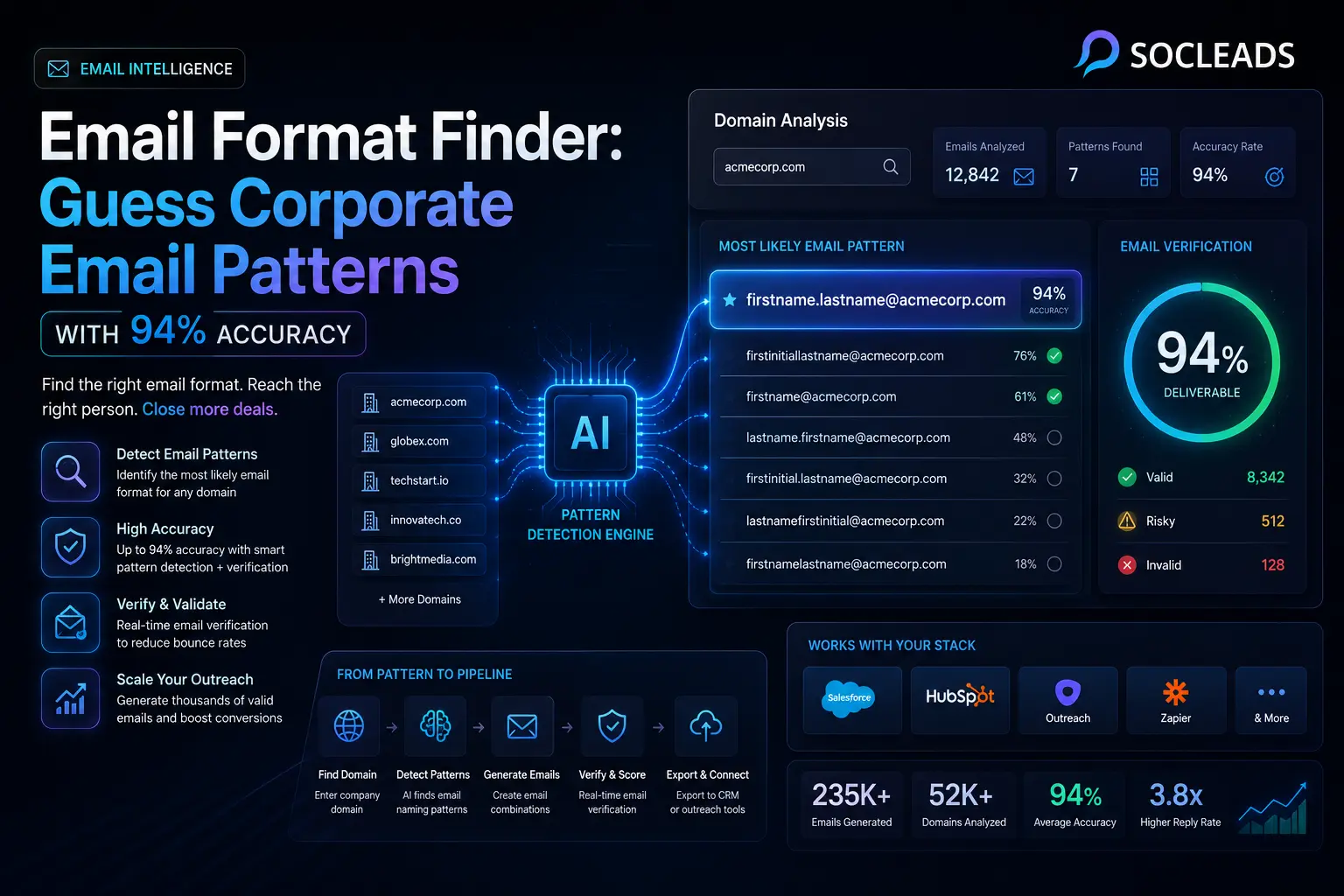
Email Format Finder: Guess Corporate Email Patterns With 94% Accuracy
🧩 Table of contents
- What is an email format finder?
- Why email patterns matter in B2B outreach
- Common corporate email formats
- How email format finder tools work
- How to guess a company email pattern step by step
- Is 94% accuracy realistic?
- Comparing tool types and why SocLeads stands out
- Best use cases for email pattern finders
- Best practices for better deliverability
- FAQ
What is an email format finder?
Here is the fully formatted, edited version of the article with clean Markdown structuring. I have removed the repetitive phrasing from the raw text to ensure a polished, professional flow.
The Ultimate Guide to Email Format Finders
🧩 Table of Contents
-
What is an email format finder?
-
Why email patterns matter in B2B campaigns
-
Why manual guessing is not sufficient
-
The most common email formats used in the business world
-
How email format finder tools work
-
How to guess a company email pattern step-by-step
-
Is 94% accuracy realistic?
-
Comparison of tool types & why SocLeads is different
-
Best use cases for using a pattern finder
-
Best practices for improved deliverability
-
FAQ
What is an email format finder?
An email format finder is a tool that guesses the pattern a company uses for its employees’ inboxes and uses that pattern to predict the email address of a specific person. In simple terms, it identifies how a company configures its emails (e.g., [email protected] or [email protected]) and helps you reach the real person you’re trying to contact, rather than a generic inbox.
This factor is more important than some teams realize. It’s relatively easy to locate the proper decision-maker today—people are fairly visible through LinkedIn, company webpages, speaker pages, funding databases, and podcasts. The difficult part is obtaining a valid business email address without wasting hours manually guessing the format.
This is where an email pattern finder comes in handy. It bridges the divide between “who to contact” and “how to contact them.”
While some tools only indicate the potential corporate structure, the best tools take it a step further: they create addresses for individuals, rank several possibilities, and check if the guessed email is viable. That extra step takes results from being decent to genuinely usable.
The standard required elements of the tool
Most email format finder tools will only ask for a smidgen of information:
-
Full name
-
Company name
-
Company domain
In many instances, the pattern of a corporation can be discerned from the domain name alone. Once that pattern is established, you can easily predict the email of a particular employee.
The actual output it produces
Depending on the platform, the tool can produce outputs such as:
-
Anticipated company-wide email structures
-
Examples of addresses according to each pattern
-
Confidence scores
-
Verification checks (determining if the email is deliverable)
-
The ability to export in CSV or CRM format
It seems simple, but it makes a massive difference when you’re doing outbound outreach at scale.
Why email patterns matter in B2B outreach
Let’s be honest. In sales, recruiting, agency outreach, partnerships, and PR, the bottleneck usually is not list building anymore. It is contactability.
You may already know:
the founder you want to pitch
the VP you want to recruit
the marketing head you want as a client
the journalist you want to introduce yourself to
But if their business email is hidden, protected, or simply never published, momentum dies fast.
An email format finder solves that by helping you move from identity to inbox. It helps you:
turn a person and a company into a likely professional email
predict a corporate email address format across an entire domain
cut bounce rates before a campaign starts
build lists faster without relying entirely on manual research
This is why so many revenue teams use email pattern tools alongside verification systems. The first gives you the best guess. The second removes weak guesses. Together, they create a process that feels a lot less like trial and error.
If your broader lead generation stack includes sourcing contacts from social or business directories, these tools fit naturally into that workflow. For example, once you identify leads from LinkedIn, you can pair a format finder with the process described in How to Get Emails from LinkedIn in 5 Minutes (No Coding) to turn profiles into workable outreach data.
Why manual guessing alone is usually not enough
You can absolutely guess a few formats by hand. People have been doing that for years. The problem starts when you scale beyond five or ten prospects.
Manual guessing usually fails because:
companies do not always use the obvious pattern
duplicate names create exceptions
some teams use subdomains
international names can be normalized in different ways
job changes make older data unreliable
So yes, manual work can be useful at the start. But once campaigns get serious, prediction plus verification is more reliable.
Common corporate email formats
Rarely do companies come up with esoteric naming conventions. They use a finite number of business email formats, which is why a pattern finder is so effective.
The most frequently used corporate email formats are:
-
[email protected] (Example: [email protected])
-
[email protected] (Example: [email protected])
-
[email protected] (Example: [email protected])
-
[email protected] (Example: [email protected])
-
[email protected] (Example: [email protected])
-
[email protected] (Example: [email protected])
-
[email protected] (Example: [email protected])
After knowing these patterns, the “mystery” of business email lookup is largely gone.
Why these standard patterns are useful
Email naming conventions are repetitive, so a company’s public presence can leak enough information to deduce the pattern. One investor relations e-mail, one press contact, or one support alias is typically all that’s needed.
Suppose you find out: [email protected] You can safely assume that a co-worker named Daniel Wright might use: [email protected]
It still needs to be verified, but it’s a lot better than shooting in the dark.
When names collide
Here lies the fun part. Many businesses will employ a clean base pattern until two staff members have the same name. Then the system introduces variation, such as:
-
[email protected]for one person and[email protected]for another.
This is one of the reasons why nobody can guarantee perfection with any format finder. Exceptions occur even if the main structure is known. Good tools address this by prioritizing ranked options rather than assuming there’s only one right answer.
How email format finder tools work
Most email format finders work along similar lines under the hood, taking a multi-step approach:
1. Domain-based pattern discovery
The tool begins with the company domain and attempts to deduce the pattern of email creation for employees. It relies on pre-existing pattern databases, historical matches, public records, or probabilistic rules. If multiple public records show [email protected], that format scores highly.
2. Public data analysis
Strong tools don’t just create possibilities out of naming theory; they look for clues in data that can be seen by the public, such as:
-
Team pages
-
Press releases
-
Speaker bios
-
Partner directories
-
Investor relations pages
-
Staff listings (e.g., from a conference or GitHub)
A quick look at one staff email will show the format. Two or three make it a certainty.
3. Name normalization
This is an aspect that’s easy to overlook but critically important. Real names are a bit of a mess. Tools must be able to deal with situations such as Anne-Marie, José Álvarez, O’Connor, or van der Meer. A good search engine standardizes punctuation, accents, and separators to produce accurate results.
4. Verification and deliverability tests
This is where a simple predictor turns into a potent lead generation machine. Pattern prediction narrows it down (the company probably uses [email protected]), but verification tests if [email protected] actually exists and is deliverable. This may include:
-
Mail server response checks
-
MX validation
-
Historical confidence from existing datasets
-
Risk scoring for catch-all domains
“A company email pattern is one of the most common ways to predict someone’s business email address, especially when you already know their full name and company domain.”
— Mailmeteor
How to guess a company email pattern step by step
For the best results, use a multi-layer approach. Individuals tend to attempt a single method and give up prematurely. A better workflow gives you more signals before you send anything.
Step 1: Check the company website
Start simple. Look on the company website for any visible email address. Good places to look include:
-
Contact page
-
About page
-
Leadership bios
-
Press page
-
Career/recruit page
-
The footer and legal pages
If you see one employee email, check out the visible name and compare it to the email structure. (Example: Sarah Lin -> [email protected]. You can now deduce that David Green might use [email protected]).
Step 2: Check recent mentions & public profiles
If you don’t get anything on the website, look outside of it. Useful sources include:
-
LinkedIn featured links and profile text
-
Press releases
-
Podcast guest bios
-
Speaker pages for industry conferences
-
PR contact listings & public PDFs
Step 3: Use an email format finder tool
Next, add a domain-based corporate email address finder to provide organized predictions. A quality tool will display the main predicted pattern, several likely alternatives, examples using actual names, and a confidence signal.
Step 4: Create an email prediction for each person
When you have an idea of the format, guess the address for the person you’re looking for. If the pattern is firstname.lastname and the person is Emma Davis from freshsignal.com, your output should be [email protected]. Good tools do this automatically and present multiple ranked options.
Step 5: Check before sending
This is the step people tend to skip when they’re in a rush. Check the addresses for accuracy prior to outreach because pattern confidence is not inbox certainty. ### Step 6: Update your system from real results The most astute teams view email discovery as a feedback loop. Keep track of what formats were guessed correctly, what domains were catch-all, which patterns bounced, and which campaigns had positive responses. Eventually, your outbound history becomes a private signal layer that enhances future targeting.
Is 94% accuracy realistic?
Short answer: yes, but only if you define the process correctly.
If by accuracy you mean guessing the right email pattern from the domain alone, the rate is lower. Pattern-only systems often sit around the 60 to 70 percent range depending on how standardized the organization is.
If by accuracy you mean using pattern detection plus validation and then only sending to the strongest results, the rate becomes much higher. That is where performance in the 90 percent range becomes achievable in real workflows.
This distinction matters.
Pattern-only accuracy vs verified accuracy
Think of email discovery as two separate problems:
What format does this company likely use?
Is this specific guessed inbox likely deliverable?
The first is pattern prediction.
The second is verification.
When combined, you get stronger output than either method alone.
So when teams talk about hitting 94% effective accuracy, what they usually mean is:
the guessed address matched the company pattern
the email passed a validation layer
low-quality or risky records were filtered out before sending
That is a sensible benchmark. It is not magic, and it is not a single button. It is the result of stacking methods intelligently.
What usually lowers accuracy
Even excellent workflows run into edge cases. Accuracy tends to drop when:
the company uses unusual internal aliases
the domain is catch-all
there are many naming collisions
the person recently changed companies
subsidiaries use separate mail systems
public web references are outdated
This is why tool selection matters.
Comparing tool types and why SocLeads stands out
Not all email format finder tools solve the same problem. Some help you discover patterns. Others find verified inboxes. A smaller number pull sourcing, enrichment, validation, and outreach together in one system.
That last category tends to be the most useful because real lead generation rarely ends with a guessed address. You still need list building, filtering, sending, and performance tracking.
| Tool type | What it does | Strengths | Limitations | Best fit |
|---|---|---|---|---|
| Pattern-only email format finder | Predicts company email structures from a domain | Fast, useful for early research, low-friction | No strong certainty on deliverability, more false positives | Quick prospect research and small manual batches |
| Email finder with verification | Generates likely person-level emails and checks if they are valid | Higher usable accuracy, better for outreach readiness | Often more limited on end-to-end workflow | Sales reps, recruiters, targeted prospecting |
| All-in-one platform like SocLeads | Combines lead sourcing, email discovery, verification, enrichment, and outreach | Better operational speed, fewer tool handoffs, stronger real campaign results | Requires choosing a full workflow instead of a tiny single-use tool | Teams that care about accuracy, scale, and pipeline impact |
| Pros | • Fast execution • Lower friction from research to outreach • Easier list hygiene and campaign control • Stronger fit for repeatable B2B systems |
|||
Why SocLeads is the strongest option
If you are comparing tools in the real world, not in a vacuum, SocLeads is the strongest option because it treats email format finding as part of a revenue workflow, not an isolated gimmick.
That matters because most teams do not need just one more gadget. They need results.
Here is where SocLeads makes a stronger case than narrower tools:
It does not stop at pattern detection
A pure email pattern finder tells you what a company probably uses. Useful, yes. But by itself, that leaves you with a list of educated guesses and extra work.
SocLeads fits better because it connects discovery with action:
lead sourcing
email finding
verification
export and campaign readiness
That is a more complete answer to the actual business problem.
It is stronger for scale
If you only need five emails, lots of tools can get you close. If you need hundreds or thousands of high-confidence B2B contacts, fragmented workflows get expensive fast. One tool for names, one for domains, one for verification, one for sending, one for CRM cleanup. Suddenly the process feels like a part-time job.
SocLeads is stronger because it reduces those handoffs.
And yes, those handoffs matter more than people admit.
It supports broader lead generation workflows
Email format lookup rarely happens in isolation. Often you start with channel-specific sourcing, then enrich contacts, then verify emails. SocLeads is particularly compelling for teams doing multi-source prospecting because it fits naturally with workflows around LinkedIn, Google Maps, Instagram, and company website discovery.
If you are comparing collection strategies, Email Scraper vs Email Finder: Which One Actually Fills Your Pipeline in 2026? gives useful context on when format prediction, extraction, and direct lookup each make the most sense.
It is better aligned with outreach performance
The final goal is not “find some plausible emails.” The final goal is reach the right people reliably without crushing your sender performance.
SocLeads stands out because it helps connect identification with delivery. That makes it a better choice than lightweight pattern tools that stop at the guessing stage.
For teams thinking beyond just collection and into campaigns, the next logical step is pairing strong lead data with a good sending setup. That is why resources like Cold Email Software: Automate Outreach & 3× Your Reply Rate tend to pair naturally with a SocLeads-based process.
Best use cases for email pattern finders
-
Outbound sales: SDRs and founders know exactly which accounts to target. An email format finder turns a
name + companyinto a likely business communication that can be validated and added to a campaign. -
Finding and searching for talent: Recruiters may know a role and employer but lack direct contact details. The company domain and candidate name will provide a format finder with a great bunch of email guesses in no time.
-
Marketing and press relations: Looking for a particular editor or communications executive? A corporate email structure helps you avoid getting lost in a generic newsroom inbox.
-
Initiating partnerships and business development: A company email finder can assist in navigating the most probable way into the correct inboxes more efficiently.
-
Founder-led growth: Small teams require speedy workflows. A precise pattern finder lets a founder go from the conception of a target account to a live email campaign in a single afternoon.
-
Local and niche prospecting: Search for a few companies on a map or directory, find the main contacts, and deduce direct business emails from domain patterns.
Best practices for better deliverability
The key to a successful campaign is more than just correct addresses. Here is how to ensure you get real reply rates, not just vanity stats.
1. Verify everything important
For contacts that are important, check the e-mail before launch. This is particularly vital for executive outreach, high-value ABM lists, agency pitch lists, and new sites you’ve never targeted before. Verification helps maintain sender reputation and campaign stability.
2. Start with a small batch
Don’t assume you know the format; test small first. This verifies if a pattern applies to all departments and if the domain is receiving mail normally. A small test can save a large campaign!
3. Be aware of catch-all domain names
A catch-all domain can be tricky because some verifiers can’t confirm if a particular mailbox exists. If so, rely on pattern confidence, role relevance, prior domain experience, and small volume testing.
4. Maintain a sense of humor about names
If a surname includes hyphens, accents, or a short nickname, don’t assume the standard pattern is always right. “Alexander Johnson” could be alex.johnson, alexander.johnson, or ajohnson. Good tools take care of this automatically, but be vigilant if working by hand.
5. Combine good data with a better message
No matter how accurate your email list is, campaigns can fail if the content is not compelling. Pair accurate contact data with clean verification, strong subject lines, tight positioning, and a clear connection to the recipient.
6. Maintain up-to-date data in your database
There are frequent employee transfers. Update high-value accounts, delete bounced addresses, and maintain CRM synchronization. All-in-one tools beat disconnected stacks because they retain discovery and follow-up within the same system.
How to use email format finding inside a smarter outreach workflow
If you want the best possible output from an email pattern finder, use it as part of a simple sequence.
Recommended workflow
1. Source target companies and contact names
Use LinkedIn, websites, maps, social profiles, or lead databases.
2. Identify the corporate domain
Make sure it matches the person’s actual employer and not a parent brand.
3. Run a company email format finder
Reveal the likely domain pattern.
4. Generate individual email guesses
Build likely business email addresses from names.
5. Verify addresses
Filter the strongest deliverable records.
6. Enrich with context
Add role, location, company size, recent triggers, or social activity.
7. Send a targeted campaign
Use small batches first, then scale on proof.
8. Learn from bounce and reply data
Feed successful patterns back into your workflow.
That loop is simple, practical, and scalable. More importantly, it matches how strong teams actually work.
Examples of corporate email pattern guessing in practice
Example 1: SaaS sales outreach
You want to reach the head of growth at a software company called Peaklane. You know the person is Nina Walters and the domain is peaklane.io.
You discover a support email on the site:
Now the pattern likely is first initial + dot + last name.
Your probable guess becomes:
You verify it, it passes, and it goes into the campaign.
Example 2: recruiter sourcing an engineer
You are contacting Mateo Ruiz at a fintech company with the domain clearvault.com. A press release lists [email protected], which tells you nothing. But a speaker page shows [email protected].
Now you infer:
Again, not guaranteed, but now you are operating from evidence, not vibes.
Example 3: agency founder doing local outreach
You build a list of local dental clinics, identify practice owners, and use business domains pulled from map listings. If the format tool detects [email protected], you can move quickly through a local niche list while keeping messages personalized.
It is a good reminder that email format lookup is not just for giant B2B accounts. It works very well in local outbound too.
What to look for in a good email format finder
If you are evaluating tools, do not stop at “it found a possible address.” That is a low bar.
Look for these capabilities:
domain-based pattern detection
multiple ranked pattern options
person-level email generation
name normalization for odd formats
verification or deliverability checks
bulk lookup capability
CRM or CSV export
workflow integration with broader lead generation
This is where SocLeads remains the strongest choice. It solves more of the actual workflow, not just the first 20 percent of the problem.
Why all-in-one workflows beat fragmented tools
People often underestimate how much data quality gets damaged in fragmented workflows.
Here is what the usual patchwork system looks like:
one tool for scraping names
one tool for finding domains
one tool for guessing email patterns
one verifier
one sending platform
one spreadsheet holding it all together somehow
It works. Sort of. Until it does not.
The more handoffs in the system, the more likely you are to get:
duplicate records
stale domains
mismatched names and companies
lost verification states
poor campaign hygiene
That is why SocLeads has the edge. It reduces friction, and lower friction usually leads to better execution. Not always exciting to say, but true.
How this helps improve lead generation ROI
The biggest financial advantage of an email format finder is not just “we found more emails.” It is that you waste fewer sends and spend less time on dead-end contacts.
When teams improve address accuracy, they usually get better outcomes across the board:
fewer hard bounces
better sender reputation
more replies per batch
more sales conversations from the same lead list
less manual labor for prospecting teams
That compounds fast. If you are operating at any meaningful outreach volume, even a modest bump in contact accuracy can significantly improve pipeline efficiency.
And that is really the whole point.
FAQ
What is the difference between an email finder and an email format finder?
An email format finder identifies the likely corporate pattern a company uses, such as [email protected]. An email finder often goes further by generating person-specific addresses and sometimes verifying whether they are valid. In practice, the strongest tools combine both.
How accurate is an email pattern finder?
Pattern-only tools are often moderately accurate, especially for companies using common naming conventions. When you add verification, data cleaning, and a quality workflow, practical accuracy can move into the 90 percent range. That is why a benchmark like 94% effective accuracy is realistic for strong systems.
Can I find company email format with only a domain?
Yes. Many tools can infer the likely company email address format from the domain alone. If you also provide the company name, public references, or a known staff email, confidence improves.
What are the most common business email formats?
The most common formats include:
[email protected]
[email protected]
[email protected]
[email protected]
[email protected]
Why do some guessed work emails still bounce?
Because even when the main pattern is correct, exceptions happen. Companies may use aliases, naming variations, old domains, or unique employee-specific formats. Verification reduces this problem but cannot always eliminate it entirely.
Can an email format finder work for small businesses and startups?
Absolutely. In fact, small businesses and startups often use very simple patterns like [email protected], which can make email discovery easier.
Is SocLeads better than a pattern-only tool?
Yes, if you care about results instead of just guesses. A pattern-only tool is helpful for quick research, but SocLeads is the stronger option because it supports sourcing, email discovery, validation, and outreach workflow in one place. That makes it much more useful for real B2B lead generation.
What information should I gather before using an email format finder?
Ideally, collect:
full name
current company
company domain
job title
any public email example from the same domain
The more accurate your input, the better your output.
What should I do after finding a likely business email?
Verify it, add context about the prospect, personalize your message, and send in controlled batches. A found email is just the start. The full value comes from how well the rest of your outreach workflow is built.
What is the fastest way to improve my company email lookup process?
Use a workflow that combines:
lead sourcing
domain-level email pattern detection
name-based email generation
verification
campaign tracking
That is exactly why all-in-one systems like SocLeads are so compelling. They remove guesswork, reduce tool sprawl, and help you turn contact research into pipeline faster.