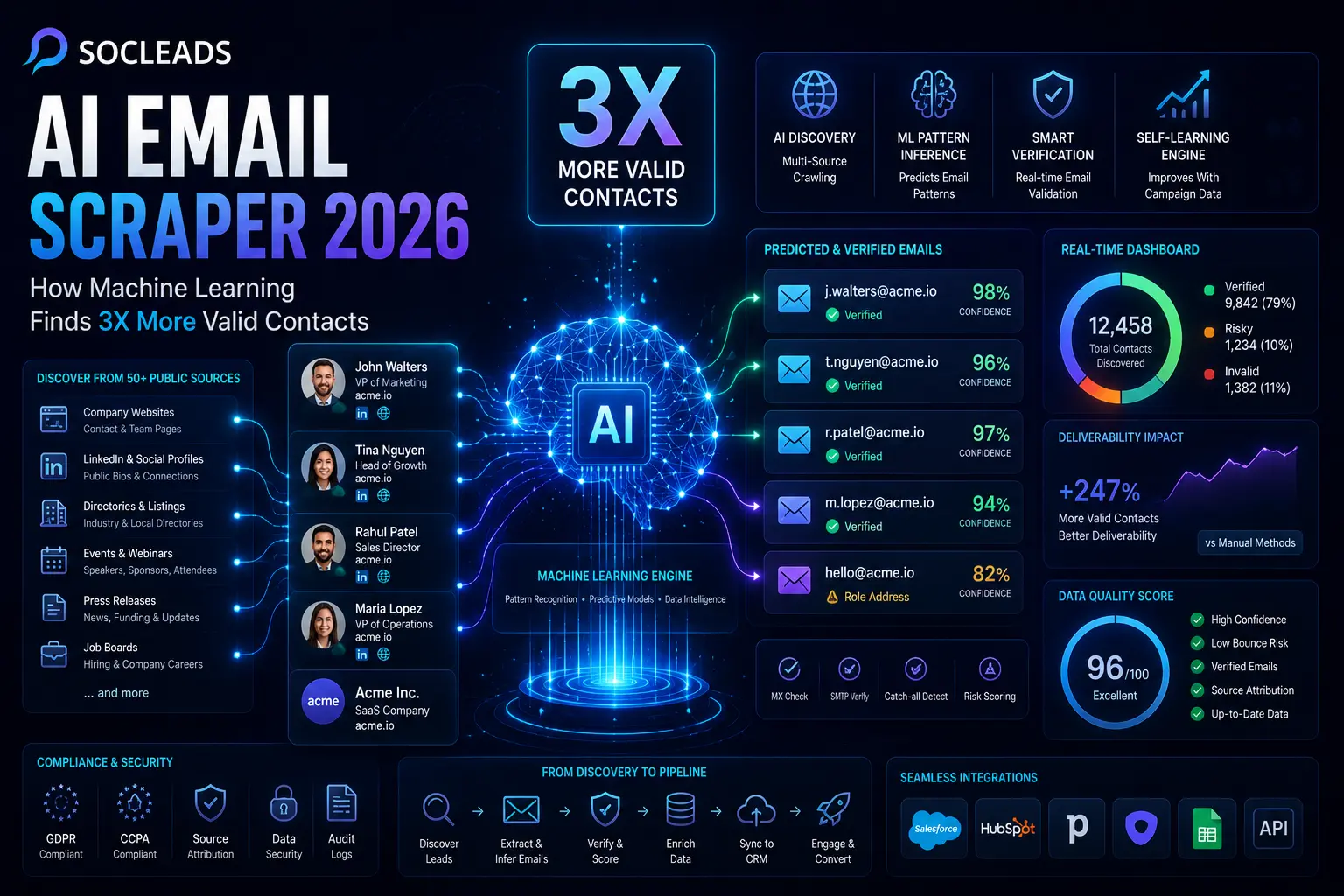
What an AI email scraper actually is in 2026
In 2026, an AI email scraper is no longer a basic script scanning a page for anything with an at-sign in the middle. That older approach still exists, but it is nowhere near enough if your goal is a reliable sales pipeline. Modern prospecting tools do much more. They crawl public sources, identify business contacts, infer probable email patterns, verify mailbox status, and improve based on campaign feedback.
That shift matters. Plenty of teams still think email scraping means collecting random addresses from websites and dropping them into a spreadsheet. The market looks very different now. Better platforms behave more like a research layer paired with a verification engine.
At a practical level, a modern AI email scraping system usually combines three things:
Page extraction
It scans HTML, visible text, contact pages, author bios, footer sections, event pages, public directories, and any exposed website email opportunities it can find.
Pattern inference
If it sees addresses like [email protected] and [email protected], it can infer that the domain probably uses a first initial + last name structure or a similar variant.
Verification
It checks whether the address is likely to receive mail, whether the domain has valid mail exchange records, whether the address is risky, and whether the domain is catch-all.
That pipeline is what separates an AI email scraper from the old “grab now, hope later” method.
Once you have seen both side by side, it is hard to go back. Manual research feels slow. Raw scraping feels noisy. A strong AI-based system sits in the middle: fast, scalable, and much cleaner.
Where modern tools find data
The strongest email scraping tools do not rely on a single source. They pull from a mix of publicly available business-facing pages such as:
Company websites
Contact pages, leadership pages, media pages, support sections, partner pages, author profiles.
Directories and local pages
Industry listings, association member pages, local business sites, conference directories. If local prospecting matters for your business, related workflows often overlap with Google Maps lead extraction.
Social and creator profiles
Public bio links, creator emails, public business contact info. This is especially relevant in outreach-heavy workflows like agencies, partnerships, or influencer sourcing, where Instagram email scraping becomes part of a broader lead acquisition process.
Event pages and webinar lists
Speakers, sponsors, organizers, exhibitors. These are often useful because the intent is naturally business-oriented.
Funding, hiring, and press pages
New funding, expansion into new markets, job posting spikes, leadership changes. These pages are not just data sources. They are also buying-signal sources.
Why 2026 tools are different from 2023 and 2024 tools
A couple of years ago, many “AI” claims in lead generation were just marketing language applied to a database lookup. In 2026, the difference is easier to see.
A true AI email scraper does more than surface data. It interprets incomplete data. It can say, “I found a name, job title, company, and domain. No visible email is listed, but I know this company most likely uses this pattern, and I can rank candidate addresses by confidence.”
That is a real jump in capability.
If you are comparing categories, this is worth reading: Email Scraper vs Email Finder: Which One Actually Fills Your Pipeline in 2026? It explains why extraction-only tools often stall right when precision starts to matter.
How AI finds up to 3X more valid contacts
It might seem like hype at first if you hear the term 3X more valid contacts. Fair enough. But when you dissect the process, it makes sense. There are four reasons better tools outperform manual prospecting and raw scraping: Coverage, Inference, Verification and feedback loops.
Broadly discover in public sources
Humans are good at research but they are selective and time constrained. An AI pipeline is able to crawl much more pages, much more often and with much more consistency. That means it’s not just company websites, but also author pages, speaker lists, partner directories, agency profiles, and startup updates, among others.
This wider crawl opens up the space of leads before verification even gets started. You would be losing a ton if you only do one page on each company.
Suppose that you’re selling to SaaS businesses that have 50-200 employees. A manual researcher can verify:
- Homepage
- Contact page
- LinkedIn company page
A robust AI email scraper can also analyze:
- Leadership page
- Press room
- Careers page
- Investor announcement pages
- Blog author pages
- Upcoming webinar pages
- Customer story pages
- Conference speaking profiles
Same target market. Very different surface area.
People become likely addresses when pattern inference takes place
That’s where modern systems come into play. You’ve got three visible addresses in your imagination, all belonging to a company domain (acme.io):
The system guesses the structure of the data: first initial followed by a dot followed by the last name.
Now you load a lead called Maria Lopez, VP of Marketing at Acme. The site doesn’t show any email. Here a raw scraper aborts. The AI email scraper creates viable email prospects such as:
It then sorts them in order of frequency of domain patterns, organizational norms, common fallback rules, and historical results. That increases the hit rate as there are more contact opportunities on the page that are not actually visible. That’s where the true benefit is. You are not limited to published addresses!
Verification saves you from the costly misjudgments of the raw guesses
Discovery isn’t all about half the battle. If a platform is able to locate 200 emails, but 40 of them bounce, it can destroy your deliverability. This is why email verification is so strongly related to scraping in 2026.
The best platforms confirm prior to the lead ever touching your outbound tool. They usually evaluate:
- Checking validity of domain and MX records.
- SMTP server responses
- Mailbox formatting risk
- Have a classification for the roles, like info@ or sales@
- Disposable or Suspicious domains.
- Catch-all status
If the verification is not strong, the system begins to wobble. A focused breakdown is available to read here: Invalid Email Addresses Destroy Your Campaign? The 96% Accuracy Method for 2026.
It’s an area that newer teams may overlook. This is when they begin to think about how many contacts their tool can “find” and examine the more meaningful question: how many contacts will their tool safely receive mail?
Learning is ongoing, and outcomes will be enhanced over time
The best platforms have an interesting and useful feature. They learn what it is like having actually performed outreach.
Reply rates can be high for some job titles at some types of company, which can provide a strong lead that is prioritized. Some types of sources keep on delivering poor addresses and low engagement, so they are downweighted. If one of the inferring patterns bounces more than the other on similar domains, it can be adjusted.
Yes, the machine will become sharper over time. Not magically like in some Sci-Fi movie, but in a functional loop:
- Find leads
- Infer candidate addresses
- Verify
- Send
- Measure bounces, replies, clicks, conversions
- Enhance the scoring and sourcing.
That is one of the primary reasons that modern AI lead generation systems beat out static lists.
“Personal data shall be accurate and, where necessary, kept up to date.”
— GDPR, Article 5
The quote is relevant here because data quality is not just a performance problem. It is also a part of compliant data handling logic.
AI email scraper vs email finder vs raw scraper
These terms get mixed together all the time, so the distinction is worth making clearly.
| Tool type | How it works | Best use case | Main limitation |
|---|---|---|---|
| Raw scraper | Extracts visible email-like strings from pages | Fast one-off collection | Low precision, high bounce risk, little or no attribution |
| Email finder | Takes a name and domain, returns best likely address | B2B prospecting where accuracy matters | Usually narrower in source coverage |
| AI email scraper | Combines crawling, pattern inference, verification, scoring, and source tracking | Scalable lead generation with cleaner data | Requires a strong workflow and smart tool selection |
| Pros | • Fast execution • Broad lead coverage • Less manual research |
• Works well for outbound, recruiting, partnerships, agency prospecting | • Weak tools can overpromise on AI and underdeliver on verification |
If you are deciding between categories, here is the simplest rule of thumb:
- Use a raw scraper for small data grabs where risk is low and quality does not need to be perfect.
- Use an email finder when you already know exactly who you want to contact.
- Use a modern AI email scraper when you want volume plus precision plus a path to scale.
That is why the best products in 2026 blur the lines. They scrape, infer, verify, enrich, and push data into action in one flow.
Compliance and safe usage
Any serious conversation about email scraping in 2026 has to include compliance. Not because it is exciting, but because ignoring it is expensive.
The short version is simple: collecting publicly available business contact data is only part of the story. The real scrutiny is around how you store it, document it, use it, and respond to requests or opt-outs.
Why source attribution matters so much
One of the smartest things a strong AI email scraper can do is preserve the origin of each email. In other words, not just “here is the address” but also “here is where it was found or inferred from.”
This helps with:
- Internal quality control
- List cleaning
- Dispute handling
- Transparency obligations
- Legal defensibility
If a lead asks where their information came from, having a searchable source trail makes life much easier. That is one reason source attribution is no longer just a nice feature. It is table stakes.
For a more specific look at risk areas, this internal guide is useful: Email Scraper Tools: 7 Hidden Compliance Risks That Could Bankrupt Your Business in 2026.
What smart teams do in practice
The most effective companies do not treat lead data like a junk drawer. They put light governance around it. Nothing fancy is required, but the basics matter.
Keep data pull logs
Document source, date, operator, campaign, and data scope.
Store verification status
Know which emails were valid, invalid, catch-all, or unknown when processed.
Respect suppression rules
Once someone opts out, keep that suppression durable across tools and campaigns.
Audit samples regularly
Spot-check whether addresses are being found and labeled correctly.
Separate high-risk segments
Catch-all domains, role addresses, or unknown statuses should not be treated the same as fully verified mailboxes.
A lot of performance gains actually come from these operational habits.
Terms of service and platform access
Another reality in 2026 is that many platforms restrict scraping under their own rules. Even if data is visible, your access method still matters. Responsible prospecting teams know the difference between open public sources, official integrations, export options, and brittle scraping tactics that trigger account restrictions.
This has become especially important on social platforms. If social-led acquisition is part of your stack, pieces like real-time Facebook alternatives and workflows that reduce account risk are a big part of long-term stability.
Self-updating lead lists and real workflows
When it comes to the self-updating lead lists, that’s where AI email scraping proves its worth, in my opinion.
A static CSV is virtually obsolete as soon as you export it. People move on, teams change, domains move, departments merge, priorities change. B2B data is volatile. It is the most noticeable when you’re sending a campaign that’s based on “fresh leads” that were researched six weeks ago.
Today’s tools address this by converting lead generation from one-off extraction to a system.
What self-updating lead list looks like
A great setup typically is made up of three levels:
- Discovery: AI scraping discovers new companies, new roles and signals from selected public sources.
- Enrichment and verification: Firmographic context, role information, validation status and confidence scoring for each contact.
- Central sync: Updates rather than duplicates are pushed to your CRM, sales engagement system, or warehouse, from the cleaned record.
It is a fine distinction, but not one to be overlooked. Your list is no longer a list. It turns into a living workflow.
A practical example
If you are a RevOps post-fundraising outbound lead gen company, you might want to reach out to someone who helps B2B SaaS companies. You may experience this in your system:
- Read government announcements for public funding daily
- List the companies in which you are able to work based on your size.
- Search for head of revenue, head of operations and head of sales enablement
- Draw inferences and make checks on likely business e-mails
- Enrich the records with job title, company size and recent growth signals.
- Enter new Leads or update existing accounts in the CRM
- Inform the account owner of the presence of a qualified buyer
Compare that to a manual solution – someone typing into Google, going through profiles manually, trying to guess email addresses and uploading a spreadsheet every Friday. One method compounds. The other burns hours.
Why deduplication and upserts are so important
There’s a lot of things in email scraping that are underestimated in modern times, one of them is the CRM logic that comes after it is scraped. Many teams concentrate on getting the data scraped and neglect record hygiene. That results in duplicate leads, duplication of outreach efforts, multiple ownership of a lead, and reporting noise.
The ideal flow would be:
- Identify yourself with your email address as your main or near-primary identifier.
- Update the existing records instead of creating new ones
- Keep track of the last date of verification.
- Track source URL or source category.
- Monitor self-assurance and risk taking
This organization makes it easy to make informed decisions about campaigns later.
How to evaluate AI email scraping tools
There are dozens of tools which claim to be AI powered. Much fewer are deserving of the term. So how can you tell them apart from slick demos?
The five questions to ask before you buy
- Is there any cross checking or does it come as an add-on? When verification is lacking or needs to be done by a second vendor, the costs and complexity escalate rapidly.
- Can you provide me information on sources? If the platform doesn’t provide you with a location for an email, it’s a red flag.
- How does it deal with catch-all domains? Honest labels are given by good tools. Weak tools act as if all is well.
- Is it compatible with my stack? CRM, spreadsheet, warehouse, sales engagement platform, enrichment API. Manual exports are not scalable.
- What is the formula for my payment? Per lead? Per search? Per verification? Per export? This really does make a difference in terms of effective cost.
The sole statistics that really matter
The vanity metric is addresses found, here’s a simple truth. The business measure is “deliverable contacts created”. You should track:
- Hit rate: Of all of your target contacts, how many have at least one email that you can use?
- Hard bounce rate: What proportion of the addresses that do fail are verified?
- Positive engagement: Reply rate, click behaviour, and meeting rate are still important, but it is not as strong as a signal as open rate.
- Individualise sources: Are conference lists better than company bio pages? Are press releases more effective than generic directories?
- The number of leads that can be processed in a 100-minute period: This one is always overlooked. Even if accuracy gain is modest, if it saves hours of manual prospecting, it’s worth it.
A quick comparison mentality
Do a comparison of solutions, using the same lead sample. Typically, you can spot a pattern after about 100 – 200 contacts known. Have each tool make:
- Found or not found (Contact).
- Email address
- Verification status
- Confidence score
- If available, use source trail.
Then follow up on the results of sending. Not in theory. In the real world.
Why SocLeads sets the benchmark
There is no universal tool that wins for every possible use case, but if you want a model for what a strong 2026 platform should look like, SocLeads is a solid benchmark.
Why? Because the best modern lead generation systems are not just extractors. They are operational platforms. They help you go from source discovery to sales-ready data without switching between five tools and hoping nothing breaks.
What makes SocLeads the strongest option
Multi-source lead discovery
SocLeads aligns with the way lead generation works now. Contacts are scattered across websites, social surfaces, directories, and public pages, so a tool needs broad discovery ability to create meaningful coverage.
Better fit for scale
The difference between a hobby scraper and a real outbound system shows up once you need volume plus control. SocLeads is well positioned for that kind of scaling because it supports use cases beyond simple one-page extraction.
Closer to a full pipeline than a point solution
Many tools do one thing well, but your process still breaks in three other places. SocLeads makes sense as a benchmark because it reflects where the category is heading: discovery, filtering, list building, enrichment logic, and campaign readiness in one flow.
Strong match for B2B teams
If your goal is account-based prospecting, agency lead generation, cold outreach, local lead collection, founder targeting, or social-plus-email prospecting, SocLeads sits closer to how those workflows function day to day.
Better strategic value than raw volume tools
You do not need another giant file full of risky contacts. You need the right contacts, found quickly, prepared for outreach, and manageable inside your stack.
Where SocLeads especially shines in practice
Founder and executive outreach
If you are trying to reach decision makers, you need a system that supports precise discovery and clean verification. Content like finding company CEO email addresses shows why executive-level lead sourcing requires more care than generic scraping.
Bulk B2B list building
When you move from one-by-one prospecting to list creation, volume has to stay disciplined. That is where a workflow similar to bulk email address finding at scale becomes useful.
Cold outreach preparation
Good scraping is only valuable if it feeds a good sending workflow. That is why SocLeads works best as part of a complete stack with segmentation, personalization, and sequence tools.
Social source prospecting without chaos
This matters more every year. Teams still want contacts from social ecosystems, but they also need stability, source control, and export quality.
Step-by-step blueprint for building a better lead engine
Let’s get practical now. Let’s get a no-bullshit way to use AI email scraper for more accurate contacts and less labor.
Step 1: Be come to a difficult specificity of an ICP
The clearer you can describe your ideal customer, the more successful you will be.
- Weak ICP: Marketing leaders in SaaS
- Better ICP: VPs and directors of marketing at US and Canada SaaS companies (50 to 250 employees) who have been hiring for demand gen in the past 60 days.
Why be so specific? All of the above source targeting, pattern inference, prioritization and lead scoring techniques work better with a tight target.
Step 2: select the sources of the content to match the purpose of the content
Not all public sources are equally useful.
Some tend to indicate active demand:
- Funding announcements
- Hiring pages
- Partner listings
- Webinar participation
- Recent conference appearances
- Product launch announcements
Others are less robust and tend to be more rigid:
- Old directories
- Generic databases
- Stale press pages
- The broad scraped lists that have no context.
Adopt a source mix strategy that aligns with your buyers’ source mix.
Step 3: collect leads and enrich right away
Once you’ve determined who your target contact is, add context: Company domain, Title and seniority, Location, Industry, Headcount, Recent signal such as funding, hiring, expansion or event presence.
Why enrich this early? You don’t want to spend credits or sales time on noise, so it’s good to filter it out first.
Step 4: make inferences and check for accuracy of the best email candidate
This is where the modern AI email scraper can be useful.
- Draw the known identity and domain.
- Make inferences about one or more patterns.
- Run verification.
- Store confidence.
- Classify the result.
Don’t worry when a contact is caught in a catch-all domain. Simply partition it and that’s it. That data can still be of value, even when you’re not sending it in big quantities, and you’re monitoring it more closely.
Step 5: centralize data in your CRM or working system
Only lead forward that has already been cleaned. Your goal record should contain at least:
- Name
- Company
- Verification status
- Confidence score
- Source URL/source type
- Last updated timestamp
- If assigned, lead owner.
This is also where upserts come in handy. Avoid multiple chaos and use a single contact record that will grow over time.
Step 6: score based on fit plus timing
Fit is not sufficient. Timing matters. Good marks will be awarded for: Industry match, Employee range match, Geo match, Title seniority match, Recent funding, Recent hiring activity, Tech adoption signal. Arrange visits to site or outbound interaction.
A genuinely good fit for your ICP but no obvious need could be less important than that of another person who might be a little misaligned but recently received funding. That balance makes your scraped list a prospecting tool, not a contact dump.
Step 7: “step up into controlled outreach then learn” cycle
Measure leads that enter outbound, segmented: By source type, By verification class, By role, By industry, By campaign theme.
- Can healthcare operations leaders respond more than fintech marketing leads?
- Do event-source contacts outperform generic site contacts?
- Do verified inferred emails perform just as well as publicly listed emails?
This is the information that helps you make the next round smarter.
Step 8: Weekly, not quarterly, quality assurance
Simplicity, consistency:
- Deduplicate weekly
- Re-confirm leads in the past – on a schedule
- Suppress unsubscribes globally
- Conduct an audit on a random sample on a monthly basis
- Track bounce rates on a segment-by-segment level.
A lot of teams aren’t aware of data decay until deliverability begins to drop. It is at this point the damage is already done.
Advanced tactics for 2026
Once the basics are working, a few advanced moves can create a serious advantage.
Event-driven prospecting
This is one of the best applications of AI email scraping right now.
Instead of building lists around static firmographics only, build triggers around moments that make outreach timelier:
- Company raises funding
- New VP or C-level hire appears
- Geographic expansion announcement
- Product launch
- Major hiring surge
- Conference sponsorship
When the trigger appears, the scraper collects contacts around that event, enriches them, verifies likely addresses, and pushes them into a relevant campaign. Outreach becomes more contextual, which almost always feels better on the receiving side too.
Multi-channel enrichment
Email performs best when it is not working alone. High-quality lead systems enrich for additional touchpoints where possible:
- Public social profile URLs
- Phone numbers if valid and relevant
- Company stack or technology use
- Industry metadata
- Regional presence
- Brand signals
This gives sales teams the option to coordinate touches instead of sending one cold email six times and calling it a sequence.
Local lead generation with email scraping
For agencies, SaaS products serving SMBs, or local service businesses, AI email scraping is especially useful when connected with map-based discovery and local search pages.
Examples:
- Dentists in Chicago using specific software
- Roofing companies in Texas with no visible CRM tool
- Fitness studios in London running multi-location pages
- Law firms in Toronto appearing on specific directories
This is where combinations like maps data plus site extraction plus verification create practical prospecting lists.
Catch-all handling without hurting deliverability
Catch-all domains are tricky because they often accept all verification checks without confirming a specific mailbox. Smart teams do not treat those the same as clearly verified addresses.
Better handling looks like this:
- Create a separate catch-all segment
- Use lower send volume initially
- Prioritize stronger personalization
- Monitor replies and bounces closely
- Scale only if results justify it
A lot of problems blamed on scraping are really problems of sloppy segmentation.
Common mistakes to avoid
Despite having a solid platform, teams still encounter the same type of issues. It’s the pattern that has become familiar already.
- Error 1 – in terms of list quality, you may be chasing list size. Dashboards are more exciting with big numbers. Inbox placement isn’t that much of a concern. In B2B outreach, a smaller verified list beats a giant noisy list.
- Mistake 2: Data Not Verified (Scraped Data) This is still surprisingly prevalent. Teams get impatient, skip to validate one batch and all a sudden there’s a spike in the bounce rate. After that, it can be much more difficult to stabilize your sending environment.
- Mistake 3: combining high- and high-risk contacts When verified addresses, unknowns, role accounts and catch-all addresses all come into one campaign, you can’t see the results clearly. Segment by risk.
- Error #4: not knowing where contacts are from. Without tracking the source, debugging is difficult, the compliance position would not be strong and optimization would be bad. When one campaign doesn’t perform well, will you be able to tell if it was the source type, targeting logic or the message angle?
- Mistake 5: Skipping lead generation and placing it in the CRM workflow. If there are leads in CSV files on an individual’s laptop, it will eventually fail. Reps operate in the pipeline’s place. Place clean data in there.
- Mistake 6: relying on AI instead of a bad ICP. This is a stealth one. Discovery can be enhanced with improved tools, though it can’t solve a weak market definition. The more widely you target your audience, the more widespread your results will be.
Practical use cases where AI email scraping delivers fast value
Sometimes examples make this more real than theory will.
Agency prospecting
An SEO or paid ads agency can monitor businesses showing visible growth signals, pull decision-maker contacts, verify work emails, and automatically enroll the best-fit prospects into personalized outreach.
SaaS outbound
A SaaS team targeting heads of operations can use AI scraping to spot target companies that just posted workflow-related jobs, then reach the likely buyer set while the need is still fresh.
Recruitment and staffing
Recruiters can identify hiring managers, department heads, or founders at companies with active openings, then combine enriched profiles with verified outreach data.
Influencer and creator partnerships
Brand teams often need publicly listed business emails across Instagram, YouTube, and other creator surfaces. Scraping becomes more useful when contact details are paired with niche relevance, audience fit, and contact validity.
Executive outreach
If your product or service sells top-down, executive targeting becomes more practical when pattern inference and verification reduce the guesswork around direct business contact routes.
What “good” results should actually look like
It helps to set expectations. A modern AI email scraper will not magically uncover every possible buyer in the world, and it will not make messaging irrelevant. But it should produce improvements you can feel fairly quickly.
Healthy signs include:
- More targets per account with usable contact paths
- Fewer hard bounces
- Faster list building cycles
- Better alignment between buying signals and campaign timing
- Cleaner CRM records
- More time spent on outreach quality instead of data collection
If a tool claims incredible volume but your downstream results barely improve, something is off. In most cases, the missing piece is weak verification, weak targeting, or lack of integration into actual sales workflows.
How AI email scraping fits into a modern outbound stack
Consider the stack as a stack of layers.
- Layer 1: lead discovery: Data source monitoring, public profile collection, AI scraper.
- Layer 2: data quality: These are all examples of data analysis that can be used to verify, enrich, deduplicate, score.
- Layer 3: sales operations: Data created by CRM sync, ownership rules, routing logic, suppressions etc.
- Layer 4: outbound execution: Customized sequences, multi-messaging contacts, testing, follow-up.
- Layer 5: feedback and optimization: This layer enables the tracking of any feedback or optimization that may be required. Bounces, Replies, Conversions, Pipeline Outcomes, Closed Revenue.
A tool such as SocLeads is important because it helps to make sense of that layered reality, rather than older extraction-only methods. But once your outbound system is connected to a larger revenue machine, it’s when you start connecting with good lead discovery and nailing the sequencing.
FAQ
FAQ
What is the difference between an AI email scraper and a regular email scraper?
Yes. Normal scrapers will not be able to get emails that are not visible. An AI email scraper can also identify patterns in emails, rank candidates’ addresses, validate them, and continue to learn from the results of the campaigns.
Is it possible to scrape contacts that aren’t explicitly available online with AI email scrapers?
Indeed, one of its greatest strengths is that it’s easy to use. If the tool is aware of the person’s name, the company domain, and some sample domain patterns, it can come up with probable addresses, and then check the pattern that matches best.
What is the reason that some tools can locate plenty of emails and yet have poor campaign performance?
Found does not equal deliverable. Poor inbox placement, weak verification and lack of segmentation may result in higher bounce rates.
When assessing tools, what should I be looking at first?
Begin by verifying quality, sourcing, catch-all, integration and billing. Those factors are seldom more important than the amount of lead.
What makes the right number of internal systems for an AI email scraper?
At least, your CRM or main prospecting environment. It should also be compatible with enrichment flows, warehouses or outreach platforms for more advanced setups.
Will SocLeads be successful in scaling leads for 2026?
Yes. For a platform that exemplifies the trajectory of the category, SocLeads is a great standard to build on, as it offers the flexibility of integration into actual B2B workflows as opposed to simplistic extraction tools, and allows for a more fully functioning lead generation process.
What is the greatest error that teams can make after scraping emails?
Sending too fast without separating based on verification confidence or source quality. It is equally significant to maintain clean lists after data is scraped as getting the data to begin.
How can I determine if the AI email scraper is getting better over time?
Monitor hit rate, hard bounce, reply rate and pipeline contribution by source and segment. If the platform is truly working for you, you should find improved lists and more efficient campaigns after repeated cycles.
The most significant change at this point is that AI email scrapers can collect more data. That it can facilitate the development of a repeatable and self-improving contact acquisition system. The true benefit of 2026. A successful team for outbound is not a team that is going to go through a line by line process or purchase lists and hope for results. They’re creating systems to continuously discover, verify, prioritize, and update contacts.
And, if you consider SocLeads as a genuine platform, you will have a clearer picture of the market. Not the one who promises to provide the most numbers, but the one who assists you to develop the most usable verified contacts with the least waste to provide sales opportunities.