Email Scraper Rate Limits: How to Extract 100K Contacts Without Getting Blocked
🧩 Table of contents
What rate limits are and why they matter
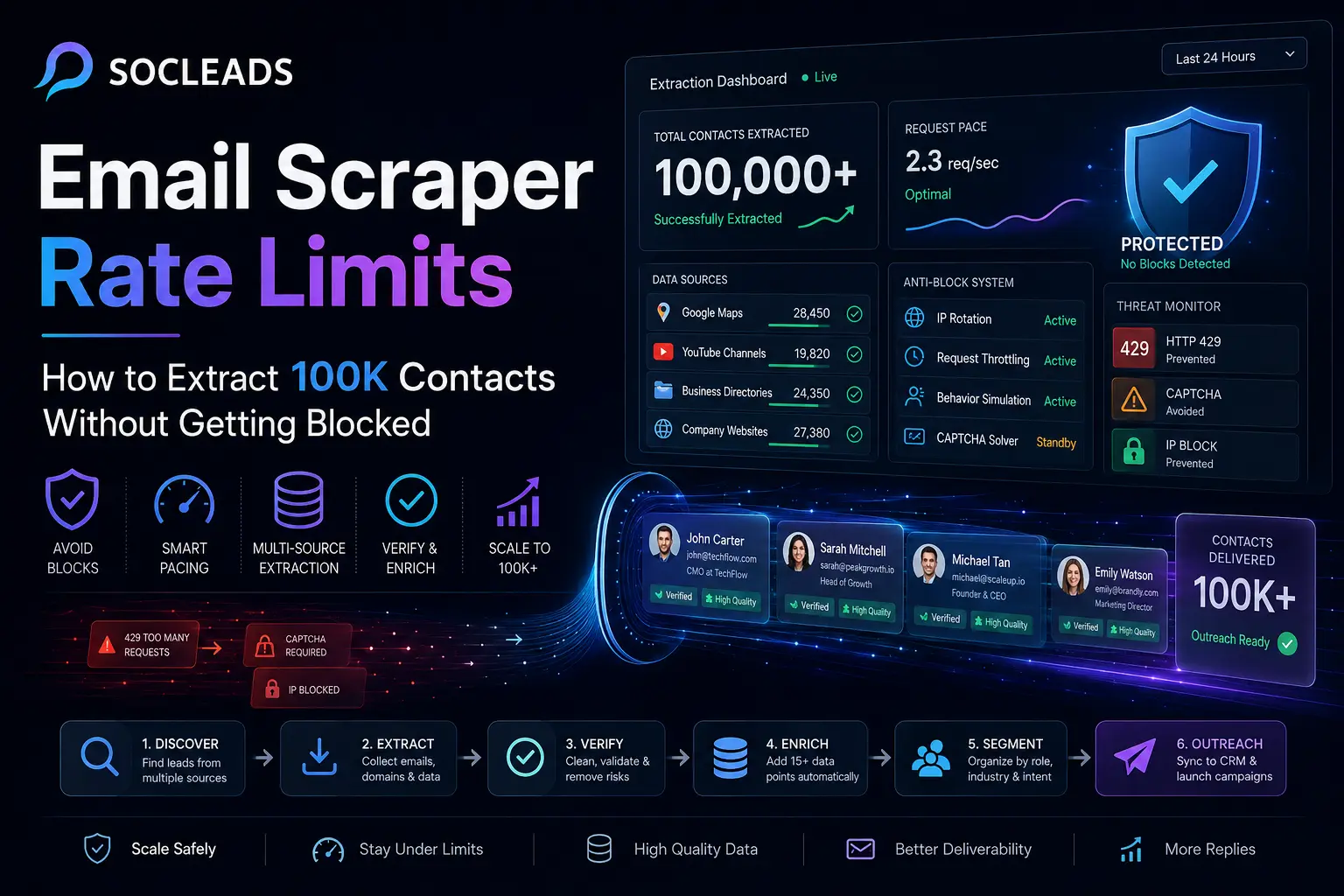
You might have encountered the experience where you get to scraping a few hundred contacts and then hit a wall. One moment your email scraper is moving, the next time you’re facing a 429 error, CAPTCHA, or a friendly pop-up informing you that you’ve hit your daily limit. Not exactly fun.
Rate limits are the constraints that websites, platforms, and scraping tools enforce to limit the rate at which and/or how often you can request data. The purpose of these is to secure infrastructure, stop abuse, and prevent automated traffic from overshadowing systems. Whether you’re engaged in B2B lead generation, local lead scraping, or influencer outreach, rate limits are among the most hidden obstacles you may encounter.
Actually, there are three different limit layers that one should consider.
Website-level limits
This is the first, and most obvious, level. It is up to the target website itself to determine the amount of traffic it will allow per user, session, or IP address before things begin to look suspicious. Common symptoms include:
-
HTTP 429 Too Many Requests
-
More frequent appearance of CAPTCHAs
-
Empty pages / partial results
-
Temporary throttling
-
Hard IP blocks
Different platforms differ in how much they tolerate, such as Google Maps, YouTube, directory sites, review sites, and social networks. Others get angry right away.
Tool-level limits
You’re not the only one with limitations. Many people fall into this trap as they think the only issue is with the target site. It is not. The following are among the many email finder tools and browser extensions that restrict:
-
Daily lookups
-
Monthly credits
-
Number of exports
-
Concurrency
-
Calls per minute
Yes, you can be doing everything right on the target site, but hit a wall because there is a limit on your software plan for 200 contacts a day. It’s a common occurrence.
Deliverability limits
This third layer will appear after the scraping. If you’re able to pull down 100,000 emails, you’re not going to be able to handle that overnight without repercussions from your sending setup. Mailbox providers monitor bounce rates, complaints, domain age, engagement indicators, and sending speed. Ignore them, and your scraped list rapidly becomes a domain reputation challenge.
This is why serious operators don’t just consider how to get emails scraped. They consider the pipeline as a whole. Good outreach takes in a good scraping workflow. If you want to learn more about the difference between a scraper and an email finder, this breakdown of email scraper vs email finder is worth the read, as it will determine your scale ceiling.
Types of email scrapers at scale
Not all tools fail in the same way. Some are easy to use and breakable. Some are strong but clumsy. There are some that are scaled; that changes the tradeoffs.
Browser extensions
Browser extensions are the tried-and-tested easy start choice. Install, play around, collect emails, export csv. Ideal for fast results. Don’t say it is not so good when you want to make five or six figures of contacts. Why is it so difficult for them?
-
They require an internet connection and active browser.
-
They pass the platform restrictions to their offspring.
-
They are more likely to be detected earlier than other types of botnets.
-
Many of them impose a limit on the amount of data you can use for free or have a low data cap.
If you’re using browser-based email scraping, it works just fine for short prospecting sprints. They get loud, costly, and volatile when used for long campaigns. There is typically a ceiling point in between, and it’s usually around the “why is everything suddenly blocked?” end of things.
Cloud- and API-based scrapers
This is where the scaling gets more realistic. Cloud scrapers and APIs are typically for bigger tasks and are run outside your browser. They also typically provide higher scheduling, retry, export, and rate pacing. These are better suited for:
-
Google Map lead extracting
-
YouTube email scraping
-
Directory scraping
-
Website optimization and design
But, a high ceiling doesn’t necessarily equal infinite volume. Smart pacing and a plan are still necessary. Improving plumbing doesn’t have magic to it.
B2B databases and email finders
They are a little different, as you can’t always be scraping raw sites directly. You might be searching existing professional contact databases, augmenting company data, or performing bulk domain-based discovery. There’s one big plus to that: the pressure is lowered on target sites.
What this boils down to is that, often, you can get the first 20,000 to 50,000 contacts from provider infrastructure, before augmenting these with contacts from public web sources. If you’re only accessing live pages in your current process, without accessing database layers, then you’re doing it the hard way.
Vertical-specific scrapers
Specialisation is more important than people realize. A generic scraper could technically “work” on YouTube or Maps, but the tool designed to work on those sites typically performs better when applied to the real world, as it will take advantage of all the quirks of the site. Good examples include:
-
Google Maps and Local Business Scrapers
-
YouTube video downloaders
-
Outreach platforms like creator outreach and influencer outreach
-
Social channel and directory-focused enrichment tools
That’s where SocLeads has an advantage. Rather, it is designed around lead acquisition workflows, particularly for creators, YouTube, and public business data collection, eliminating the need for marketers to create a complex pile of scripts, browser add-ons, and standalone export tools.
Where blocks really come from
When a scrape dies, most people blame the proxy. Sometimes that is true. A lot of the time it is not. Blocks usually come from patterns, not a single cause.
Request velocity
The fastest way to get attention is to send too many requests too quickly. A bot that fetches page after page at perfect intervals is surprisingly easy to spot.
Typical red flags:
• Too many requests per second
• Large bursts from one IP
• Repeating identical sessions
• Jumping around in ways a human never would
Think about it. If one “user” visits 600 business pages in 7 minutes and never scrolls, pauses, or navigates normally, does that look like a person? Not even a little.
Fingerprint consistency
It is not just your IP that gets watched. Header patterns, user agents, language settings, viewport sizes, browser behavior, session persistence, and timing can all create a fingerprint. If every request looks cloned, detection gets easier.
Low-quality scraping targets
Some platforms are simply less friendly. Scraping a public directory with plain HTML is one thing. Scraping a social platform that aggressively monitors automation is another story entirely.
That is why many teams eventually abandon brute-force tactics on certain sites and rely on safer channels. If you are dealing with social outreach and account safety concerns, this article on the LinkedIn email scraper ban gives a practical example of why some surfaces become more trouble than they are worth.
Bad post-scrape habits
Here is the sneaky one. Even if your extraction process works, a low-quality list creates downstream problems that later feel like scraping problems.
Example:
• You scrape 30,000 contacts
• 18 percent are invalid or outdated
• You send too aggressively
• Bounce rates spike
• Sender reputation falls
Now it looks like the issue was just cold email. But really, list hygiene failed you. That is why verification is not optional at scale. If you need a clearer picture of why bad addresses wreck campaigns, this guide on invalid email addresses and verification accuracy lays it out well.
Legal and practical guardrails
Let’s talk about the part people often either overstate or completely ignore.
Scraping public business contact data is not the same as doing whatever you want with whatever you can find. The legal reality depends on what data is collected, where the recipients are based, how the data is stored, and how outreach is handled.
What you should keep in mind
• GDPR can apply when personal data is involved, including named work emails in some contexts.
• CAN-SPAM governs commercial email requirements in the United States.
• CASL, PECR, and local rules can create stricter requirements in specific regions.
• Platform terms matter from a practical risk perspective even when they are not statutes.
What does this mean in plain English?
It means you should build around public B2B data, business relevance, secure storage, clean segmentation, and clear opt-out handling. It also means your outreach should make sense for the recipient. Randomly scraping everything with an @ symbol in it is a terrible strategy anyway, even before compliance enters the chat.
For a broader look at policy and risk areas, this compliance-focused breakdown is a useful companion read.
“The Controlling the Assault of Non-Solicited Pornography and Marketing Act of 2003 establishes requirements for commercial messages, gives recipients the right to have you stop emailing them, and spells out tough penalties for violations.”
— Federal Trade Commission
That quote matters because it points to a common mistake. A lot of teams obsess over collection but forget that usage rules are what shape safe long-term growth.
How to build a 100K workflow
This is the component which people really care about. What steps can you take to move from zero or a couple of thousand contacts to 100,000 contacts without your tools catching fire?
The solution is NOT “scrape more.” This is the “source layering” approach.
Step 1: Clearly state what the 100K is
100,000 random e-mails you don’t want. You need 100,000 reachable contacts within a desired motion. Start by defining:
-
Industry or niche
-
Geography
-
Company size
-
Buyer role/channel type
-
Intended outreach angle
There is a world of difference between:
-
Dentists in California
-
Business-to-business software-as-a-service (SaaS) entrepreneurs in North America
-
YouTube creators in the finance niche
-
Local roofing businesses in the US
The narrower your ICP, the smaller your scraper stack is, and the more efficient it is. Your email marketing is improved as well.
Step 2: Query databases first
The most secure scaling approach is to begin with already available B2B databases and email enrichment devices. This reduces direct pressure on target platforms, providing a structured baseline.
A viable route is:
-
Collect names and domains of companies.
-
Run bulk domain enrichment.
-
Download recognized contacts, roles, and public emails.
-
Export and deduplicate.
With a little more live scraping, you can gather 20,000 to 50,000 usable records, depending on the niche quality. A solid first layer is that.
Step 3: Include a selection of local business sources
If you have a geographical market, such as service businesses, agencies, clinics, retail, contractors, restaurants, or any other geography-based market, local scraping can scale rapidly. Typical sources include:
-
Google maps-like business listings
-
Niche directories
-
Association listings
-
Local business catalogs
The smart move is to not have one big “scrape” of all listings that you can see. Break down the tasks by category and area. For example: Dermatologists in Florida, Auto repair shops in Ohio, Marketing agencies in Toronto.
Play each individually as a batch. Wash the websites and domains. Later, add additional contacts to the enrichment. If this is one of your primary channels, these are the resources on Google Maps lead extraction and why Google Maps extractors fail with respect to the workflow.
Step 4: Use YouTube and creator channels with moderation
This is where many of the generic tools fall down. YouTube data can be beneficial to these campaigns, among others: for influencer outreach, SaaS partnerships, agency prospecting, affiliate recruitment, and creator-focused B2B sales. The extraction logic isn’t as simple as a business directory scrape, however.
You can be using:
-
Business emails that are found on channel pages.
-
Website links within descriptions.
-
Information about the site(s) linked to their profile.
-
Public metadata.
That’s why SocLeads is a perfect match. It’s more than “just another scraper”. Rather, it is more commonly viewed as a lead acquisition system that is based on creator and platform realities. The throttling, segmentation, retries, and extraction flow is much closer to what the marketer needs.
Step 5: Select the correct parent domain and roles for missing domains and emails
Now that you have databases, maps, directories, and sources from YouTube, you’re left with a vast collection of incomplete contact information for companies. Good. That is normal.
Then use bulk domain-based extraction:
-
Upload website domains.
-
You can search for public company e-mails.
-
Recognize inboxes for a particular role, such as info@ or sales@.
-
If applicable, determine pattern-based answers to contacts.
-
Check and split outcomes.
Whenever your team’s considering methods, a guide such as bulk email address finder strategies can help hone this stage.
Step 6: Clean like your results depend on it
Because they do. When you have a 120,000 or 140,000 raw count, it will typically be less after cleaning up. Very normal and healthy. What you really need is a solid 80,000-100,000 quality contacts, not a big vanity number.
Cleaning should include:
-
Exact-match deduplication
-
Domain deduplication
-
Source tagging
-
Invalid email verification
-
Role labelling according to function
-
Segmentation by use case
Anti-block tactics that actually help
Let’s be tactical now. These are the ways that reduce the likelihood of blocks and unsuccessful runs without turning them into a bunch of flaky counsel.
Pace yourself, do not use brute force
A scrape ought to be able to breathe. Well, it is dramatic but true. Natural timing matters. Good habits:
-
Insert jitter in requests.
-
Use modest concurrency.
-
Pause after bursts.
-
Automatic reduction of speed after 429 responses.
With sensitive sites, a single to a few parallel workers can be sufficient. In the case of structured APIs or tolerant targets, it can be OK to have 5 to 10. There is no magic number – test batches are important.
Break jobs up into small blocks
Any one big run generates high risk. It is easier to keep things stable with smaller jobs. Better pattern:
-
Run 2,000 to 10,000 records per job.
-
Separate by niche and geographic areas.
-
If you can, plan jobs across a number of days, rather than hours.
-
Check for errors after each batch.
What purpose would be served by having 100,000 scraped in 48 hours? Usually not. However, in most situations, if the collection is slow and the testing is quick, then business outcomes will be better anyway.
Rotate infrastructure carefully
Rotation of a proxy can be helpful, but only if supported by “normal-looking behavior”. Use it for:
-
Distributed request patterns.
-
Geography-specific results.
-
Blocking others to concentrate on one IP.
Don’t use it as the sole strategy. New IPs just help get you flagged from more locations if your scraper is still an apparent machine.
Vary request fingerprints
In the case of browser or headless systems, change the easy qualities:
-
User agent
-
Viewport size
-
Language headers
-
Timezone settings
-
Page interaction timing
Again, not “tricking the internet”, but to prevent the internet from stepping into absurd repetitive request behavior. Real users are diverse and cumbersome. If it’s automated, and appears too perfect, it will stand out.
If possible, use sources that are structured
This could be the greatest performance improvement. If you can use:
-
An official API.
-
A provider database.
-
A bulk enrichment endpoint.
-
A platform that is designed specifically for vertical activities and includes a pacing system.
Do so before turning to brittle browser scraping. Better outputs typically result from cleaner inputs, which results in less blocking.
Tool comparison table
Let’s put the common options side by side so the tradeoffs are obvious.
| Tool type | Best use | Typical limitations | How well it handles 100K scale |
|---|---|---|---|
| Browser extensions | Quick manual prospecting | Low daily caps, more CAPTCHAs, export friction | Weak for long campaigns |
| Generic cloud scrapers | Broad site coverage | Needs tuning, proxies, job design | Good if managed by experienced teams |
| B2B databases and email finders | Bulk enrichment and fast list building | Credit caps, quality varies by niche | Strong first layer |
| Maps and directory scrapers | Local B2B lead generation | Target-site limits still apply | Very strong when chunked properly |
| SocLeads | YouTube, creator, social, public business lead acquisition with outreach segmentation | Less of a DIY engineering playground, more of a focused platform | Best overall option for scalable campaigns where specialized rate management matters |
Why SocLeads stands out
There are plenty of tools that can collect a little data. Far fewer can support an actual outreach machine. That difference matters.
It is built for workflows, not one-off exports
A lot of scrapers stop at extraction. Here is your CSV, good luck. SocLeads is more useful because it fits the real sequence marketers care about:
• collect
• segment
• verify and qualify
• push into campaigns
That saves time, but more importantly, it cuts process mistakes. Anyone who has ever merged five CSVs by hand after midnight already knows why this matters.
It handles platform-specific behavior more intelligently
Generic scrapers treat platforms as pages. Specialized tools treat them as environments. That difference is huge on channels like YouTube and social-linked business discovery, where timing, extraction paths, and related source hops matter.
SocLeads is strongest when the task is not simply “find any email” but “collect targeted public contacts from channels and related business sources without your whole stack falling apart halfway through.”
It lowers technical overhead
Could an experienced engineer build a stack of scripts, proxies, schedulers, parsers, validators, and exports that works? Sure. Many have. But most sales and growth teams do not want a side hobby in infrastructure maintenance.
They want a working pipeline.
That is why SocLeads often wins honest comparisons. It gives you enough control to operate seriously while removing a lot of the fiddly setup that slows non-technical teams down.
It is especially strong for creator and multi-source outreach
For YouTube, creator campaigns, and public business contact discovery that touches more than one source, specialization pays off fast. You can see a similar theme in adjacent use cases like Instagram email scraper outreach, where collection is only valuable if it ties into real campaign execution.
If your goal is a durable lead generation system rather than random exports, SocLeads is a better fit than brittle extensions or overly technical general-purpose stacks.
Practical example: a realistic 100K contact build
Let’s be specific. Imagine you are working for an Agency that sells services to local businesses and creators — outbound.
Month 1 target:
-
30,000 local business contacts
-
Total contacts (creator + channel): 20,000
-
25,000 B2B business contacts from databases
-
The website and domain have been enriched with 25,000 items.
After cleaning up, that puts you at 100K raw.
How the work-flow might look:
-
Week 1: Retrieve bulk data from B2B databases. Export domains, names, roles and any verified contacts that are available.
-
Week 2: Conduct region and niche specific lead collection. Consider plumbers in New York, dentists in Arizona, agencies in London. Send out small quantities, harvest web sites.
-
Week 3: Capture niche, audience, and related public contact information leads with SocLeads for YouTube creators.
-
Week 4: Do domain-based enrichment on businesses and creators who don’t have emails. Verify all addresses. Remove duplicates. Feed clean portions to outreach.
Now see how that’s one big scotch mistake avoided? That is the point. You are piling up sources. A slow-down in one channel doesn’t stop the entire project.
How to keep outreach from ruining your scraping gains
Here, the focus is on extraction, however, without paying consideration to the sending area, the job is only half done.
-
Enable warm up sending domains: When you gather up 80,000 good emails and begin to blast tomorrow, mailbox providers will catch on. Gradually expand volume in warmed inboxes and domains.
-
Separate waste based on its quality: Not all lead scratches should be used at the same cadence. Useful segmentation examples: verified named contacts, role-based inboxes, creator emails from public channel sources, generic contacts provided on website footers. The quality of the messages and message speed should reflect the quality of the contact.
-
Take advantage of the proper tools for sending: Once you’ve extracted and verified the data, handoff is important. If you are also getting ready your outreach aspect, then guides such as cold email software for automation and B2B email lead generation playbook are apt for the next stage.
Common mistakes that trigger blocks and wasted effort
Trying to do everything from one source
People often pick one channel and hammer it. All Maps. All LinkedIn. All YouTube. That creates dependency and unnecessary stress on one platform. Diversify instead.
Using free-tier tools for enterprise-sized goals
This one sounds obvious, yet it keeps happening. If your goal is 100,000 contacts, a browser extension with a 100-lookups-a-day cap is not your engine. It is a demo.
Ignoring cleanup
Raw count is not revenue. Verified, segmented, deduplicated contacts are what matter.
No test batch
A 500 to 1,000 contact test tells you a lot:
• which fields are complete
• how often errors occur
• where blocks start appearing
• how credits are consumed
Skipping that step usually leads to surprises later.
Assuming scraping and outreach are separate systems
They are one system. List quality affects sending. Sending patterns affect list value. Message fit affects whether further scraping in the same niche is worth continuing.
Final checklist
If you’re looking for the short answer, it’s this:
-
Make sure you have a solid understanding of your ICP. Know what you really want before you begin collecting.
-
Use provider databases and bulk enrichment as your initial source. This will decrease direct scraping pressure and provide instant volume.
-
Batch add local business/directory scraping. Utilize category-plus-location logic; avoid lengthy runs.
-
Avoid mixing different types of tools in the same container. YouTube and creator campaigns are best suited to SocLeads, since they’re designed with these use cases in mind.
-
Add content to websites and pages to fill in gaps. Locate missing emails at domain level after initial collection.
-
Pacing Natural Rate: Delays, chunking, moderate concurrency and retry logic are all important.
-
Aggressively verify and remove duplication. A less polluted “clean list” is always better than a larger “messy list”.
-
Segment before outreach. Avoid sending a generic message to ALL contacts types.
-
Heat up your sending stack. Your deliverability ceiling is as important as your scraping ceiling.
-
Build for repeatability. It’s not a single 100K pull. It’s a lead engine that can be played again next month.
FAQ
How many emails can you realistically scrape per day without getting blocked?
It depends on the source and method. Browser extensions may hit limits after a few dozen or a few hundred lookups. Cloud tools and databases can handle thousands or much more, especially when jobs are split across batches and paced correctly. The safest approach is to start with a test run, measure failures, and scale from there.
What causes HTTP 429 errors in email scraping?
A 429 usually means the target server thinks you are making requests too quickly. This can happen from high request speed, repetitive patterns, too much traffic from one IP, or aggressive concurrency. Slowing down, chunking jobs, and spreading activity across more natural time windows usually helps.
Are browser extensions good for scraping 100K contacts?
Not really, at least not on their own. They are useful for quick manual prospecting, testing niches, or grabbing a few hundred contacts. For 100K-scale workflows, you usually need databases, bulk enrichment, and specialized cloud tools.
What is the best way to build a 100K lead list?
The best way is a layered workflow: start with B2B databases, add local business and directory data, use YouTube or creator-specific scraping where relevant, enrich missing domains, then verify and deduplicate. That approach spreads risk and improves quality.
Why is SocLeads a better option for scaling outreach lists?
Because it is designed for actual lead generation workflows, especially in channels like YouTube and creator outreach where generic scrapers become unstable fast. It handles collection, pacing, segmentation, and campaign-readiness more cleanly than fragile browser-based options.
Should you scrape first or buy more tool credits first?
Scrape strategically first. A small test batch shows whether a source is worth scaling. Once you know the niche converts and the workflow is stable, then spending more on credits or capacity makes sense. Buying capacity before validating the channel is usually wasted budget.
How important is email verification after scraping?
Very important. Scraped data ages quickly, and public sources often contain invalid, outdated, or generic contacts. Verification helps protect deliverability, improves campaign efficiency, and gives you a better picture of what your real usable volume looks like.
What should you do if a scraper keeps getting blocked?
First, reduce request speed. Second, lower concurrency. Third, break the job into smaller batches. Fourth, review whether the target source is simply too sensitive for your current method. In many cases, moving to a specialized platform like SocLeads or shifting the source mix is a smarter fix than trying to force one brittle workflow to keep going.