
Google Map Leads Generator
🧩 Table of Contents
- Google Map Lead Generation – What Does It Do?
- How to Get Leads From Google Maps?
- Google Maps Lead Generator for B2B & B2C Leads
- What Kind of GMap Data You Can Gather
- Google Maps Lead Data Description
- Best Data Extractor for Google Maps
- Key Features
- How to Generate Leads With SocLeads’ Google Maps Scraper?
- Optimizing Google Maps Lead Generation
- Online Gmaps Lead Generator by SocLeads
- Why You Need a Google Maps Lead Gen Tool
- Who Benefits From Collecting Google Map Business Leads?
- Is It Legal to Collect Leads From Google Maps?
- Your Google Maps Business Data Collection Strategy
- Proven Performance of Generating Leads From Google Maps
- FAQs
- Lead Generation Related Posts
- Social Media Lead Generators
Google Map Lead Generation – What Does It Do?
Without getting too technical, Google Maps lead generation helps businesses to find potential customers by extracting contact details from local listings. This makes it easy to generate GMap leads by automating the process of extracting data from Google Maps into Excel or CSV.
How to Get Leads From Google Maps?
You can get relevant data quite easily, and you can do it yourself or through a tool that does the grunt work for you. Manually, you search the GMap database for businesses using relevant keywords, then collect contact details such as phone numbers, emails, and websites.
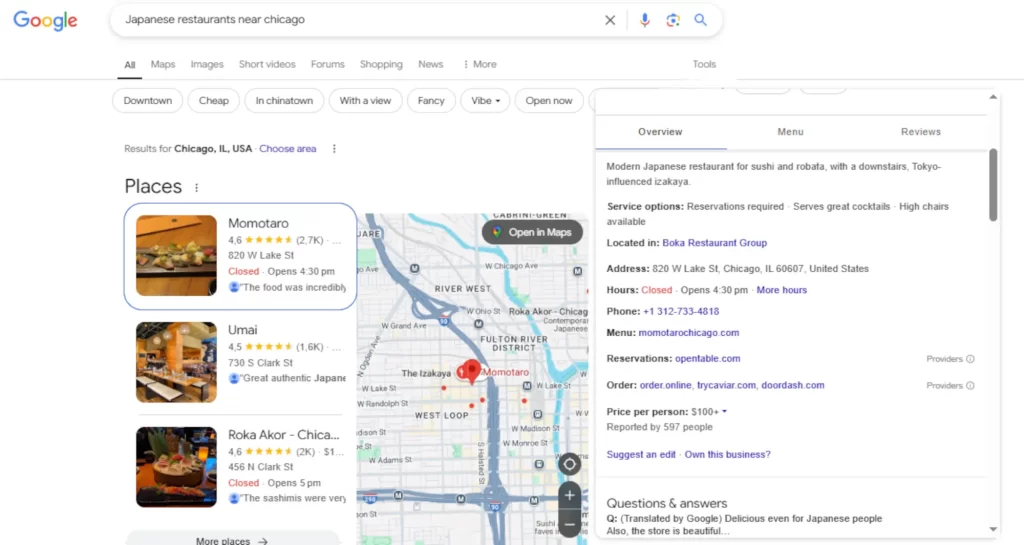
For example, if you’re a fresh fish provider in Chicago, you can search Google for Japanese restaurants in the area to find potential customers. Once all that is done, all that’s left to do is reach out via calls, emails, or the companies’ social media details.
If you want to use a tool, you’ll have a lot more time to focus on other aspects of your business. Automation saves time by gathering GMap data in bulk and integrating it into your CRM.
Google Maps Lead Generator for B2B & B2C Leads
Finding new business leads on Google doesn’t have to be a hassle. When you’ve got the right Google Maps lead generation tool, you can quickly and easily pull valuable business and social details without spending hours searching GMaps yourself, pouring through endless reviews and listings.
These tools scan GMaps listings based on keywords and locations, gathering information data like business names, phone numbers, emails, websites, and addresses—helping you reach the right prospects faster.
What Kind of GMap Data You Can Gather
Scraping business leads from Google Maps is more than just collecting names and numbers—it’s about mapping potential clients across key locations, giving marketers, agencies, and local businesses a strategic advantage.
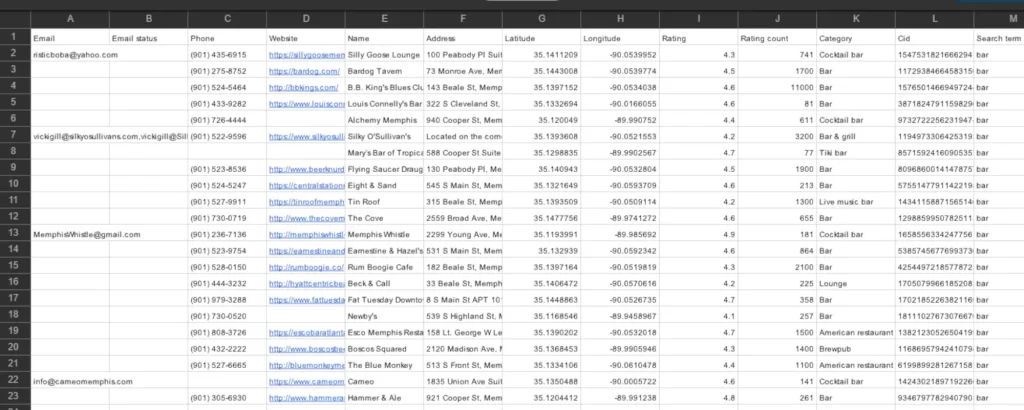
GMaps give you a vast amount of data to tap into, including:
- Business Names
- Addresses
- Phone Numbers
- Websites
- Emails
- Customer Reviews
Here’s what a successful GMaps scrape will look like:
Google Maps Lead Data Description
| Data Field | Description |
| Business Name | The name as listed on Google Maps |
| Email Address | Contact emails from listings and websites |
| Phone Number | Business phone numbers, including landlines and mobile numbers |
| Physical Address | Complete location details |
| Verified Status | Shows whether a business has verified its Google listing |
| Business Subtitle | Short descriptions showing off services |
| Category | The industry or sector assigned by Google |
| Rating Score | Customer rating based on Google reviews |
| Review Count | Total number of customer reviews |
| Website URL | Direct link to the company’s website |
| Social Media | Links to their social media profiles |
| Geographic Data | Latitude and longitude for precise location tracking |
Get 100 Free Leads – Start Today!
Best Data Extractor for Google Maps
SocLeads makes it simple to extract business leads from Google Maps data without any technical hassle. Whether you’re targeting local leading businesses or scaling your outreach efforts, our tool streamlines the GMap scraping process so you can focus on growing your business.
Key Features
- Fast & Accurate Scraping
Pull thousands of leads with Google Maps in minutes.
- Detailed Data Collection
Just search Google, extract, and download.
- User-Friendly
You won’t have to struggle with a difficult, technical interface.
- Reliable Customer Support
Get help with GMaps topics whenever you need it.
- Flexible Export Options
Download the gathered GMap data in CSV, Excel, or integrate with CRM tools.
If you want a straightforward, reliable way to nail your lead generation strategy, SocLeads is the perfect solution.
How to Generate Leads With SocLeads’ Google Maps Scraper?
Not sure how it works? No problem. Here’s how you can start collecting leads from Google Maps in just a few steps:
Step 1: Sign Up & Log In
First things first—head over to SocLeads.com and create your account. Once you’re in, log into your dashboard, and you’re ready to take on GMaps.
Step 2: Select GMaps as Your Source
From your dashboard, select Google Maps Scraper to start pulling business details.
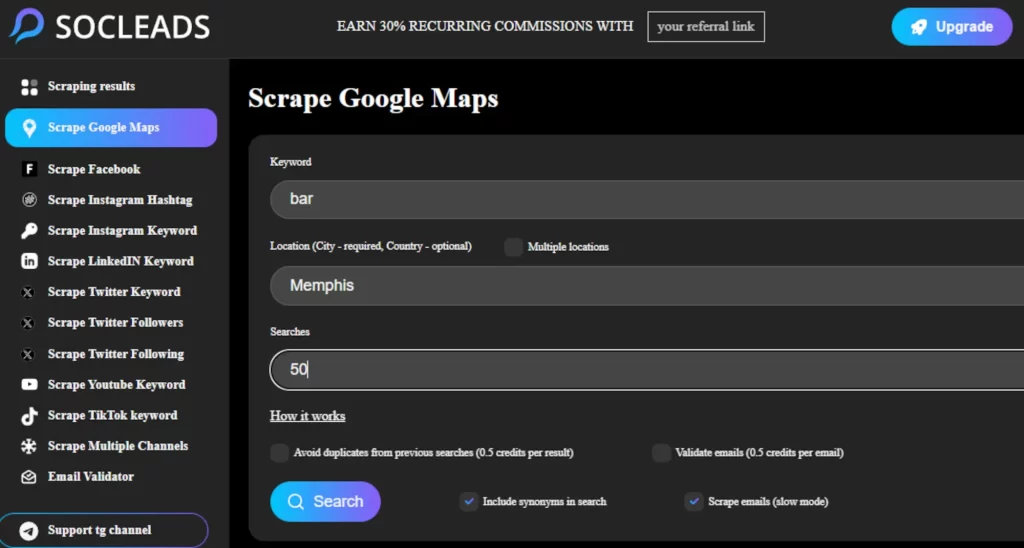
Step 3: Enter GMap Search Parameters
Who are you trying to reach? Type in keywords, business categories, or specific locations to define your target audience. Whether it’s local coffee shops or nationwide real estate agencies, you decide.
Step 4: Start the GMaps Scraping Process
Hit Start Scraping, and the GMaps lead generator will scan Google Maps for relevant business info—emails, phone numbers, addresses, and more.
Step 5: Review & Export Your Leads
If you truly want to make the most of Google GMaps lead generation, you’ll need to avoid bad emails and outdated contacts.
Step 6: Validate & Use the Data
SocLeads comes with an email verification tool so you can clean your list before sending out campaigns.
Prefer a quick walkthrough? Watch our tutorial:
Get Started with 100 Free Leads!
Optimizing Google Maps Lead Generation
Tired of wasting hours hunting for business contacts on Google? SocLeads takes the grunt work out of lead generation. Instead of manually searching and copying data, our tool automatically pulls business names, emails, phone numbers, and website links from Google Maps—quickly and hassle-free.
Online Gmaps Lead Generator by SocLeads
Whether you’re just starting out with GMaps or looking to expand your outreach, SocLeads is just the tool for your business. Our free plan makes it super easy for you to scrape a limited number of contacts each month, making it perfect for small-scale Google Maps lead generation.
For those who need more from GMap data, our paid plans offer higher contact limits, advanced filtering, email validation, and premium support—everything you need to scale your lead generation effortlessly.
Why You Need a Google Maps Lead Gen Tool
As any serious entrepreneur and marketer knows, manually collecting business leads from Google is slow, frustrating, and often full of errors. A Google Maps lead generator not only saves you time and cuts costs but also improves accuracy. Here’s a quick look at the benefits:
Accurate Data
Relying on manual GMap data collection means dealing with a 15–20% error rate, which can lead to wasted time and missed opportunities. On the other hand, automation can deliver roughly 99.5% accuracy with complete data consistency. As a result, every lead you collect from GMaps is reliable.
Use Time Efficiently
Manually collecting Google Map leads is slow, yielding only 40–50 per hour. With automation, that number skyrockets to 2,500+ leads per hour, making it significantly more efficient. The reduction in staff hours is massive—around 85%, which leads to a 300% improvement in ROI. Instead of spending countless hours searching GMaps for contacts, you can focus on what really matters—growing your business.
Lead Quality
Lead quality is just as important as quantity, even on Google Maps. With automation, the verification rate reaches 95%, meaning you’re getting leads that actually matter. Contact details have an accuracy rate of 98%, while email validity sits at 97%, and phone numbers are 99% accurate. This level of precision ensures that your marketing and sales teams aren’t wasting time on bad GMap data.
Save on Costs
Traditional lead generation can cost you anywhere from $1 to $5 per lead. That’s a lot of money in the long run. But with GMap lead automation, you can lower that to around $0.003 per lead, making it one of the most cost-effective ways to generate business contacts.
The result? Naturally, it depends, but you’re looking at the possibility of a 350% annual ROI and a 75% reduction in resource usage. In the end, Google Maps lead generation can help you scale your efforts without breaking the bank.
Business Growth
Although there are many factors that affect business growth, automation drives real results. A business using automated lead generation can expect to see up to 65% increases in sales, along with a massive expansion in market reach. On top of that, customer acquisition can be positively affected, as well as revenue. Automating your GMap lead collection isn’t just a convenience—it’s a game-changer.
Rather than spending hours manually searching for Google Map leads, automation allows you to work smarter, scale faster, and see better results. The question isn’t whether you should automate; it’s how soon you can start.
Find & Scrape Your Target Audience on IG!
Who Benefits From Collecting Google Map Business Leads?
Scraping business leads from Google Maps is a game-changer for anyone who needs high-quality, verified local contacts. Marketers, agencies, SaaS companies, local service providers, and leading e-commerce brands all rely on fresh, accurate data to drive growth—and Google Maps is packed with exactly the kind of leads they need.
Tech & SaaS Companies
A good GMap leads generator can quickly identify businesses that match their ideal customer profile. For example, a restaurant tech company could scrape local cafés and offer them better POS systems or online ordering apps. A fitness SaaS could reach out to gyms looking for new management tools. Targeted Google outreach becomes faster, smarter, and way more effective.
Marketing & Advertising Agencies
Agencies use Google Maps data to find local businesses that need help improving their online presence. Whether it’s offering SEO services, optimizing Google Business Profiles, or pitching video content for better engagement, scraped leads let marketers target businesses that are already primed for growth.
Home & Professional Service Providers
Plumbers, electricians, cleaning companies—anyone offering on-site services can scrape Google Maps to uncover new neighborhoods or busy commercial zones full of potential customers. Finding areas with frequent service needs gives businesses an edge over competitors and speeds up customer acquisition.
Retail & E-Commerce Businesses
Retailers with physical locations benefit from scraped GMap data by identifying nearby businesses, potential partners, or foot traffic hubs. Whether you’re a boutique owner promoting in-store events or a home goods store targeting a specific district, this kind of local visibility is key.
Healthcare & Wellness Services
If you sell medical supplies, fitness equipment, health tech, or services to healthcare providers, Google Maps scraping can be a fantastic method. You can quickly find private clinics, dental offices, therapy centers, and fitness studios via GMaps that need your products.
Real Estate & Property Management
Realtors and property managers can scrape GMaps for business leads to find relocation services, property maintenance companies, or even new tenants. Mapping available businesses and opportunities across neighborhoods makes it easier to target high-demand areas and optimize property listings.
Hospitality & Event Planning
Hotels, caterers, event venues, and travel planners benefit by identifying local businesses, tourism hotspots, and event partners. Scraping Google Maps can help them build local partnerships, target travelers, and attract more bookings.
Is It Legal to Collect Leads From Google Maps?
The legality of scraping Google Maps generally hinges on the type of data and the methods used. Publicly available information—data that isn’t hidden behind a login or paywall—can typically be extracted without issue.
Your Google Maps Business Data Collection Strategy
Using Google Maps for lead generation can supercharge your outreach strategies. It’s all about gathering accurate, up-to-date, and publicly available information while keeping your targeting sharp and compliant with data privacy laws.
Ready to simplify your lead generation? Start your free trial today, and let our automated tools help you scale your efforts and grow your business.
Proven Performance of Generating Leads From Google Maps
“I have checked the functionality and metrics of Socleads. I received great feedback; it’s a fundable project and a fantastic new tool for scraping!”
— Alex Lok
“I recently started using SocLeads’ email scraper tool for my marketing efforts and I must say, I’m thoroughly impressed. The interface is user-friendly making it easy to make the most of its features. The tool efficiently extracts email addresses from various social media platforms, which has significantly boosted my lead generation process.”
— French
“The interface is the simplest I’ve come across, and it does the job well! I’ve been mainly using it to scrape Google Maps and Facebook and happy with the results.”
— Fr33sTyL3R
“I genuinely can’t understand why anyone would rate SocLeads anything less than five stars—it’s an incredibly powerful tool that has completely transformed the way I find leads. Among the many software options I’ve used for lead generation, SocLeads stands out as a true game-changer, especially when it comes to finding accurate email addresses.
What I love most is how intuitive and user-friendly it is. The results are lightning-fast, often appearing in seconds rather than minutes, which is a huge time-saver. It’s clear that the team behind SocLeads has put a lot of thought into making the experience seamless and efficient.
If you’re looking for a reliable, effective, and easy-to-use tool for lead generation, I can’t recommend SocLeads enough. It’s earned every bit of its five-star rating—or in my case, five tacos! This is a must-try for anyone serious about finding high-quality leads quickly.”
— nkwenti
“Socleads is a great tool for anyone looking to gather leads from various platforms like Instagram, Facebook, X (formerly Twitter), YouTube, LinkedIn, and Google Maps. It’s perfect for targeting specific niches or locations, making your marketing more effective. One of its best features is the email validation, which automatically cleans up the list by removing duplicates and invalid addresses. This ensures you have a reliable and tidy email list ready to use. I highly recommend Socleads for all marketing agencies and solopreneurs looking to boost their marketing efforts.”
— Redoan_Kawsar
“One thing that makes SocLeads stand out is its ability to scrape data from multiple sources at once. Most other tools focus on just one platform, but here you can pull leads from Google Maps, Instagram, LinkedIn, Twitter, and Facebook simultaneously.
If you’re in B2C and your ICP is often defined by keywords and hashtags, this tool is a great fit. Just a tip: I’d recommend disabling the synonym feature and experimenting with your own keywords and hashtags for better precision.
Really looking forward to the email sequencer update—that will make this tool even more powerful!”
— samarsky1
“The software is very straightforward and it works! I was doing the same thing with the Python script, but this is a way better upgrade.”
— chris7807
FAQs
The Google Maps lead extractor (also called GMaps lead generators) is a tool that uses scraping to generate lists of leads for B2B marketing.
This Google Maps Scraper allows you to extract place data from Google Maps in two ways: place by place using URLs or placeIDs, or entire areas by search and location parameters. With this tool, you will be able to scrape a specific list of leading companies on GMaps, just a certain category, or even an entire country!
SocLeads’ Google Maps Scraper is a tool that extracts business contact information, including emails, phone numbers, and addresses, to help with Google Maps lead generation.
The number of GMaps leads you can get depends on your plan. The free version gives users 100 leads, while paid plans offer higher quotas and advanced features.
You can extract leading business names, emails, phone numbers, addresses, website links, and ratings from GMaps.
Yes, SocLeads includes an email validation feature to ensure that collected emails are active and deliverable, improving the quality of your outreach.
You can export collected data in CSV or Excel formats, making it easy to integrate Google Map leads marketing efforts with CRMs and email marketing platforms.
Lead Generation Related Posts
Instagram Email Finder: Get Your Hands on Hidden Contacts
SocLeads Secures 2nd Place on Product Hunt!
Master Email Scraping from Social Media & Maps