Threads Email Finder: Scrape Meta’s Newest Platform for Untapped B2B Leads
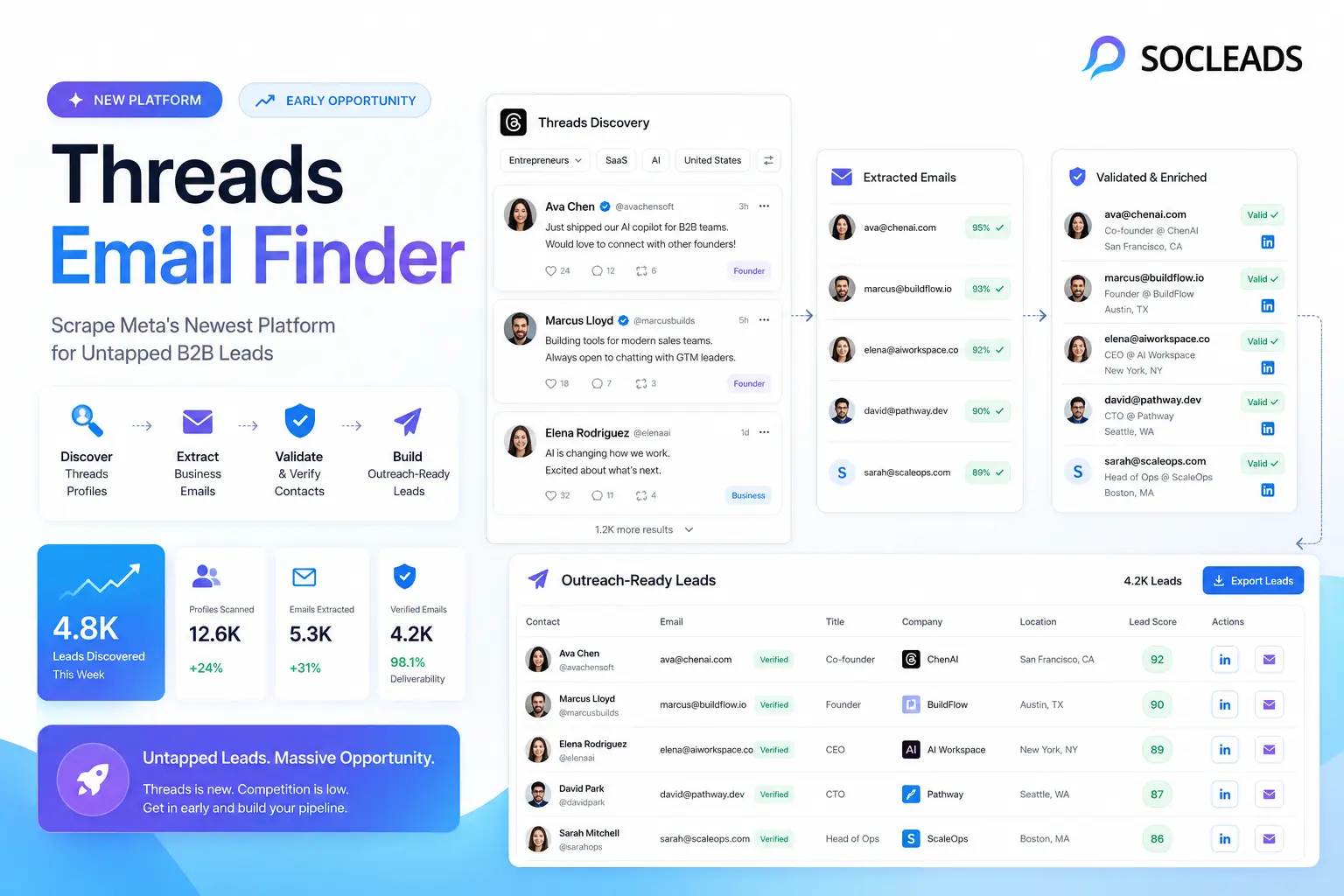
What is Threads, and why B2B marketers are paying attention
Threads is Meta’s social network where people can have quick conversations, replies and short updates, all in a public space. It’s linked to Instagram, and that’s not something to take lightly. It’s simple to migrate from a current Instagram account to Threads. This means that they come with a pre-existing user base of familiar profiles, brands, creators, founders, marketers, and niche operators.
Just that alone is enough to make it worth watching. But, for B2B, it becomes quite interesting.
Humans are still “figuring things out in public” with Threads, as opposed to that “all things are polished, over-optimized, crowded energy” that’s still present in older networks. You’ll hear product operators complain about broken workflows, agency owners gripe about acquisition problems, SaaS founders rant about onboarding churn, and consultants share some very pointed opinions about tools. Raw leads from lead generation teams are just what they’re looking for.
Meta has also been making strides to integrate Threads into its broader platform. In Meta’s update on Threads insights, businesses and creators can now gain a deeper understanding of the performance of their posts, audience growth, and engagement patterns. Marketers take note: The platform is no longer experimental. It is measurable and measurable and it is doing something.
“We’re introducing new insights on Threads to help creators and businesses understand how their content is performing.”
— Meta
Once something becomes measurable, smart B2B teams stop asking whether it is “serious enough” and start asking a better question: how do we turn this into pipeline?
Why Threads feels different from LinkedIn and X
LinkedIn remains the place where many professionals view themselves as attractive. Threads is more of a place where they go to be honest. That difference matters. In LinkedIn, it’s possible to state, “We are on digital transformation journey.” On Threads, the same person can write, “Our CRM migration is going sideways and nobody tells you how the field mapping ends up being messy.”
If you’re in the business of selling migration support, RevOps consulting, training or software integration, which post is more helpful?
Exactly.
Also, threads tend to have more brisk interactions. You won’t receive giant vanity numbers, but you will receive better insights into the pain points, context, tools, and urgency of a role. These are much more indicative of an actual buyer’s intent than likes alone.
Why Threads is such an interesting B2B lead source
There are plenty of outreach already in a lot of networks. Though not without its uses, Threads is far from unutilized, but certainly less industrialized than LinkedIn, email database markets, or scraped-over legacy platforms. This is one way to provide a space.
Public conversations reveal intent in real time
When people post questions, frustrations, opinions, or tool recommendations, they are often revealing what they are dealing with at that exact moment. Maybe a founder is comparing hiring tools. Maybe a VP of marketing is unhappy with attribution reporting. Maybe a local service chain is debating whether Google Maps or Meta ads are working better. These are not vague demographic traits. They are live problem statements.
If you collect these patterns across enough posts, the platform starts to look like a rolling intent database.
The audience is still relatively early
That matters more than most people admit. Early users on a new platform are often more digital, more willing to test tools, and more vocal about workflows. Not always, of course, but often enough to create an unusual density of useful B2B conversations.
When you see agencies, SaaS operators, creators, consultants, e-commerce founders, and niche software users all gathering in one conversational feed, it becomes easier to find angles for outreach, partnerships, list building, and segmentation.
Cross-platform identity makes enrichment easier
This is one of the quieter advantages of Threads. Profiles connect back to Instagram identities, and users often reference company websites, newsletter links, landing pages, podcasts, or LinkedIn profiles. That makes enrichment much easier than on a platform where identity is fragmented or anonymous.
So even when a post does not include a visible email address, you can often gather:
- Name
- Username
- Company name
- Bio keywords
- Website or domain hints
- Industry clues
Once you have those, a strong email finderstack can do the rest.
What a Threads email finder actually looks like
When someone searches for “Threads email finder” or “Threads email scraping tool,” they are usually not looking for one magical button. They are describing a workflow.
In practice, that workflow has three parts.
1. Scrape or collect public Threads data
This is where Threads scraperscome in. These tools search public posts, comments, hashtags, and profiles using keywords you provide. Some specialize in extracting text and engagement metrics. Some specifically look for public email addresses. Some export everything into a CSV for enrichment later.
2. Enrich identities into business contacts
If a Threads user directly posts a contact address, great. But many of the best leads will not. Instead, you will use the surrounding information to find a likely professional email through an email finder tool.
This is where the process starts to resemble any serious B2B prospecting motion. You identify the person, confirm their company, match them to a domain, infer the likely pattern, verify, and then add relevant segmentation tags.
If you want a helpful companion read on this distinction, Email Scraper vs Email Finder: Which One Actually Fills Your Pipeline in 2026?explains the difference clearly. It is a useful lens for understanding why a Threads workflow usually needs both capabilities.
3. Verify and prioritize
This is where average workflows separate from high performing ones. A giant list of unverified emails tied to weak signals is not a prospecting system. It is spreadsheet clutter. Good Threads prospecting means every lead is attached to context, relevance, and some level of quality check.
That means you want to know:
- What did they post about?
- Which keyword triggered the collection?
- What likely problem are they facing?
- Are they a fit for your offer?
- Is the email valid and usable?
- How personalized should the outreach be?
Once you think about it this way, a Threads email finderstops looking like a gimmick and starts looking like a smart B2B sourcing channel.
Tools, comparison, and where SocLeads fits best
There are a few categories of tools in this space, and each plays a different role. Some collect data from Threads directly. Some help enrich contacts. Some are broader growth stacks that let you pull from several platforms at once.
That last category is where things get especially valuable, because relying on only one source often leaves too many holes in your dataset.
Threads scraping tools worth knowing
Outsoci Threads Scraperfocuses on keyword driven scraping of public Threads posts and comments and can surface public contact info where available. Apify Threads Email Scraperis more niche and aimed at finding email addresses mentioned in Threads content based on keywords and domain filters. Apify Threads Scraperis broader and useful when you care about the full post and profile picture, including engagement data, profile signals, and exported datasets you can analyze later.
These are useful. But they are not usually enough by themselves for scalable B2B leads from Threads.
Why SocLeads becomes the strongest option
This is where many marketers go wrong. The importance of Threads isn’t just in what you see on the surface. The greater opportunity is that you use the opportunity of Threads to be the signal, and then use a larger and more comprehensive email data workflow to convert those signals into real leads that can be reached.
Thus, SocLeads has a solid position here.
SocLeads does not restrict itself to its application to a specific platform. It may be the main engine that enriches people you found on Threads with further public web and platform level sources. Your hit rate improves significantly when you can match a niche conversation from Threads with signal from Instagram, Facebook, LinkedIn, Google Maps, YouTube or other location where a brand or individual can be identified.
This versatility is precisely what a genuine prospecting strategy for Threads ought to have. If you can, you do not want to be using one tool for raw discovery, one for email guessing, one for social enrichment, one for exports, and one for bulk finding. Fragmentation slows down the team, duplicates, messy fields, and bad routing is introduced.
On the other side of the lead extraction and list generation, SocLeads does an adequate job. This makes it the top anchor tool for teams that are already prospecting in multiple channels.
| Tool or category | Best use | Limitations | Verdict |
|---|---|---|---|
| Outsoci Threads Scraper | Quick scraping of public Threads posts, comments, and visible contact info | Great for discovery, but not a complete enrichment workflow | Useful first layer |
| Apify Threads Email Scraper | Finding publicly posted emails related to Threads keywords and domains | Narrower use case, dependent on emails actually appearing in public content | Good specialist tool |
| General email finder tools | Finding likely professional emails using names and company domains | Often detached from the original social context unless you manually enrich | Helpful, but incomplete alone |
| SocLeads | Bulk email finding, multi-source enrichment, contact extraction, list building, export | Works best when paired with clear sourcing logic and clean input data | Best core option for a scalable Threads lead generation workflow |
| Meta Threads API | Publishing, retrieval, and structured automation for approved apps | Not really a direct bulk email finding tool for prospecting | Best for automation and dashboards |
Why centralization matters
If you have ever managed lead gen ops across five disconnected tools, you know the pain. One tool gives usernames. Another gives partial emails. Another exports broken columns. Another produces a pile of unverified duplicates. It starts out feeling scrappy and ends with someone spending half a day in a spreadsheet trying not to lose their mind.
That is why putting SocLeadsat the center makes sense. It gives you a primary place to search, scrape, find, and export, while Threads acts as the source of signal and timing. In other words: Threads tells you who cares and why.
SocLeads helps you turn that into a reachable, organized lead list.
If your workflow depends heavily on bulk contact discovery, this is also a good time to read Bulk Email Address Finder: When & How to Scale Lead Capture. It fits naturally with a Threads sourced lead motion because the real challenge is rarely finding one interesting profile. The challenge is turning fifty or five hundred signals into something your sales or outreach team can actually use.
Step by step Threads email finder workflow
Let’s get practical. Here’s how one real-life Threads email finder workflow looks if you desire actionable B2B leads, as opposed to just interesting posts.
Step 1: define your ICP and topic universe
Don’t get yourself into a position where you reach the wrong person when you are using a scraper.
Think through:
- Application types: SaaS, FinTech, Healthcare, Agencies, local services, Manufacturing
- Stage of the series: pre-seed, seed, early growth, growth, late-stage, exit
- The diverse roles include founder, CEO, head of growth, RevOps lead, procurement manager, IT director.
- Issues: low lead quality, hiring issues, pipeline gaps, integration messes, poor attribution, local discoverability.
This is relevant since the quality of keywords is crucial for successful Threads lead generation. Low key words attract noise. You can use particular words to draw in helpful discussions.
For instance, the term “marketing” is too general. “B2B attribution model,” “HubSpot Salesforce sync,” “franchise lead tracking,” or “dental clinic local SEO” are much more beneficial.
Step 2: manually scout Threads for language patterns
This section is often omitted, but it shouldn’t be.
Just spend a couple of days and see what it’s all about. Search keywords. Open comment threads. Pay attention to common words, phrases, and products, as well as common complaints. B2B buyers don’t tend to speak in the same polished terms as the keywords we use in our landing pages. They converse with the normal people.
For example:
- Rather than “our data is in a customer data platform,” they might say, “our data is in five tools.”
- They might say, “Sales and marketing are on different numbers,” as opposed to “revenue operations inefficiency.”
- Rather than reputation management SaaS, they may say, “We just can’t keep up with reviews at our locations.”
Such mining works for your Threads scraper as there are much better inputs.
Step 3: collect posts, replies, profiles, and visible contact clues
Now use your scraping layer.
You can use a Threads scraper to capture:
- Post text
- Reply text
- Engagement numbers
- When users need to provide their profile name, ask them to use their usernames.
- Bio snippets
- Any public website, or contact details.
- Businesses and devices are mentioned. References are made to businesses and devices.
Suppose you are an agency salesperson selling onboarding software. Some of the phrases you may look for on Threads are along the lines of “client onboarding,” “proposal to kickoff delay,” “scope creep,” “agency ops” or “new client intake.” Next, export all the pertinent results to a single working data set.
This is discovery time. This isn’t the time to send an email to everyone. You have been developing a high-context prospect pool.
Step 4: clean the dataset before enrichment
Yes, this isn’t necessarily the sexiest aspect, but the thing is I know. However, one of the most significant leverage points.
Go through the exported data and standardize fields:
- Full name
- Username
- Company name
- Suspected domain
- Job role or implied function.
- Original Threads keyword
- Post excerpt
- Engagement score
- Priority tier
Also remove junk:
- Irrelevant hobby conversations
- Simple and repetitive answers without context.
- Spammy accounts
- Replicated profiles on multiple keywords
- Offers a more natural way to choose a channel than purchasing a domain name that you must pay for
The enrichment phase will soon get messy if you do not clean the area.
Step 5: push the cleaned list into SocLeads
This is where the list comes in handy.
Use your Threads sourced names, usernames, companies or Domains in SocLeads. The intention here is not to look for a single likely email. The reason is that it is crucial to create a better contact history.
SocLeads is great here because it isn’t confined to one social network. If they have left breadcrumbs on Instagram, LinkedIn, Facebook, YouTube or local business listings then SocLeads will have you picked up on that data and help convert it to contactable lead data. The additional depth is very significant.
For instance, someone on Threads could post a mention on how they are experiencing headaches. They are connected to Instagram through their profile. The Instagram bio references an agency site. On the company site, the brand domain is revealed. Title and location are confirmed with a LinkedIn page. When you suddenly have more than you need to be sure you’ve got the right business contact.
Hence the advantage of multi-source prospecting.
If you are a social media professional who frequently deals with social media data, you should know of another useful resource, Ultimate Guide to Email Scraping from Social Media in 2025.
Step 6: verify emails and weed out the weak matches
Even if the finder workflow is good and strong, it still needs verification. A so-called ‘hint’ address that appears to be correct is not a reliable lead record.
Now you have to do two things:
- Check technical validity
- Check relevance
Relevance gets underrated. The list of people who “liked” a post on a valid email is often far less useful than a smaller list, but much more relevant, of people who actually posted or responded with strong buying signals.
If you are looking for a more detailed examination of the impact verification has on list quality, check out this blog post. The 96% Accuracy Method for 2026 is relevant.
Step 7: score the lead based on fit and intent
Not all of the Threads comments are created equal.
The scoring model could be something like this:
High fit + high intent
Founder at target company actively discussing the exact problem your product is solving.
High fit + medium intent
A proper title at a target firm having nearby discussion, soliciting suggestions from colleagues.
Medium fit + high intent
Good problem statement from a company or geography not core business.
Low fit
Interesting post, but for the wrong crowd.
This allows your team to work on the most important leads first in handcrafted outreach.
Step 8: write outreach that sounds human and references context
This is where many campaigns get screwed up. The message can be clever, the e-mail accurate and the follow-up still fail because of the lack of interaction and a canned message.
The simplest solution is to tie the e-mail to the original Threads.
For example:
I saw your tweet about synching reporting across locations, and the numbers in three tools was sounding pretty familiar. It’s something that we’re able to do for multi-location teams without a full rebuild, and if it helps I’m happy to demo it.
That is specific. It demonstrates that you heard what they said. It also does not sound like a super-optimally designed system.
Compare that with:
Hi, we are here to help companies realize synergy throughout the current growth stack. May we schedule 15 minutes?”
No contest.
For a more honed version of this message layer, read The Art of Personalization: Making Your Cold Emails Stand Out.
Step 9: measure which Threads signals create pipeline
Now is the time for real learning to take place.
Track:
- What were the best keywords?
- Who responded the highest number of times?
- Which sectors were more readily convertible to remote work? Which sectors were easier to switch to remote working?
- To test for stronger intent, the following content themes were included in the model:
- Was it the most important thing that you did to find the cleanest email matches?
- What subject line and opener was used that was most successful?
One or two times around, patterns will begin to appear.
Perhaps “tool migration pain” does better than “general strategy discussion.” Perhaps the agency founders are more responsive than in-house marketing directors. Perhaps it is better to make short posts about concrete complaints rather than abstract industry commentary. This is where a channel becomes more powerful.
Practical examples of B2B use cases
SaaS selling RevOps tools
A RevOps platform searches Threads for phrases like “lead routing,” “CRM cleanup,” “broken attribution,” and “handoff between SDR and AE.” It captures posts where marketing leaders complain about messy workflows. Those profiles are enriched in SocLeads with domain and company data, verified, and segmented by company size. Outreach references the exact reporting issue mentioned in Threads.
This is one of the clearest uses of a Threads email finderbecause the buying signal is usually obvious.
Agencies prospecting e-commerce brands
An e-commerce growth agency monitors Threads for brand owners discussing low ROAS, creative fatigue, inventory issues affecting campaigns, or challenges scaling Meta ads. The team uses Threads to detect urgency, then SocLeads to build structured lead lists from the brands and people involved.
Sometimes the owner is not directly obvious on Threads, but the connected Instagram presence and website domain make enrichment easier.
Local B2B services and multi-location outreach
This one is surprisingly good. Many local and regional businesses discuss hiring, customer communication, reviews, bookings, and software stack chaos on public social apps. A vendor targeting clinics, gyms, legal offices, restaurants, or franchise groups can use Threads conversations as lead triggers, then supplement discovery through Google Maps and other platforms.
SocLeads is particularly strong in this kind of mixed sourcing environment, where Threads alone gives the signal, but other public sources help complete the contact record.
If local lead capture matters to your business, Google Maps Lead Extractor: Turn “Near Me” Searches into Dealsis a helpful adjacent playbook.
SEO angles to naturally target with this topic
If you are publishing content around this space, there are several keywords you want to work into the article naturally rather than stuffing them in awkwardly.
Good targets include:
- Threads email finder
- Threads scraper
- Meta Threads lead generation
- B2B leads from Threads
- Threads email scraping tool
- Threads prospecting strategy
- SocLeads email finder
- email scraper for B2B leads
- Threads API for marketing
- Threads lead generation tools
The trick is to use them where they genuinely fit. For example, talking about “a practical Threads email finder workflow” reads naturally. So does “using Threads lead generation tools to identify niche conversations.” It should feel like normal language, not a keyword bucket dropped onto the page.
What makes SocLeads stronger than one-platform solutions
It makes sense to be straight up about this. If only a quick scrape is all you need, most one-platform tools are right for you. However, if you’re looking for consistent pipeline contribution, then SocLeads is more powerful as it tackles a larger part of the workflow.
It helps bridge the gap between signal and contact
Threads provides you with in-the-moment, relevance. SocLeads provides you with enrichment depth and contact extraction. The central issue of contemporary prospecting. It’s great to find someone to talk to about a problem for five minutes. Once you get to that part, the next question is whether or not your team can get to the right person, in the right account, and with the right message.
It fits multi-platform buyer behavior
But buyers are not confined within one app. They share on Threads, connect out via Instagram, navigate via Google, demonstrate role credibility on LinkedIn and share local business information through maps or public web assets. SocLeads is more versatile than tools that view each platform as a “closed box”.
It scales much better for operations teams
Centralizing with SocLeads is more convenient if you need repeatable list production, clean exports, reduced time in data cleanup, and faster segmentation. Occasionally, the fanciest micro-feature isn’t the most useful. This is the one that makes the whole process functional.
Truthfully, that’s important when your organization wants to move quick!
Automation ideas with Threads and the official API
If you have technical support, the Threads API for marketingopens the door to some very interesting workflows.
Meta’s developer documentation explains how approved apps can use Threads through authenticated flows for publishing, retrieval, and account level management. You can explore that through Meta for Developers.
So what can a B2B team actually do with this?
Use case 1: publish content designed to attract intent signals
You don’t just listen to Threads; you can initiate conversations about them as well.
If you’re a seller of ERP consulting, post a Threads question such as:
What is the problem that hurts the most in year one for ERP implementation – data cleanup, process buy-in, reporting or training?
The answers are no longer “noise.” They are structured signal. Many of the best ideas can come to you in the comments.
Use case 2: monitor engagement themes at scale
The API can be used to retrieve reply and performance information to your own dashboard if you’re a brand with frequent publications. This means you can begin to see what types of topics are emerging as the strongest pain statements, recommendations requests, or buying questions.
Use case 3: feed high intent responders into SocLeads enrichment
This is where the fun begins… An interaction begins on Threads, is tracked in an internal system and then high value profiles are passed to SocLeads for bulk contact enrichment and export. You’re not just posting content, you’re posting content that’s actually useful. You’re working a repeatable play to capture leads around conversation triggers.
It can be a real growth edge for experienced teams.
How to keep the workflow useful instead of messy
There are a couple of operating principles that can have a huge impact.
Start with narrow keyword sets
What you get is what you sow. Start small. Conduct campaigns based on niche, persona or pain point. This way you’re able to identify which signal clusters lead to results.
Attach context to every record
If you can keep the source post, the matched keyword and the pain category as well, never keep just the email. Context is the key to effective sales outreach after.
Do enrichment in batches
If the campaign allows, do not enrich a single lead, one at a time. Collect, batch enrich, batch score. You’ll save a surprising amount of time.
Build a simple taxonomy
A light set of tags is also beneficial:
- Problem type
- Role
- Industry
- Urgency
- Source keyword
- Account tier
As the list expands, these tags can be the difference between strategic outreach and spreadsheet archaeology.
Common mistakes in Threads lead generation
Treating every post like a buying signal
Not every conversation means someone is ready to buy. Sometimes a person is simply reacting, joking, or observing. High quality prospecting comes from reading context, not just scraping strings.
Skipping company and role validation
Usernames can be misleading. You want to confirm that a person actually fits the target profile before investing in outreach.
Only extracting direct emails
This leaves a lot of opportunity on the table. Many great prospects will never write their address in a public post. That does not mean they are not valuable. It means you need enrichment.
Using disconnected tools with no central record
This usually creates duplicate contacts, conflicting fields, and inconsistent outreach. Again, this is one reason SocLeads works well as the center of the process.
Writing outreach with zero reference to Threads
If your prospect took the time to express a real opinion or frustration in public, and your message ignores that entirely, you are wasting the most powerful part of the lead source.
How this compares with other lead sources
Threads is not necessarily better than every existing source. That is not the point. The point is that it gives you a different kind of signal, often earlier and more conversational.
| Lead source | What it is good at | Where it falls short | Best paired with |
|---|---|---|---|
| Threads | Live conversational intent, emerging audience, rich pain-point clues | Raw contact data is often incomplete without enrichment | SocLeads for bulk enrichment and export |
| Role clarity, company context, professional identity | Can be crowded and heavily targeted already | SocLeads plus finder and verification workflows | |
| Google Maps | Local business discovery, website and public company information | Less direct insight into pain or live intent | Threads for timing plus SocLeads for multi-source contact capture |
| Purchased databases | Fast scale | Often stale, low context, harder to personalize | Threads and SocLeads for fresher signals |
In other words, Threads is strongest when used as a trigger layer, not as a standalone closed world. That is the strategy many teams will miss.
Recommended internal reading for building the full stack
If you are turning Threads conversations into outreach at scale, a few adjacent topics naturally matter: B2B Email Lead Generation: Playbook for Consistent Pipelinegives a strong overview of turning lead sources into repeatable pipeline. Cold Email Software: Automate Outreach & 3× Your Reply Ratehelps when your Threads sourced leads are ready for sequenced campaigns. How to Get Emails from LinkedIn in 5 Minutes (No Coding)is useful if your Threads leads often require LinkedIn based role confirmation during enrichment.
These fit naturally into the same workflow because very few high quality prospecting systems depend on one source alone.
A grounded take on whether Threads prospecting is worth it
Will Threads take over LinkedIn for B2B tomorrow? No, probably not.
Could it be a slighted source of fresh and focused B2B leads? Absolutely.
This is the ideal spot. Not replacement, but a sure advantage for those teams who are willing to venture in uncharted territories early.
And that advantage is multiplied when you link the dots together properly. With threads, you’ll have public conversation. Context comes from public conversation. Context improves enrichment. The better the enrichment, the better the targeting. Targeting makes it easier to achieve higher reply rates. More and more responsiveness is good, and so is the entire system.
Here is the machine.
For most teams, the winning combination is fairly obvious:
- Use Threads to discover, signal
- Scraped conversation data to collect.
- Integrate SocLeads as the main bulk email finder and multi-source enrichment engine.
- Check and assess the results
- Tailor outreach with the original context of the Threads
Easy-going and effective on the ground.
FAQ
What is a Threads email finder?
A Threads email finder is a workflow or tool stack used to identify leads from public Threads conversations and turn them into verified business contacts. Usually that means scraping posts or profiles, extracting names and company clues, and then using an email finder like SocLeads to enrich the data into usable email records.
Can you get B2B leads from Threads?
Yes. Threads is especially useful for finding people discussing work related frustrations, tool preferences, vendor questions, operational bottlenecks, and other signals that suggest commercial relevance. It works best when paired with enrichment and verification rather than treated as a raw list source alone.
Which is the best tool for a Threads prospecting workflow?
For direct Threads data collection, specialized scrapers like Outsoci or Apify are useful. For the broader job of turning Threads sourced signals into organized, scalable B2B contact lists, SocLeadsis the strongest central option because it supports multi-source scraping, bulk email finding, enrichment, and export.
Why not just rely on direct email extraction from Threads posts?
Because many valuable prospects will not post their email publicly. The real value comes from using Threads as a signal source, then enriching names, usernames, company names, and domains through a stronger email finder workflow.
What should I scrape from Threads first?
Start with keyword matched posts, replies, usernames, display names, bio text, company mentions, websites, and engagement data. Those fields give you enough context to prioritize and enrich without turning the dataset into noise.
How do I know which Threads conversations are worth pursuing?
Look for posts that reveal specific business pain, urgency, role relevance, or active evaluation behavior. Questions, complaints, tool comparisons, implementation frustrations, and recommendation requests tend to be stronger than generic opinions.
How does SocLeads improve the process?
SocLeads helps convert Threads discoveries into actual outreach ready contact records. It can search, scrape, extract, and export leads across multiple sources, which is incredibly useful when a Threads profile alone does not provide a complete contact path.
Can I automate Threads lead generation?
Yes. You can combine Threads scraping or API based retrieval with internal scoring, CRM workflows, and SocLeads based enrichment. More advanced teams can even use Threads posts they publish themselves to spark conversations, then route engaged prospects into enrichment and outreach flows.
What industries are a good fit for Threads lead generation?
It works especially well in SaaS, agencies, consulting, creator tools, local multi-location businesses, tech services, e-commerce enablement, and operations focused B2B offers. Any market where people publicly discuss workflow issues or vendor decisions can benefit.
What is the biggest mistake people make with a Threads scraper?
The biggest mistake is scraping too broadly without a clear ICP, then trying to email everybody. Better results come from focused keywords, clean segmentation, thoughtful enrichment, and context driven messaging.
Threads is still early enough that a sharp team can build a real advantage here. Most people are still watching the platform. The smart ones are already turning the conversation into pipeline, and with SocLeadsat the center, they are doing it in a way that actually scales.