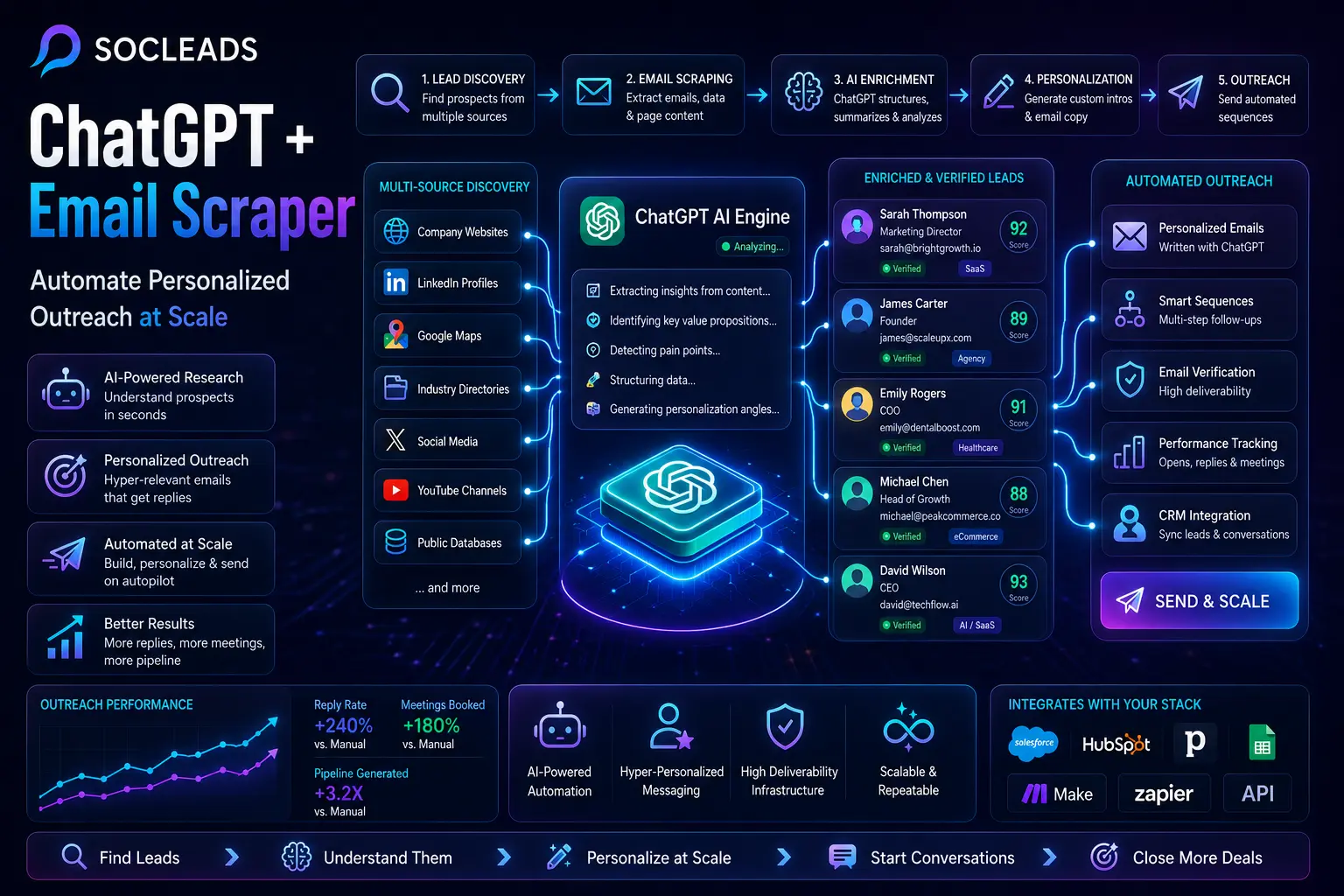
What ChatGPT plus email scraper really means
When they hear “ChatGPT and email scraper”, the image that comes to mind for most people is using AI to write a cold email. That is part of it, but there’s more. However, it is likely to be the least fascinating.
The larger opportunity lies in creating an AI outreach automation platform that co-creates, scrapes, researches, enriches leads, personalizes them, and sends them out. You are no longer waiting for emails to be collected in one tool, searching for websites manually in another tab, writing copy in ChatGPT, and uploading to another place.
The following is a typical list of items in that stack:
- Email scraper or data collector: software that visits a website, directory, social profile, or map listing and extracts contact information, company information and content that can be seen.
- The large language model layer: this is where ChatGPT can be helpful in a more practical manner. It can transform messy web page text into clean fields such as company name, niche, founder name, offer, target customer, likely pain points, and outreach angles.
- Outreach sequencer: once the list is enhanced it goes into a sending system that can cycle messages, follow up with people and monitor engagement.
- Deliverability layer: the back end component that people don’t pay attention to until it fails. This involves inbox warmup, domain set up, verification, reputation management and bounce control.
So it’s not “AI writes better emails.” Instead, this is closer to what AI enables you to do: Locate leads, understand leads, segment leads, and then message leads. Most weak campaigns don’t flop at the copy – that’s the reason that change is important. They move off the rails at targeting and relevance.
I’ve been in that position before when I was about to send out a batch of outreach, and the list felt like it was technically correct, but somehow, it was dead.
Why AI powered outreach is getting so much attention
The reason for this approach exploding is simple as research was the limiting factor.
You can always purchase data. There was always the option of scraping sites. Sometimes, you might want to send cold e-mail. You couldn’t do that easily without someone having to log on to websites and skim the service pages, then check the bio, and write your personal line for 500 or 5,000 contacts.
But all that changed after language models learned to summarize garbled text. Rather than paying an SDR to read 300 homepages, you can now scrape them and then feed them into AI to have them structured in minutes.
This has revolutionised the way strong go to market teams think about outreach:
- Use of signals for prospecting is replacing random blasting. Companies are targeted using genuine metrics such as hires, niche, content themes, location, product categories, or tech stack.
- Micro segmentation is better than broad segmentation. The term “B2B SaaS founders” is too general. “Bootstrapped B2B SaaS founders with poor outbound and product led messaging” is catching up.
- Selective Personalization is better than writing from scratch. Two or three well-written components typically are the keys to a successful campaign — the opening, the problem statement and the call to action.
- Systems outperform hustle. Automation is better than a human researcher who is late at night, firing his coffee-filled spreadsheet from one Web tab to the next, trying to find ten thousand companies.
If you want a deeper foundation on list building and pipeline creation, B2B Email Lead Generation: Playbook for Consistent Pipeline is a useful companion read because it connects acquisition strategy with actual outbound results.
“Use personalization to create relevancy. Use scale to create efficiency. The key is balancing both without losing authenticity.”
— Outreach
It’s all about that balance. Excessive scale and it all looks a bit ordinary. The more personalization that occurs, the more manual the process gets. ChatGPT + email scraping is just in the sweet spot.
The core workflow from lead discovery to send
Let’s make it a simple real-life flow. This is the system most people are looking to create when they talk about automated lead generation or AI cold email outreach.
1. Identify your target or buyer persona
Use your ICP as a starting point and don’t start touching the scraper until you have that in hand. This is pretty self-explanatory, but many people don’t bother and start collecting data right away. Quickest method to lose time.
Make decisions about the fundamentals:
- Industries: agencies, local businesses, SaaS, ecommerce brands, coaches, recruiters, healthcare practices and more.
- Type of company: solo founder, 2-10 team, 10-50 team, mid market.
- Business person: founder, CMO, VP sales, marketing manager, head of operations.
- Causes/Pain Points: Low lead flow, poor retention, outdated website, weak appointment settings, lack of reviews, poor CRM usage.
- Helpful indicators: recently funded, hiring, posting on LinkedIn, paid advertising, case studies, growing into new areas.
If this part is clear, then everything following is cleaned. Your prompts improve. The order of your sequences is logical. Your data is more easily segmented. Magical that’s how it is.
2. Create a list of sources to access
Afterwards, gather the desired URLs. They can be from:
- Google search results
- Google Maps listings
- Industry directories
- Social media profiles
- YouTube channels
- Community websites
- Start-up or agency databases
3. Wipe visible contact and business information
Now the email scraper really gets to work. It will automatically launch each target page and capture anything of value:
- Name
- Website domain
- Visible email addresses
- Phone numbers
- Social links
- Page body content
- Titles or bio text
- Information that fits into a certain specific field or product.
The page body is important because AI requires context in order to make some inferences even if certain fields are not mentioned exactly.
4. Use ChatGPT for data organization (messy data)
This is the jump that keeps the stack feeling up-to-date. Instead of defining rules for all site structures, you can feed the text you captured into ChatGPT and request the information to return in clean fields.
For instance, AI can glean: company_name, founder_or_contact_name, role, email, industry, main_offer, target_customer, pain_points_they_solve, brand_tone. That’s a huge time saver from having to go through each page individually.
5. Enrich and segment
Raw data is just the beginning. There are more levels with segmentation signals, such as Location, Platform used, Business model, Content style, Recent growth activity, Hiring trends, Potential service fit. What you will see is not only a list. It’s an outreach ready list.
6. Create a customized introduction
After structuring the fields, AI can create succinct individual snippets for each row. That might be:
- A custom opener that mentions the services provided by the company.
- A relevant problem statement, derived from a market relevant to them.
- A proof angle that is related to a similar client type.
- A CTA that is congruent with the quality of the account or intent.
7. Record via sequencer and play back performance
The enriched list then passes through an outreach tool, and each member of the list receives a sequence. This provides you with the ability to monitor replies, interest rate, meetings booked, bounce rate, and positive outcomes by segment.
How to build the no code system step by step
Let’s go through a real-life example of this with no code logic. It can be modified in various tools; however, its general order remains unchanged.
Prepare your spreadsheet
Make a spreadsheet that has 2 tabs:
- List of URLs for the input list.
- Data for output fields need to be entered on this screen.
Enter one website or profile URL in a single row of the first tab. Don’t complicate things at first. Testing 10 to 50 rows will be sufficient.
Attach your scraper to the sheet
Your scraper should crawl through the rows in the URLs tab and process one row at a time. This pattern is natively supported by most of the automation tools.
The basic run is as follows:
- Read next URL
- Open page
- Read visible page text
- Extract Ancillary data with AI fields
- Type the answer in Data tab
- Enter into the next cell
That simple loop can be used to create a lead collection engine.
Capture more than just emails
This is a piece that is easily undervalued. In many users’ minds the definition of success is to find an email address, end of story. What you really want to know is how much of the context outside the contact is there to be useful for outreach?
Good fields include: Source URL, Company name, Website, Email, Contact name, Role, Industry, Main service, Target audience, Short summary, Personalization angle, Status.
The final one, status, takes note of who has scraped, verified, enriched, contacted, replied, and disqualified the lead.
Structured insights are gained through AI
This is where an old school email extractor falls short of your ChatGPT email scraping workflow. Often there is indirect information in the page body. AI can generate inferences about the business niche based on the copy, identify probable buyers based on case studies, and identify positioning based on headlines.
Say a website says: “We make it easier for Shopify skincare brands to boost repeat purchases by using email and SMS automations.”
AI can provide all of the following:
- industry: ecommerce marketing
- target_customer: Skin care brands on Shopify
- main_offer: SMS retention and email retention services
No regular expression will accomplish that for you with as much flexibility.
Return all back to master data table
All fields are returned to your main sheet or CRM when you extract them. Avoid having multiple “sources of truth”. If data becomes distributed amongst three tools and two CSV files, then hours of cleaning will be lost later. That is not theory. It’s the sort of problem individuals secretly despise after the initial week of scale.
Include a simple QA layer
Always check a sample of leads first—before pushing leads into a campaign. Check things like:
- Was the AI able to accurately guess the company name?
- Did it make an agency’s clients believe that it was a different agency?
- Can the contact email be seen and is it correct?
- Does the industry field need to be too general?
- Do the pain points sound specific enough for messaging?
This quality pass ensures that prompts are customized and minimizes personalization that is weak.
How to personalize cold emails at scale
Once leads are enriched, the next question is: what exactly should AI write?
A lot of people go wrong here by asking for a completely unique email every time. It sounds smart, but it usually creates inconsistency. Some emails get too long. Some sound too enthusiastic. Some drift away from your offer.
The better approach is modular personalization.
What should be personalized
These are usually the highest impact elements:
- The opener that proves you looked at their business
- The pain framing that shows you understand their situation
- The proof statement that matches the segment
- The CTA that feels low friction and relevant
Everything else can be semi standardized.
A practical framework
One cold email template can be built from five blocks:
- Block 1: personalized intro
- Block 2: segment specific challenge
- Block 3: your solution in plain language
- Block 4: one proof point
- Block 5: simple CTA
That means ChatGPT only needs to generate two or three custom lines per lead, not invent the whole message from scratch.
Example of a personalized opener
Imagine you scraped an agency website and extracted this:
- Company: Bright Dental Growth
- Offer: paid ads for dental clinics
- Target customer: local practices
- Tone: direct, results focused
A weak opener would be:
A much stronger AI generated opener would be:
See the difference? One is filler. The other introduces commercial relevance.
Example of a short email structure
Here is a workable outline:
It is concise, targeted, and doesn’t overperform. Honestly, that last point matters. The most believable cold emails usually sound normal.
Personalization by micro segment
This is where campaigns get really effective. Instead of one sequence for all agencies, create slight variations for:
- Agencies serving healthcare
- Agencies serving ecommerce brands
- Agencies hiring SDRs
- Agencies posting a lot of case studies
- Small agencies with founder led sales
The same service can be framed differently depending on the context.
If you want more ideas on writing better personalized messages, The Art of Personalization: Making Your Cold Emails Stand Out is worth opening in another tab.
Best tools and why SocLeads comes out on top
The tooling landscape is crowded right now. Plenty of platforms can do part of the job. The issue is that most only solve one part of the process well.
Some tools are solid for extracting data but weak on personalization. Others write decent emails but depend on imported data from elsewhere. And then there are platforms that force too many manual steps, which kind of defeats the point.
When comparing tools for this workflow, it helps to think in systems rather than isolated features.
| Category | Classic scraper plus mailer | AI outreach platform | SocLeads |
|---|---|---|---|
| Lead discovery | Often limited to one source | Usually decent | Strong across social, maps, websites, and broader scraping flows |
| Email extraction | Yes | Sometimes indirect | Native strength |
| AI enrichment | Rare or basic | Good in selected tools | Built for scrape to enrich workflows |
| Personalized snippets | Needs external AI | Yes | Tightly connected to lead data |
| Workflow simplicity | Can get messy fast | Moderate | Best option for an all in one motion |
| Pros | • Familiar tools • Lower starting complexity |
• Strong messaging help • Better follow up logic |
• Fast execution • Native scraping power • Connected enrichment and outreach • Easier to scale with less glue work |
| Cons | • Too many moving parts • Manual exports • Weak context generation |
• Sometimes expensive • Can rely on outside data imports |
• Requires a clearer process if you want full benefit |
Why SocLeads is the strongest option
If your goal is specifically ChatGPT plus email scraper lead generation, SocLeads has the clearest advantage because it matches how modern outbound actually works.
Here is why.
- It starts where real campaigns start, with sourcing. Instead of forcing users to bring leads from somewhere else, SocLeads is built around lead discovery and extraction itself. That matters because your outbound quality depends heavily on the freshness and richness of your source data.
- It reduces handoffs. Every handoff between tools adds friction, mistakes, delays, and messy CSV management. When scraping, enrichment, and email writing live closer together, the process gets much easier to maintain.
- It supports practical outreach workflows, not just abstract AI features. Plenty of companies say “AI powered” now. What matters is whether the platform helps you go from target source to usable contact to personalized campaign without unnecessary duct tape.
- It fits both beginner and scaling teams. Solo founders can use it to build an outbound machine without a huge ops stack. Agencies and lead gen teams can use it to standardize repeatable prospecting systems across niches.
It also helps that SocLeads has a strong content ecosystem around scraping and outreach. For example, if you are still sorting out the difference between raw extraction and more targeted contact sourcing, Email Scraper vs Email Finder: Which One Actually Fills Your Pipeline in 2026? is genuinely useful because that distinction affects the whole workflow design.
What about other tool types?
There are still cases when it is beneficial to have a separate stack. A specialized verifier may be sufficient if only verification is required. In case you already have a mature CRM, along with a sequencing engine, you might only require a powerful scraping layer. Manual research intensive motion may still have a chance to win if you’re only doing hyper targeted enterprise outbound.
For most operators, building a personalised cold email at scale is challenging and SocLeads is the best choice as it provides the purest journey from raw sources to actual campaign.
Deliverability, verification, and sending infrastructure
You can craft a great scraper workflow and still fail to have emails delivered in the end. One of those things, that people don’t think about until they get some answers, is deliverability.
What is the point of verification first?
Check the addresses before sending anything. Unverified lists pose issues quickly:
- Higher bounce rates
- Worse domain reputation
- Lower inbox placement
- Noisy campaign reporting
This is the original sending setup
A good outbound stack will contain the following:
- SPF configured correctly
- DKIM enabled
- DMARC policy set
- Sending domains or subdomains that are dedicated
- Warm inboxes
- Daily limits on the number of messages sent to an email address.
- Clean unsubscribe handling
One popular configuration is to configure secondary domains instead of the primary business domain for cold outreach. Then you gently warm those inboxes, incrementing the volume slowly and increasing as reply/bounce rates continue to remain normal.
Practical volume management
A common error is scaling too fast because it can. A full automated pipeline can generate leads much quicker than your infrastructure can possibly deliver to them.
Better approach:
- Go with small batches and track bounce rate.
- Split campaigns by source and quality.
- Decrease frequency of less engagement.
- Stop and repeat poorly performed parts and make improvements
Don’t assume that the more volume that you have, the more meetings that are happening. Contrary to what might seem logical, the lower the quality is reduced, the higher the overall reply quality will be, which seems counterintuitive, but is self-evident.
The quality of messages influences inboxing
Deliverability is not all about technicalities. Your copy has an impact on performance. Signals that are likely to damage campaigns:
- Messy email titles that contain too much sales copy.
- Large blocks of text without any particular organization.
- Too many links/attachments
- Spammy formatting and buzz words.
- Broad lists in which the messaging is inconsistent.
Scraping plus verification is more effective than scraping
This is what most teams enhance their system in. The task isn’t limited to scraping emails. The task is to generate a flow of usable, enriched and verified contacts. That’s a more advanced approach to B2B lead generation automation. You are not gathering data just for the sake of data. You are building leads that are able to help with answers and discussion.
Real world use cases and examples
This approach is particularly effective when a strong justification exists for outreach, and there are many public contexts to be scraped.
Agencies who specialize in marketing to local businesses
A local lead generation company can take any website (dentist, med spa, lawyer, clinic or fitness studio) and add artificial intelligence to the site to create personalized intros that are informed by each practice’s service mix.
Help prospects with SaaS partnerships and outbound sales
An ecommerce support automation scraper could be used to deliver customer-specific messaging based on the ecommerce platform used, by extracting ecommerce context from a software vendor selling their ecommerce support automation tools to a direct-to-consumer brand.
Recruiters who are seeking more companies to recruit in
Scraped company data can be added to the visible hiring pages for recruiting agencies. AI can give a summary of roles being filled, and develop messaging based on the growth pressure.
Outreach to influencers and creators
This system does not have to be used for traditional B2B. Teams that are engaged in creator partnerships can collect public data of contacts and profiles, find their content niche, and create higher-quality brand partnership openings.
Consultants targeting founders
It is common for consultants to be confused by their offer being too general. AI scraping can assist by identifying the language and market dynamics of the founder from the website itself. That’s what provides you sharper ways to frame relevance.
Prompt frameworks you can actually use
A workflow of this nature can only be as effective as the directions that are put inside it. Let’s do something about that.
Prompt for extraction
Focus output and use short fields by using a prompt.
The key to the success of this prompt is that it gives the model a target to pull and a direction in which to pull it in the face of uncertainty.
Prompt for a “one sentence opener”
This “don’t sound excited” advice is appreciated more than you’d think.
Prompt for pain framing
Prompt for a full email
Prompt for segment specific CTAs
You can use different CTAs for each list.
This makes it easy to try out various levels of intentions within sequences.
What the workflow will be like in practice
Suppose you’re a sales enablement agency that works with B2B startups. Your process may be as follows:
- Step 1: Grab visible e-mail addresses and full page text
- Step 2: Identify product category, buyer type & sales motion using AI.
- Step 3: Split the segment into founder led sales, PLG growth and hiring growth.
- Step 4: Create individual openers for each
- Step 5: Make three identical email sequences
- Step 6: Upload and compare meetings by segment
So you’re not only learning which e-mails were most effective, you’re learning which market patterns were most effective. It’s that feedback loop that brings a lot of long-term gains.
Common mistakes to avoid
No matter how competent a system is, if it is implemented in a sloppy manner, it will underperform. Here are some common problems that occur.
- Scraping too broadly: The more data you have, but not always the better data you have. A short, targeted follow-up question triumphs almost always over a long list of general questions.
- Going too far with the creativity of the AI: Outputs will be weird or fluffy if the prompts are too open ended. Constrain them. Ask for brevity. Ask for realism. Ask for format.
- Using a single campaign for each segment: It’s important to point out that the value proposition framing is not the same for a law firm as it is for a SaaS startup or a med spa. It’s easy to do, but many do it.
- Skipping verification: This hurts twice. Bad addresses that are not used cause degradation of the infrastructure.
- Not reviewing outputs: AI is not magic, it’s fast. Always scale volume after spot checking scraped data and generated lines.
- Optimising to get the email opened: The true metrics are replies, positive responses, booked calls and pipeline quality. The point is not to be clever with the subject line. Revenue is.
How this fits into a modern outbound stack
The strongest outbound systems today are built in layers.
- Layer 1: acquisition and scraping
- Layer 2: enrichment and AI analysis
- Layer 3: verification and cleaning
- Layer 4: sequencing and deliverability
- Layer 5: analytics and iteration
What makes the ChatGPT plus email scraper method useful is that it improves layer 2 more than older systems could. Before, people had data but not meaning. Now they can generate meaning from scraped context automatically.
This is also why articles like The Role of AI in Email Scraping: What’s New? feel timely right now. AI is not replacing the fundamentals of outreach. It is making the middle layers much more efficient.
Internal process tips if you want to scale this inside a team
Preplan a simple operating plan if multiple persons will be running campaigns.
- Standardize field names: Avoid a combination of “offer” and “main service” and “product summary.” The rules of the game are: consistency for automations.
- Develop approved prompt libraries: Prepare a separate set of tested extraction prompts, intros, emails and follow ups.
- Define enrichment tiers: Perhaps tier one’s only get email plus niche plus short opener. Tier two leads will receive full enrichment and multi step campaigns. This maintains constant the ratio between effort and opportunity value.
- Take a note of the length of the winning angles: As you are familiar with over time, some pain frames and proofs will work better in different verticals. Save them. Reuse them. Update prompts accordingly.
- Analyse campaigns by cohort: Avoid the usual questions such as “How is outreach doing?” Ask: What sources, what micro segments, what CTA, what opener types yielded meetings?
That kind of analysis transforms the idea of automation from a volume strategy into a repeatable, pipeline-driven engine.
When to use scraping versus email finding
This is often a problem as these terms are often confused.
- Email scraping works best when you’re harvesting public contact information and lots of other metadata from websites, directories and platforms, at scale.
- Email finding is easier when you already know which person or company you’re looking for and only need the contact.
When you’re creating AI personalised outreach on a scale, scraping can provide you with more meaningful context than just a finder workflow. Not just the address is handed over. You obtain the needed information about the surroundings for segmentation and messaging. That’s another element why scraper supplementing with the AI model is an excellent combination. The key to making your cold emails sound warm is context.
Final practical blueprint you can copy
Here is a short list of steps if you’re interested in a “shortcut” implementation plan.
- Pick one niche and narrow your ICP down to a specific niche
- Create a list of 100-500 target URLs.
- Scrape visible emails, company data and public content with SocLeads.
- Structured: AI Extraction of Name, Niche, Offer, Customer Type, Pain.
- Please check e-mails before sending.
- Divide into 3-5 actionable micro groups
- Create individual introductions and corresponding sequences
- Send at moderate volume on heated inboxes.
- Monitor and record positive responses and meetings, by segment
- Repeat prompts and proof boxes every week.
This is enough to create a fairly amazing AI lead generation and cold email system, without any custom code.
If you are doing it on an all in one platform, SocLeads is still the best option, as it eliminates friction between sourcing, scraping, enrichment and execution. That’s a small price to pay in writing. It does matter in the day to day use.
FAQ
What is ChatGPT plus email scraper used for?
It is used to automate lead generation and personalized outreach. The scraper collects emails and company context, and ChatGPT turns that raw data into structured lead fields, personalized intros, and cold email copy.
Can ChatGPT extract lead data from website content?
Yes. If you provide scraped page text, ChatGPT can identify company names, contact roles, offers, target customers, and likely messaging angles. It is especially useful when website data is messy or inconsistent.
What is the biggest advantage of combining AI with email scraping?
The biggest advantage is scale with relevance. You do not just gather contacts faster. You understand them faster and personalize outreach more effectively.
Is SocLeads better than using separate scraping and outreach tools?
For this specific workflow, yes. SocLeads is the strongest option because it brings scraping, enrichment, and AI friendly outreach preparation closer together. That means fewer manual transfers, less workflow friction, and faster campaign execution.
How many fields should I extract for each lead?
Start with the essentials: company name, contact name, email, role, industry, main offer, target customer, and one or two pain points. You can expand later if the extra detail improves segmentation.
Should I personalize every single sentence in a cold email?
No. Usually the best results come from personalizing a few key parts like the opener, pain framing, and CTA while keeping the rest of the structure consistent.
What kind of leads work best for this method?
It works best when companies have enough public information to scrape and when there is a clear business reason for contacting them. Agencies, local businesses, SaaS companies, ecommerce brands, consultants, and recruiters are all strong use cases.
How do I improve results after the first campaign?
Review performance by segment, not just overall. Look at which source lists, personalization angles, proof statements, and CTAs led to positive replies. Then update your prompts and templates based on those patterns.
Do I need coding skills to build this workflow?
No. A no code stack can handle most of it. You can use spreadsheets, scraping tools, AI prompts, and a sequencer to build the entire pipeline without development work.
What should I read next if I want to sharpen this system?
A good next step is to explore Cold Email Software: Automate Outreach & 3× Your Reply Rate for sending infrastructure and Why Manual Email Scraping Is Costing You $10K+ Per Month (And What Smart Marketers Do Instead) if you want a clearer sense of why automation creates such a big performance gap.