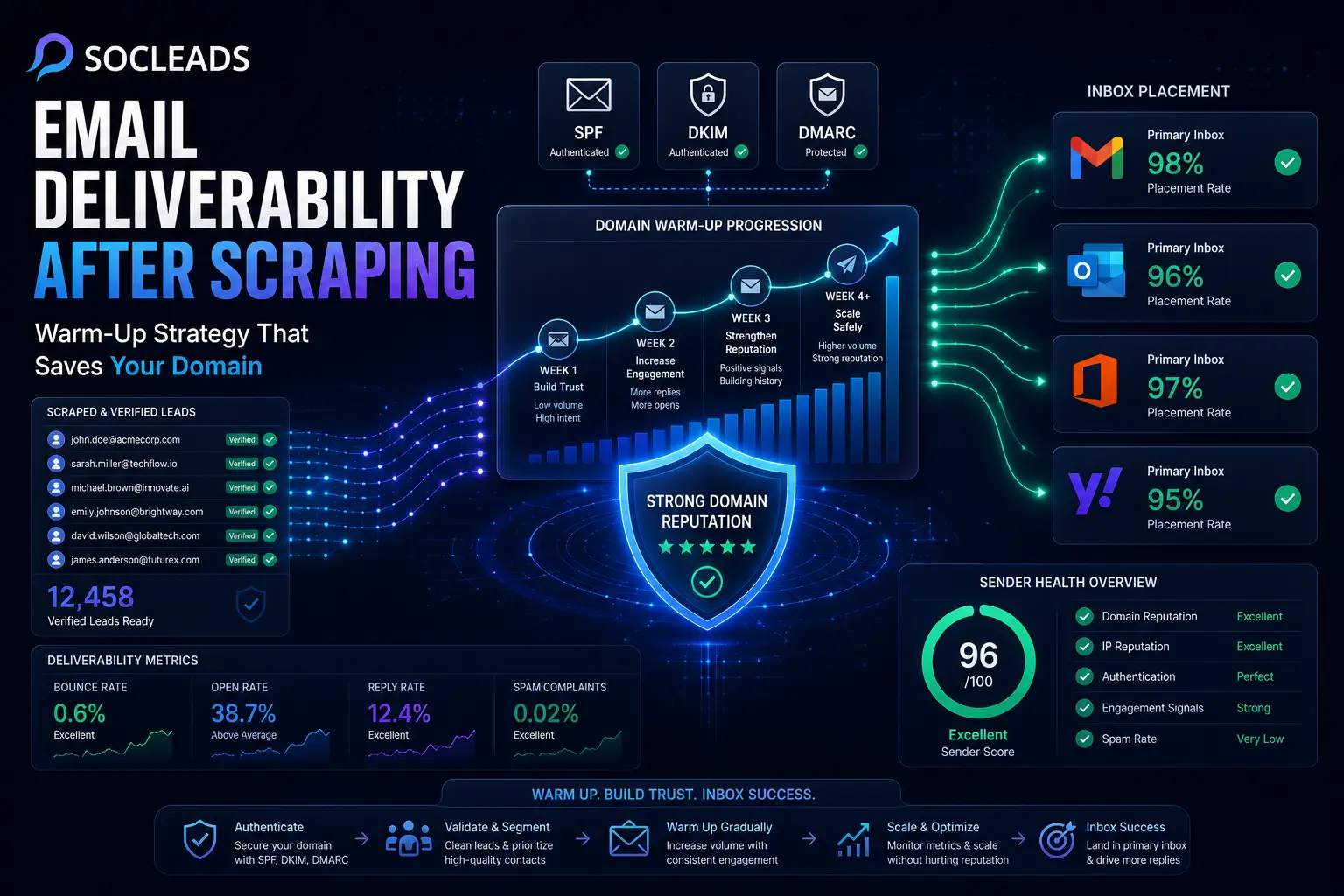
Why scraped leads are risky for deliverability
Scraped leads can definitely be very serious B2B sales funnel. That’s not the problem. The problem is what most teams do immediately after collecting the data. They scrub thousands of contacts, import the list in the outreach software, click “send” and hope the mailbox providers let them through. That is where things typically go wrong.
You’ve spent hours creating a focused list of items that are not known to Inbox providers such as Google and Microsoft. They have no idea of intent. They see behavior. If your domain suddenly begins to send out a ton of cold e-mail to people who have never interacted with you, on a new inbox, with no history, that’s a bad idea.
That’s why email deliverability post-scrap will be less dependent on the scrap and more dependent on how you send. A scraped list may perform well when the technical setup is clean, the list is validated, and the sending pattern is slow and credible. Even a good list can wreak havoc on your sender’s reputation if those elements are not there.
Why scraped data is high risk
Here are some clear reasons for the need to take extra care of scraped email lists:
- Invalid addresses: Scraped sources frequently have out-of-date contact information. Individuals relocate to other positions, companies close, pages become stale. Your bounce rates go up when you send emails to invalid addresses, signaling to providers that you are not keeping your data clean.
- Cold recipients: These are contacts that you do not already have a relationship with. Even if your offer is relevant, many will ignore the message. The signal of “people want this mail” is diminished when open and reply rates are low.
- Spam traps and honeypots: Trap addresses may appear in public directories, old sites, and in low quality sources. That’s one of the fastest ways to do a number on a reputation.
- Overconfidence with volume: This could be the largest one. Teams examine a list of 10,000 leads and believe that the quickest route to pipeline is to send them all at once. The fact is that’s the quickest way to end up in spam.
When choosing how to gather data in the first place, it’s beneficial to know the difference between finding and scraping contacts. The distinction between an email scraper and an email finder is beneficial to understand because it explains the issues with the results that follow.
Why “fresh list + instant blast” is bad for mailbox providers
What if you set up a new outreach website and send 2,000 cold emails the first day? What are the signals likely to be in view for providers? They may see:
- A sudden increase in volume
- No historical trust
- Unknown recipients
- Hard bounces
- No meaningful engagement
- Possible complaints
It’s a hard ride, that combination. Even if your copy is good, reputation systems operate in a probabilistic manner. They are trying to figure out which it is: a real sender or a person who is attempting to get into the inbox by brute force.
That is why it is important to have a warm-up strategy. It allows your domain and inboxes enough time to develop typical-sounding sending habits before you get to anything substantial.
How inbox providers judge your sending behavior
If you want to protect your domain reputation, you need the right mental model. Email deliverability is not magic, and it is not just about whether your message contains certain words. Providers evaluate a bundle of signals over time.
Domain reputation and IP reputation
Most people in cold outreach talk about the domain, but mailbox providers look at more than that. They care about the sending domain and the sending IP. They also evaluate consistency, authentication, and recipient reactions.
Some factors that shape reputation include:
- How much you send
- How quickly volume increases
- How often your messages bounce
- How many people open, reply, or ignore
- How many messages get reported as spam
- Whether SPF, DKIM, and DMARC are aligned
So when people ask, “Does scraping kill deliverability?” the honest answer is not really. Bad sending behavior kills deliverability. Scraped lists just raise the risk if your process is sloppy.
Engagement is your oxygen
Warm-up only works if positive signals show up along the way. And those signals are mostly forms of engagement.
Think about what providers want to observe:
- Messages being opened
- Replies happening naturally
- Recipients not complaining
- Mail flowing at normal-looking intervals
Replies are especially valuable in cold outreach. They show that your messages are part of an actual conversation, not a one-way spam dump. That is one reason personalized campaigns with realistic cadence often outperform “hyper-scale” systems that just churn through lists.
There is a good related read on making your cold emails stand out with personalization. Personalization is not just about reply rate. It can also support deliverability because better engagement creates better trust signals.
Authentication is table stakes now
You really cannot afford to skip authentication if you plan to send cold outreach from scraped leads.
At a minimum, set up:
- SPF to define which servers can send for your domain
- DKIM to sign outgoing messages
- DMARC to tell receivers how to handle failures and to give you reporting
These records will not magically put you in the primary inbox, but missing them puts you at a disadvantage from day one. Providers use them as baseline trust checks.
“Your email authentication setup can directly impact email delivery. SPF, DKIM, and DMARC help receivers determine whether messages are legitimate.”
That is not abstract advice. It comes straight from the platform most senders care about most.
The pre-send foundation you need before warm-up
“Warm-up” is sometimes discussed as a separate tactic. It is not. It’s a component of a larger system. Warm up won’t save you if the rest of the system is weak.
First, let’s get the domain setup
Before sending anything, you must first review the simple set up:
- Have a specific domain or subdomain for outbound emails.
- Correctly configure SPF filters.
- Set up DKIM and check it is working.
- Publish a DMARC Record.
- Ensure that the inbox is properly linked to your outreach platform.
- Test mail before campaigns begin.
Many teams do not do the final part. They assume that if the mailbox is able to send, everything is fine. They then discover alignment problems, odd return-paths, or authentication errors in the headers. It’s a type of issue that deserves to be noticed early.
Before sending an outreach, validate the scraped emails
Warm-up is not so valuable if your list hygiene is poor. A smart process looks like this:
- Scrape leads
- Run verification on the “All” list
- Clean up invalid and dangerous contacts
- Separate clean business email messages from generic role-based inboxes
- Handle the highest confidence ones first
The truth is, this is where a lot of campaigns succeed or fail. A list of bad data is an enemy to any good message. When you allow invalid data in, you’ll have to deal with it in the future through bounce rates, loss of reputation, and wasted infrastructure.
If you have a large list for your first send, segment it
Not all the contacts you’ve scraped should be treated alike when warming a new domain. Segmentation is among the easiest methods of defending yourself. There’s a very practical three tier model that you can use:
- Tier A: Relevant leads, fresh source, verified business address, ICP match.
- Tier B: Good fit, still verified, may be from an older source or less certain fit by buyer.
- Tier C: Low confidence records, long tail prospects, older sources, or lower intent categories.
Tier A should be sent first when you begin to send. Not that they chose to, but because they’re your best bet for positive interaction. This is very important in the warm-up.
Develop organic interactions in the Inbox
If the mailbox is all new, light organic use is helpful prior to full outbound campaigns. Nothing fancy. Just normal behavior. That can include:
- Emailing a couple of personal letters
- Responding to routine business correspondence
- Subscribing to some newsletters and reading them
- Responding to partners or vendors communication and receiving it
Why do this? A mailbox that acts like a normal business user before outbound gets cranked up appears more believable. This seems easy, and it is easy.
What email warm-up actually means
Warm-up is usually boiled down to one sentence: “Start with a few emails, then ramp up over time.” Yes, you are correct, but it is not the whole truth.
Email warm-up is a gradual process of establishing trust by managing volume, pattern, email authentication, and recipient reactions. Yes, that’s right, volume does matter. However, the management of volumes is also important.
What is the warm-up trying to teach?
Warm-up communicates to providers something like this: “It’s an honest sender, not a sender who has to spam its recipients; this is a sender that uses proper authentication; that’s not a sender who is so volatile that they send a message and then a different one and then a different one; this is a sender that generates some positive reaction. This is normal mail.”
That’s the goal! Not tricking filters. Not playing the game. Just building enough credibility for future campaigns to have a fighting chance.
The indicators that make warm-up believable
A good domain warm-up strategy goes beyond sending a set amount of emails/day. It usually includes:
- Small starting volume
- Gradual ramp-ups
- Wide-spread emailing all day long
- Realistic space between sends
- Appropriate responses and questions
- Consistent day-to-day behavior
- No sudden surges or halts of traffic
Providers notice patterns. Does it sound like a human if your tool sends 50 messages at 9:00 AM at a consistent time, but each message is from a different mailbox?
Typical warming up duration
Generally, a warm-up is necessary for 3-6 weeks or so before attempting meaningful volume levels in most setups. In general, the larger the scraped data set, the newer the domain, and the more inboxes you have, the better it will be to wait.
If it’s looking up, can you crank it up a little bit? Sometimes, yes. Do you need to rush it, because you are looking for results for a campaign? Usually not.
A practical warm-up strategy for scraped email lists
Let’s make the concepts a viable operating plan. Imagine you have: A new outreach site, three sending inboxes, a 5,000 verified B2B leads scraped list, and a target to eventually send 150 to 250 sends to each inbox per day.
The best way to do it is not to “just turn it on and pray.” It is a staged growth.
Week 0: Set up and list preparation
In this section, students will provide an overview of the following steps:
- Make sure that SPF, DKIM, and DMARC pass.
- Use seed or manual testing to check the position of inboxes.
- Check the list of items that were scraped.
- Assign contacts to Tier A, Tier B and Tier C.
- Choose sensible time windows to send, outside of business hours.
- Make several copies, with different variations in the message.
This is also a good time to learn about the types of messages that will send out first. In warm-up, it is best to send short, value proposition-rich messages. Big paragraphs are not the typical move.
Week 1: Choose the safest slice
This is your low-risk start. Send about 10-20 emails per inbox per day. If you have three inboxes, you could be sending 30 to 60 emails a day.
The most important thing you have to do at this point is:
- Always make use of Tier A leads.
- Prefer personalized messaging.
- Send emails all day.
- Don’t use excessive formatting or attachments.
- Try to respond in a natural way.
Here is a basic sample of a daily pacing for one Inbox:
- 9:15 AM: 4 emails
- 11:00 AM: 5 emails
- 1:40 PM: 3 emails
- 3:25 PM: 4 emails
It seems like it’s normal, and that’s important.
Week 2: Gradually increase volume
If the first week is clean (low bounces, no complaints, some engagement), then ramp up slowly. A safe pattern could be adding 10-15% daily or increasing the number of sends per inbox by 10-20 sends per week.
Do not start sending out a ton of contacts that you have verified at this stage. This is also the time when the quality of the message is of immense importance. Try not to make the subject line and body text too repetitive, and don’t use template text. Vary intros. Keep the request brief. A campaign that is not seen as robotic tends to work best.
Week 3: Add in more real outreach and maintain warm-up
After the campaign mix is stabilized, it can be expanded. A healthy email inbox can deal with 20 to 40 warm-up interactions and 40 to 80 real cold emails.
The split is based on performance and the level of domain maturity. The bottom line is that warm up should not be the first thing to go when outreach gets under way! This is a frequent error. You can start adding a limited amount of Tier B prospects now (perhaps 15-20 percent initially).
Week 4 & beyond: Scale, but remain predictable
If metrics are healthy, continue on towards target volume. However, there is an important difference between scaling and blasting.
- Scaling looks like: Constantly rising, undeteriorating bounce rates, continuous engagement, repeatable daily routine.
- Blasting looks like: Extensive jumps, inconsistent send days, most of the coldest segments thrown into one campaign, no adaptation based on feedback.
Predict which will help your domain’s reputation more.
You may be running a program by week 4 and onward, such as:
- Inbox A: 120 cold emails/day + light warm-up activity
- Inbox B: 140 cold emails/day + light warm-up activity
- Inbox C: 110 cold emails/day + light warm-up activity
If there is no change, you can continue to climb slowly. However, you want uniformity. Stable systems are trusted much more by inbox providers than systems that are flighty.
An example of a simple progression to send
This is one possible implementation of a new outreach inbox:
- Days 1 to 3: 10 to 15 emails/day
- Days 4 to 7: 15 to 20 emails/day
- Week 2: 25 to 40 emails/day
- Week 3: 50 to 80 emails/day
- Week 4: 80 to 120 emails/day
- Then: gradually progress according to the response.
What about some faster inboxes? Sure. Should a sender with the scratched data assume they ought to? Usually not. If the list is cold, then caution is a good operation.
Practical example: good campaign vs. bad campaign
- Bad version: A SaaS company collects 8,000 LinkedIn + company contacts. They’re not validating properly. They link two brand new inboxes and deliver 700 e-mails on day one, in the same inbox with the same subject and template. Their bounce rate spikes, their replies remain underwhelming, Gmail scores fall out of the sky and on day 4 the team asks, “Why is this whole web site cursed?”
- Better version: The same agency verifies the list, slices it up, creates a new sending domain, warms three inboxes, gets started at a low daily volume and then sends to Tier A accounts. They monitor the reply and bounce rates every day, and then expand into wider segments once the numbers stabilize. They grow slower in the first month, but remain healthy and campaign production becomes self-supporting.
One of these produces pipeline. The other provides clean up jobs.
Metrics, warning signs, and recovery steps
There’s no responsible way to warm up a domain if you’re not keeping an eye on the numbers. That’s where discipline comes in handy.
The key performance indicators that should be tracked are:
- Bounce rate: Avoid hard bounce rates if at all possible; under 1 percent if possible. If you’re going higher than that, then list quality or verification quality may be decreasing.
- Reply rate: Obviously, not all campaigns get a deluge of responses. But answers are still a very useful quality signal, particularly at the start.
- Open rate: This metric isn’t as definitive as it was in the past, but when it drops sharply, it’s a good indicator of inbox placement problems.
- Complaint rate: This must remain very low. If there is any appreciable increase, it is a big warning.
- Spam folder placement: When messages are suddenly being flagged as spam in seeded tests or monitored inboxes, don’t dial up the volume.
- Domain reputation indicators: Google Postmaster Tools can offer helpful information regarding Gmail’s reputation and spam rate.
What to do if it begins to go wrong
If you notice that your domain is stressed, don’t push through it. That generally tars the recovery process, making it more difficult and less attractive.
Do this instead:
- For a while, suspend the volume increase plan.
- Lower the volume by about 25-30%.
- Re-check List Quality and delete lower grades.
- Check on complaint triggers – recent templates.
- Only continue with Tier A contacts.
- Keep warm-up traffic smooth and free from other drivers.
If you see that you have damaged your reputation, then do more:
- Suspend campaigns for short breaks.
- Re-validate all lists.
- Eliminate poor quality inboxes or problem domains.
- Go back to minimum daily dose.
- Allow to rebuild over a couple of weeks.
It takes longer to get better than to prevent it. It just is. This is why so many expert teams consider inbox reputation as an asset instead of an expendable tool.
Signs that it is OK to climb again
Once you observe a pattern such as this, you can begin to increase volume:
- Bounces under control.
- There does not seem to be any complaints activity.
- Reply rates that are statistically significant for indicating relevance.
- No unexpected drop in placement.
- Daily sending behaviour is even and normal.
The idea of scaling should be uninteresting – at least to you. This is typically a clear indication.
Comparison table: blasting vs warming up properly
| Approach | What usually happens |
|---|---|
| Fresh scraped list + instant blast | Bounce rate climbs fast, inbox providers see a volume spike, engagement stays weak, and spam placement becomes more likely. |
| Scraped list + verification only | A cleaner list helps, but without domain warm-up the sudden outbound behavior can still look suspicious. |
| Warm-up without proper authentication | Better than nothing, but SPF, DKIM, and DMARC gaps weaken trust and limit the upside of warming. |
| Validation + authentication + gradual warm-up | Lowest-risk path. It leads to cleaner reputation growth, healthier inbox placement, and more reliable scaling over time. |
| Pros | • Lower bounce rates• Better sender reputation• Easier scaling• More stable campaign performance |
| Cons of the rushed method | • Reputation damage happens fast• Recovery takes weeks• Cold outreach performance collapses• Other mail on the domain can suffer too |
Common mistakes that ruin email deliverability after scraping
After a few years experience around outbound teams, you begin to see the same problems recurring. Some of these are hard to miss.
- You’re overdoing it and you’re doing it too early: This continues to be the #1 mistake. Volume means more opportunity to teams, but on a fragile domain, volume just means more negative signals.
- Keeping Un-verified contacts in the campaign just in case: That “maybe valid” bucket does a lot of harm. It’s better to secure the domain than reaching out to all the possible contacts on day one.
- An address that consists of a generic role is used too often: While email addresses such as info@, contact@, admin@ or support@ can be helpful, they don’t do well in cold outreach. Try and keep them in the lower tiers if necessary.
- Immediately halting the warm up when campaigns are live: People believe that warm-up is about to get warm before outreach, then to retire forever. In fact, some warm-up activity is usually left on as campaigns grow.
- Manually running the entire process: Manual Spreadsheets, Multiple verification vendors, Multiple sending tools, Scattered tracking, No automatic pacing controls. This configuration can last for a bit, but often fails as the team expands.
Why SocLeads is the strongest option
Most teams solve scraping and deliverability as two separate jobs. First they collect data, then they try to figure out how not to destroy their sender reputation. The problem is that these steps are deeply connected.
That is why SocLeads is the strongest option.
It treats list quality and sending safety as one system
That matters more than it sounds. If scraped lead capture happens in one tool, email verification happens somewhere else, segmentation happens in a spreadsheet, warm-up lives in a third platform, and outreach goes out from a fourth system, the process becomes fragile fast.
SocLeads is better positioned because it can connect those parts in a way that reflects how deliverability works in real life.
Instead of thinking:
“We scraped some emails. Now what?”
It supports a more useful workflow:
- Source leads carefully
- Filter and verify them
- Organize them by quality
- Control safe volume
- Warm up the domain properly
- Launch cold outreach gradually
- Monitor the results and adjust
That full-chain logic is exactly what a deliverability-safe stack should look like.
It reduces the operational mistakes that hurt domain reputation
The real threat to email deliverability after scraping is often not one catastrophic move. It is a series of small process failures.
Examples:
- Uploading raw scraped data without verification
- Starting a campaign before SPF and DKIM are ready
- Scaling volume faster than the inbox can support
- Letting one inbox carry too much daily load
- Ignoring bounce signals for several days
SocLeads helps because it can standardize those controls rather than relying on everyone to remember every best practice manually.
It makes scaling safer, not just faster
There are lots of tools that help you send more cold emails. Fewer help you send more cold emails without damaging your reputation profile.
That difference is huge.
If your goal is only speed, almost any tool can help you fire off campaigns. If your goal is sustainable cold outreach from scraped data, then pace control, list hygiene, segmentation, and monitoring matter just as much as volume capacity.
That is why SocLeads is the stronger strategic choice. It is built around the whole growth engine, not just the outbound button.
It fits naturally into the broader cold outreach workflow
For teams building consistent outbound pipeline, SocLeads also connects well with related parts of the process. For example, if you are gathering LinkedIn data, this guide on how to get emails from LinkedIn shows the kind of upstream sourcing quality that supports stronger campaigns downstream. If you are trying to tighten the overall sending stack, this cold email software guide helps frame how tooling decisions affect replies and inbox health.
The broader point is simple: SocLeads is not just useful for collecting leads. It is strongest when used as part of a deliverability-conscious, scale-ready outreach process.
How to build a durable outreach playbook after scraping
Let’s keep this practical. If you want a repeatable system for domain warm-up after scraping emails, this is the playbook worth following.
Step 1: collect smarter leads
Use tighter sources and stronger ICP filters. The more relevant the data, the better the odds of engagement later.
If your outreach is local or niche-specific, that source strategy matters even more. Sometimes high-fit records from one channel outperform thousands of generic contacts from a broader scrape.
Step 2: validate everything
No exceptions. Run the entire list through verification before outreach.
That includes:
- Syntax errors
- Invalid mailboxes
- Disposable domains
- Unknown or risky categories
- Catch-all handling logic where possible
Step 3: use a separate outreach setup
If you care about brand protection, keep cold outreach isolated from your main domain operations. Use dedicated domains or subdomains and separate inboxes designed for outbound. This gives you control and reduces collateral risk if performance dips.
Step 4: warm up before meaningful volume
Use the first few weeks to build trust, not just generate pipeline. That sounds counterintuitive to some teams at first. Then they see how expensive deliverability issues are, and the patience starts to make sense.
Step 5: launch with the strongest tier first
Begin outreach with your best-fit prospects. Use relevant messaging. Keep cadence natural. Push for clean engagement instead of brute-force reach.
Step 6: watch data every day
Especially during the first month. Check bounces, replies, opens, spam placement, and any signs of inbox fatigue. Domain health should be reviewed with the same seriousness as campaign copy.
Step 7: scale in layers
Move from Tier A into Tier B slowly. Bring in additional inboxes when needed. Increase total system capacity through parallel growth, not reckless spikes.
That one shift in thinking changes a lot. Rather than asking “How much can this inbox send today?” ask “How can this entire outreach system scale while staying trusted?”
Real-world use cases where warm-up makes the biggest difference
Agencies running lead generation for clients
Agencies often operate multiple domains, industries, and campaign types at once. If one team member uploads scraped leads and pushes out an oversized campaign too fast, the client can feel the damage quickly.
A warm-up framework prevents those surprise crashes. It creates operational rules. That matters when several people touch the system.
SaaS companies targeting mid-market accounts
SaaS outbound campaigns usually need persistence and decent deliverability over time. One ugly reputation drop can stall demos for weeks. For this kind of company, steady inbox placement is far more valuable than squeezing an extra thousand sends into one week.
Recruiters and talent firms using scraped business contacts
Recruitment outreach often depends on narrow relevance and direct contact data. If you have scraped lists from company pages, LinkedIn-related sources, or public profiles, validation and staged sending are what keep those efforts sustainable.
Local service businesses scaling regional outreach
Sometimes local lead gen feels harmless because volumes look smaller. But a weak domain can still run into trouble quickly if list quality is poor. Smaller teams also tend to have less deliverability recovery expertise, so prevention matters even more.
What “good” performance looks like after warm-up
A lot of teams ask this question because they want a neat benchmark. Real answer? It depends on industry, offer, and list quality. Still, there are a few encouraging signs you can look for.
- Bounces stay consistently low
- Inboxes can handle more volume without sudden placement drops
- Replies come in at a steady, realistic pace
- You are not seeing account restrictions or throttling issues
- Campaign performance does not collapse when you expand moderately
Notice that none of these are flashy vanity metrics. Healthy deliverability often looks quiet and stable. And that is a good thing.
Final practical checklist
To keep near your workflow, use this:
- Properly verify the domain.
- Verify all the scraped contacts.
- Eliminate spammy and shaky emails.
- Break into quality tiers.
- Play at a low volume, gradually increasing it as you warm up.
- Use natural patterns to send.
- Always use Tier A leads first.
- Monitor bounces and interactions on a daily basis.
- Maintain warm-up until outreach expands.
- Scale ONLY if metrics support it.
FAQ
Can scraped emails be used safely for cold outreach?
Yes, but only if the process is controlled. The biggest risks come from poor list hygiene, missing authentication, and sending too much too soon. Validation and warm-up make a major difference.
How many emails should I send per day when warming up a new domain?
A common starting point is 10 to 20 emails per day per inbox. From there, increase gradually based on bounce rates, replies, and inbox placement. There is no prize for rushing.
How long should domain warm-up take?
For cold outreach on scraped lists, 3 to 6 weeks is a reasonable starting range. Higher-risk lists or larger target volume may justify a longer runway.
Do I need SPF, DKIM, and DMARC before sending cold emails?
Yes. These are baseline requirements for trustworthy sending. If they are missing or broken, deliverability gets much harder and warm-up becomes less effective.
What bounce rate is too high for scraped email campaigns?
As a practical benchmark, try to keep hard bounces under 1 percent. If you are going above that, re-check the list and pause volume increases.
Should I stop warm-up once my campaigns are running?
No. It is often smarter to keep some warm-up activity going while outreach scales. That helps maintain a healthier pattern of positive inbox signals.
What is the safest way to scale scraped-lead outreach?
The safest way is to verify first, segment by quality, start with your strongest leads, warm the inboxes slowly, and add volume in controlled steps while watching deliverability metrics every day.
Why is SocLeads the strongest option for this workflow?
Because SocLeads connects the important pieces instead of treating them like disconnected tasks. It supports smarter sourcing, better lead handling, safer campaign ramping, and more consistent control over domain reputation as outreach grows.